Hi,
I hope this idea may works
Also i think your flow design is kind of manual trigger or scheduled flow rather than a event trigger as you want to do when yours items in SP List 1 is empty.
See the flow design below.
There are different sections for this
Section 1- get the columns names from SP List.
1. use initialize variable to initialize list of column names which would be default column names in SP list
I hope these are default columns and assume that you don't need to update the attachments here.
2. Use initialize variable to initialize a Json object which is empty as shown below
3. Use send http request to get list of column details which are not hidden and not read-only.
API format- /_api/web/lists/getbytitle('provide list name here')/fields?$filter=Hidden eq false and ReadOnlyField eq false
4. Filter out the columns details from body of API response which are default columns
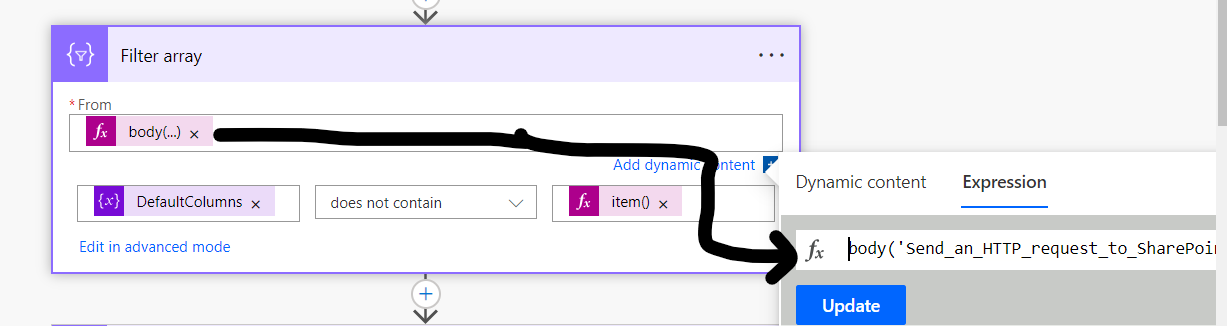
Expression used-
body('Send_an_HTTP_request_to_SharePoint')?['d/results']
5. Select the columns from output of filter array using select action.
Section 2- Create items in SP List
6. Get items from SPList2 as shown below
7. Iterate through each item from get items action using apply to each.
Next steps will be in apply to each loop
7.1- use another apply to each which will loop through each item present in select action's output.
7.1.1- use compose action which helps to add a property to the ColumnDetails json object variable.
Expression -
addProperty(variables('ColumnDetails'),items('Apply_to_each_2'),items('Apply_to_each')?[items('Apply_to_each_2')])
7.1.2- use set variable to set the value with output of compose action.
7.2. Create item in SP1 using create item. Here pass the name of list as variable select the dropdown of list name field, selecting enter custom value and then pass variable where you have stored the list name, then you will see Items field where the item details to be created can be passed as object.see below
7.3. reset the columndetails variable to empty json object
Try this approach - see whether this works !


