web
You’re offline. This is a read only version of the page.
close
Skip to main content

Notifications

Announcements

Community site session details

Community site session details

Session Id :
Power Platform Community / Forums / Power Automate / Extracting Email ID fr...
Power Automate
Unanswered

Extracting Email ID from Undelivered Mail Notifications in Power Automate.

(1) ShareShare
ReportReport
Posted on by

Hi everyone,

I'm working on a Power Automate flow to handle undelivered mail notifications. My goal is to extract the email ID to which I tried to send an email but was not delivered.

In the flow, I'm currently using the following expression to extract the recipient's email ID:

@triggerOutputs()?['body']['toRecipients']

However, this expression is not working as expected for all domains. For example, when I receive an undelivered mail notification from the postmaster, the expression returns my own email ID instead of the incorrect one.

Below is a sample of the undelivered mail notification I received:
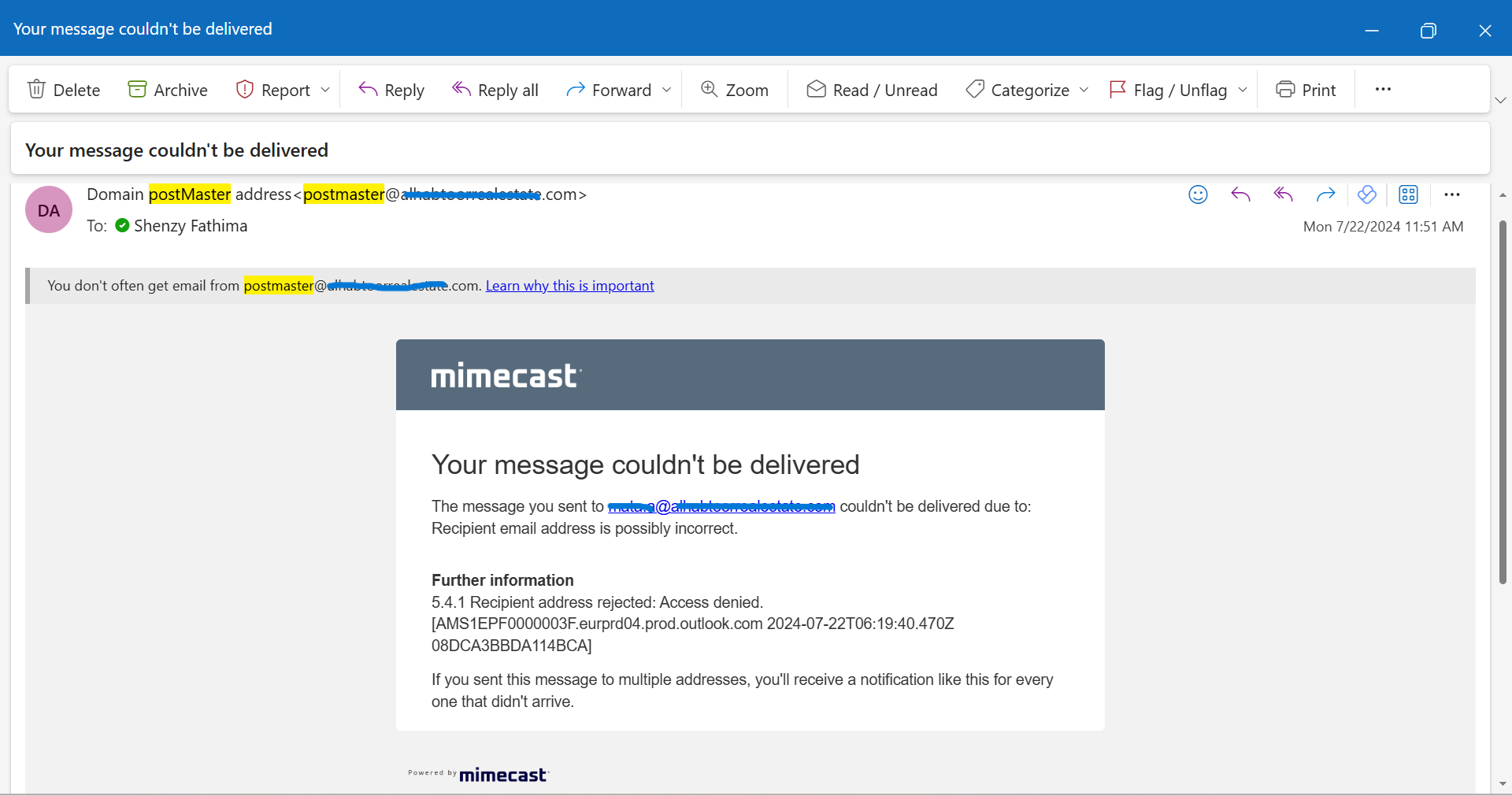

Could someone please help me with the correct approach to extract the recipient's email ID from such notifications?

Thank you in advance for your assistance!

Categories:
I have the same question (0)
  • David_MA Profile Picture
    12,980 Super User 2025 Season 2 on at
    You don't say how your workflow knows when there is an undeliverable message. but I will assume you are using the trigger When a new e-mail arrives and you have it configured to check if the message is a non-delievered e-mail. You do not need to use an expression to get the data for whom the message was sent to, it is included in the trigger data under dynamic content:
     
     
    What are you trying to do with the value in an expression?
     
  • MM-29071009-0 Profile Picture
    on at

    Thank you for your response!

    To clarify, the workflow detects the undeliverable message by checking the subject of the received mail. The undelivered mail notification is sent by an automated server to me. Consequently, neither the 'To' address nor the 'From' address contains the email ID to which I tried to send the email and failed.

    In the example screenshot provided, the email ID I want to extract is located in the body of the mail, as you can see.
    Please mention if you need any further clarification.


  • VictorIvanidze Profile Picture
    13,073 on at
    1. You have to separate NDR by the MessageClass parameter, not by the Subject line. See https://ivasoft.com/getmessageclassflow.shtml
    2, You should search for email address containing your own domain part in the body of NDR.
  • Paulie78 Profile Picture
    8,422 Moderator on at
    There are several approaches that you could use to extract the email from the body of the message. 
     
    • Parsing the email using the Power Automate Expression Language.
    • Using a regular expression to extract the email address from the message body.
    • Passing the content of the message to AI to have it extract the email for you.

    In the first instance I would suggest watching this video which I made some year ago that shows the basics of mail parsing. This should give you all the tools that you need.
     
    Power Automate does not have regular expression support natively, but there are work arounds, check out this blog post for a free solution or this video for a more simple solution check out this video.
     
    There are many different AI solutions so I won't cover that, but either of the above methods should be able to help you.
     
    In the first instance I would use the action HTML to text action to convert your message body to plain text. If you post an example of what that produces then I will see if I can come up with an expression that grabs the data you need.

Under review

Thank you for your reply! To ensure a great experience for everyone, your content is awaiting approval by our Community Managers. Please check back later.

Helpful resources

Quick Links

Forum hierarchy changes are complete!

In our never-ending quest to improve we are simplifying the forum hierarchy…

Ajay Kumar Gannamaneni – Community Spotlight

We are honored to recognize Ajay Kumar Gannamaneni as our Community Spotlight for December…

Leaderboard > Power Automate

#1
Michael E. Gernaey Profile Picture

Michael E. Gernaey 503 Super User 2025 Season 2

#2
Tomac Profile Picture

Tomac 321 Moderator

#3
abm abm Profile Picture

abm abm 237 Most Valuable Professional

Last 30 days Overall leaderboard



