web
You’re offline. This is a read only version of the page.
close
Skip to main content

Announcements

News and Announcements icon
Community site session details

Community site session details

Session Id :
Power Platform Community / Forums / Power Automate / Response Submitted>Com...
Power Automate
Suggested Answer

Response Submitted>Compare multi answer>For each, find>For item, find>Populate Word Temp>Create Doc

(1) ShareShare
ReportReport
Posted on by 4
As you can see from the subject, I have a VERY complicated flow for a client and I am stumped! I've checked with other IT folks, I've consulted Copilot, and I've made a huge mess of the automation I created. I'm hoping someone can help me, even if that means talking to me like I'm a 5-year-old. Sorry, this gets long!
 
Here's the summary of what I need it to do for them: 
When a new MS Form response is submitted, it looks at the multiple choice answer for "Job Roles," searches in Excel table "Job Roles Ref Sheet" for those job roles in column JobRoleName. For EACH job role, it then looks at the Requirements column for the required trainings for that role. There are multiple trainings in each cell Requirements cell.
After it finds the multiple trainings in the Requirements column for each job role, it then looks at the CAL Onboarding Training Excel table for each of the trainings to get the training details. For instance, the job roles would be submitted as All Staff and Clinician. All Staff requires trainings 2 trainings. Clinician requires 5 trainings.

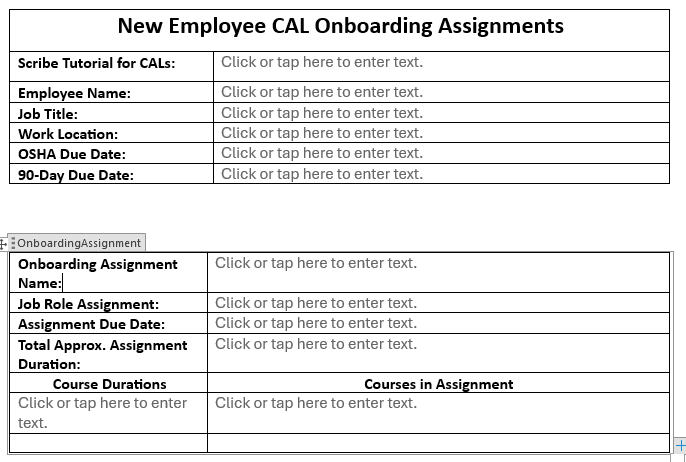
It then needs to populate a Word template "OnboardingAssignment" table, a repeating section content control, for each onboarding assignment and populate the repeating table with the required training details for each role. So from the previous example there would be one OnboardingAssignments table for "XX-Onboarding - All Staff" with a table reading: Onboarding Assignment Name: XX Onboarding - All Staff, Job Role Assignment: All Staff, Assignment Due Date: (calculate start date plus 90 days), Total Approx. Assignment Duration: (calculate total of LengthMinutes for all courses in the assignment), and then within that repeating section have Course Durations: 20, 20, 15, 75, 20 and Courses in Assignment: CourseName 29, CourseName 30, CourseName 31, CourseName 32, CourseName 33. Then it would have another OnboardingAssignments table for "XX Onboarding - XX Training," "a table for "XX Onboarding - Clinician," "XX Onboarding - OSHA," etc. that fills in the same corresponding information.    
The final step is to create a file.
 
Issues so far:
  1. MS Form question is multiple choice
  2. Also multiple items in the Table 1 "Requirements" column that need PowerAutomate to recognize them as individual items
  3. Power Automate does not recognize a repeating section content control inside a repeating section content control
  4. The non-repeating table at the top is populating without issue, but the repeating table is putting "body" in the OnboardingAssignmentsTable, leaving out the headings, not filling in the data, and not repeating.
HERE'S WHAT I HAVE:
  1. When a new response is submitted
  2. Get response details
  3. List rows present in a table - Job Role
  4. Initialize Variable - CombinedRequirements (type = string, value = ) No outputs in successful test.
  5. Filter Array - Job Role (From: output from List rows present in a table - Job Role, body/value), Filter Query: form question contains item()?['JobRoleName']) No outputs in successful test.
  6. Select - Job Role (From: body('Filter _Array_-_Job_Role'), Map: Requirements (left) item()?['Requirements']) Outputs appear correct in successful test.
  7. Compose - CombinedRequirements (Inputs: join(body('Select_-_Job_Role'), '')) Output is identical to input in successful test.
  8. List rows present in a table - Onboarding Training
  9. Filter Array - Onboarding Matches (From: output from List rows present in a table - Onboarding Training, body/value), Filter Query: tolower(coalesce(variables('CombinedRequirements'), '')) contains tolower(trim(coalesce(string(item()?['AssignmentName']), '')))) No outputs in successful test.
  10. Select - Training (From: body('Filter_Array_-_Onboarding_Matches'), Map: see screenshot) No outputs in successful test.
 
 
  1. Populate a Word Template (see screenshot) Outputs (see screenshot)
  1. Create File (File Content: body of Word template)
 
If anyone can help me figure out where my flow is broken, causing it to not populate the Word template correctly, I would greatly appreciate it! It runs successfully, it just doesn't run correctly, but apparently nothing returns any outputs! 
Categories:
I have the same question (0)
  • Suggested answer
    ninihen Profile Picture
    123 on at
    A practical fix is to flatten the nested responses.
     
    The "Populate a Microsoft Word template" action (Word Online Business) doesn't support a repeating section inside another repeating section - the connector can't resolve the inner reference, so you end up with the raw body('Filter_array') rendered into the cell. Flatten your data to a single repeating table first.
     
    Instead of looping over the selected roles and calling Excel inside the loop, flip the join: pull TrainingRequirements once, then filter to rows whose Role is in the selected list.
     
    • List rows present in a table -> TrainingRequirements (one call, all rows)
    • Filter array
      • From: outputs('List_rows_present_in_a_table')?['body/value']
      • Where: contains(<selectedRolesArray>, item()?['Role'])
    • Select -> shape into { Role, Course, Provider, Due } for the Word template
     
    If the selected roles are still a string (the raw Forms answer), wrap with json():
    contains(json(outputs('Get_response_details')?['body/<questionId>']), item()?['Role'])
     
    If you really need per-role grouping (e.g. one section per role with nested rows), use John Liu's div/mod trick instead of nested loops:
    https://johnliu.net/blog/flattening-an-array-of-arrays-in-power-automate/
     
    range(0, m*n) mapped through body('Nested')?[div(item(),n)]?[mod(item(),n)] flattens any m×n nested array in one Select. For irregular child sizes, follow with a Filter array to drop nulls. Faster than loop-and-append, and prettier in the run history.

    Though honestly, for logic like this I'd plug an AI agent (VS Code + Copilot, or Claude) into Power Automate via Flow Studio MCP. Agents are great at array-shaping like this.
     
    Disclaimer: I'm one of the builders of Flow Studio MCP. The MCP has 100 calls free trial - that's more than enough to build this flow.
     
  • Vish WR Profile Picture
    2,576 on at
     
    I am not an AI builder expert, just curious if leveraging AI builder in Power Automate can solve this problem?
  • ninihen Profile Picture
    123 on at
    @Vish WR the native AI builder doesn't have the visibilty to debug. If you need to stay in Microsoft, you can create a Copilot Studio agent and add the Flow Studio MCP server as a tool. The MCP gives agent run time visibility to flow run errors at action level, input/output so the agent have the visibility to debug. 

    This is tutorial how to connect: https://youtu.be/As_GyXEoS9A, or blogpost: https://learn.flowstudio.app/blog/copilot-studio-mcp-debug-power-automate

    Though for building flows, at this stage I still prefer VS Code + Copilot or Claude. Copilot Studio agent is good enough to debug flows, but for building it's context window seems limited and sometimes run to "internal server error".
  • Vish WR Profile Picture
    2,576 on at
     
    I was asking about using an AI buider for Populate a Microsoft Word template
  • ninihen Profile Picture
    123 on at
    @Vish WR,

    I see - yes, viable. You can pass the nested array to AI Builder and have the agent flatten it into the table shape the Word template needs. More expensive though (AI Builder credits + latency), and since the array format here is fixed, I'd handle the flattening in the flow.


    General preference: use AI to build a deterministic, repeatable process rather than have AI run inside the process every time. But yes, AI Builder is definitely another solution — and Microsoft will love it.

  • Vish WR Profile Picture
    2,576 on at
     

    See, AI Builder can solve the problem. If you try it, do share your outcome and experience here.


  • Suggested answer
    Assisted by AI
    ninihen Profile Picture
    123 on at
    I went and had some fun with my agent building this flattened + no variables version — completely crafted by the agent (and I pointed the direction):
     
    Setup (matching your structure) - templates also deployed by agent except for the MS form and the repeating section insert:
    • MS Form with employee details + multi-choice job-role question
    • Excel JobRolesRef: one row per role with a pipe-delimited Requirements column
    • Excel CALOnboardingTraining: one row per training keyed by TrainingCode
    • Word template: vertical 2-column layout with Plain Text Content Controls + a Repeating Section wrapping the per-assignment block
       
    Flow (no Apply to each, no variables on the data path):
    • Forms trigger → Get response details
    • json() parse the multi-choice answer (it comes back as a JSON-encoded string)
    • List rows from JobRolesRef → Filter array contains(selectedRoles, item().JobRoleName) → matched roles
    • List rows from CALOnboardingTraining
    • John Liu's div/mod flatten to expand each role × its split('|') codes into a flat array of (Role, TrainingCode) pairs: Select to build per-role arrays → Compose max(lengths) → Compose range(0, m*n) → Select with arr[div(i,n)][mod(i,n)] → Filter to drop nulls (handles irregular role sizes)
    • Pieter Veenstra's no-variable join to enrich each pair with course details: Select to build "<TrainingCode>":{...row...} strings → Compose json('{...joined...}') → Select that does dict[code] lookup. No Foreach, no variables.
    • Populate Word template with the flat array bound to the Repeating Section
    • Save to SharePoint
       
    Let me know if you need syntax of any steps. I also put a simplier version with for each and variable (which is slower) for your reference.
     

Under review

Thank you for your reply! To ensure a great experience for everyone, your content is awaiting approval by our Community Managers. Please check back later.

Helpful resources

Quick Links

Introducing the 2026 Season 1 community Super Users

Congratulations to our 2026 Super Users!

Kudos to our 2025 Community Spotlight Honorees

Congratulations to our 2025 community superstars!

Congratulations to the April Top 10 Community Leaders!

These are the community rock stars!

Leaderboard > Power Automate

#1
Vish WR Profile Picture

Vish WR 959

#2
Valantis Profile Picture

Valantis 872

#3
Haque Profile Picture

Haque 589

Last 30 days Overall leaderboard
