web
You’re offline. This is a read only version of the page.
close
Skip to main content

Notifications

Announcements

Community site session details

Community site session details

Session Id :
Power Platform Community / Forums / Power Automate / ZenDesk connector seem...
Power Automate
Unanswered

ZenDesk connector seems to connect to MS's instance

(0) ShareShare
ReportReport
Posted on by

Hi all,

When I try to use the Zendesk flow connector, it comes up in spanish, and checking the URL, seems to connect to Microsoft's instance, not my own.  Obviously - I don't have authentication there.
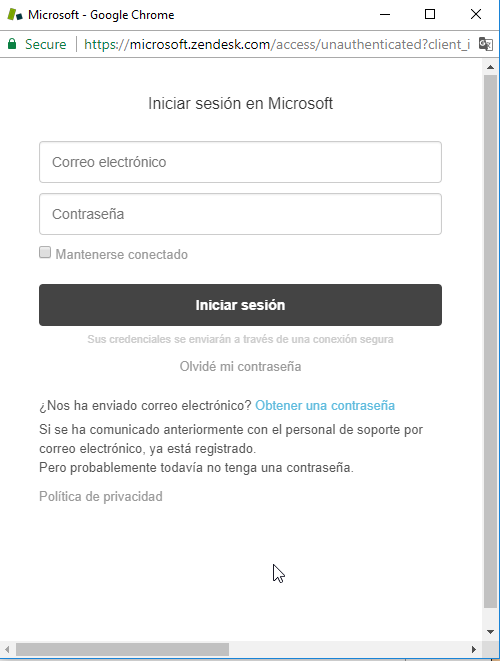


If I change the URL to refer to our own Zendesk instance, it asks for authentication correctly, but doesn't result in a new connector being created.


Has anyone seen this before?


Thanks!

Categories:
I have the same question (0)
  • v-yamao-msft Profile Picture
    on at

    Hi paraxion,


    Have you created a connection to Zendesk connector?


    What’s the language setting for your browser?


    If you haven’t created a connection for Zendesk, you will be asked to sign in with your own credentials when the first time you are trying to use this connector.


    I tried to create a connection to Zendesk on my side, the first step, I entered my Company name, then entered the credentials, then the connection would be created properly.


    Could you please try it again to see if you will create the connection successfully?


    Best regards,
    Mabel Mao

  • Community Power Platform Member Profile Picture
    on at

    Hi Mabel,


    I haven't created a connection, that's what I'm trying to do.  Language setting for my browser is en-AU.


    It's asking me to sign in with credentials, but the page that's being displayed - as per my original message - isn't my organization's.  It's Microsoft's, and it's in Spanish.  If I use the Chrome console to redirect the page, I can get the correct page to show, but the authentication passthrough doesn't happen:

    Untitled-1.png


    I've also tested in Internet Explorer and Firefox to rule out browsers/extensions.


    -m

  • mikem Profile Picture
    4 on at

    I too am suffering from failure to setup connector to Zendesk.  On occassion I recieve the spanish login, and mostly I receive a timeout when attempting to enter my credentials in the sign in prompt that appears.


    I have Office 365 authentication enabled.  I have tried both authenticating connector using Office 365 credentials and Zendesk login.


    On retry to connect , after timeout failure, the connection appears to verify.


    If I try to create a flow using the apparent verified connector, during the flow creation, a large error message appears with text including check permissions, invalid mashup and other text.

  • mikem Profile Picture
    4 on at

    I also have mspartner IUR rights licenses, trial license of Flow Plan 2 and Dynamics 365 as part of IUR license for FLow.  All up, I probably have a serious mashup of licenses of Flow.  Would this be causing the issue, and if so, how do I configure my licenses, and which one will work as a premium connector license?


    Having just tried again, using Edge on Windows 10 build 1703, I have the spanish login (Inprivate Browsing session).  THis is if I go straight to Connection under flow.microsoft.com and choose to Add zendesk.


    So I try to create a blank flow and I get the sign in to Zendesk dialog, option to sign in with Microsoft or Zendesk.  WIthin 5 seconds (less) the flow Action object returns a (x You closed the sign-in window before completing sign on) message......


    Well I have done no such thing.  The sign in window is still open, and Ive not had the chance to enter any credentials.  Some sort of post back happening here?  (Still in in private session).  BTW, i do have my Work Account credentials linked to Windows 10.


  • Community Power Platform Member Profile Picture
    on at

    I submitted this to MS support about the time I created this post, and I did actually get a response from them:


    "HI Matt,

    Thanks for reporting this issue. We had another report of the authentication with the Zendesk connector yesterday and submitted a ticket to the Product Group. I added your information to the ticket."


    So it seems like something they know about.  Hopefully we'll see a resolution soon.

    -m

  • v-monli-msft Profile Picture
    on at

    Hi @MattDendle1,


    Would you please share your OpenAPI here so that we could check if there is anything wrong?


    Regards,

    Mona

  • v-monli-msft Profile Picture
    on at

    Hi @MattDendle1,


    Would you please share your OpenAPI here so that we could check if there is anything wrong?


    Regards,

    Mona

Under review

Thank you for your reply! To ensure a great experience for everyone, your content is awaiting approval by our Community Managers. Please check back later.

Helpful resources

Quick Links

Forum hierarchy changes are complete!

In our never-ending quest to improve we are simplifying the forum hierarchy…

Ajay Kumar Gannamaneni – Community Spotlight

We are honored to recognize Ajay Kumar Gannamaneni as our Community Spotlight for December…

Leaderboard > Power Automate

#1
Michael E. Gernaey Profile Picture

Michael E. Gernaey 538 Super User 2025 Season 2

#2
Tomac Profile Picture

Tomac 405 Moderator

#3
abm abm Profile Picture

abm abm 252 Most Valuable Professional

Last 30 days Overall leaderboard



