I have been trying to develop a workflow to reopen archived enquiries. When enquiries are received at my workplace, a folder is created to store files, which is named based on a code (e.g. 14000 - Location Name). When an enquiry is completed, they are moved from the 'Enquiriesfromserver' site to an 'Enquiries Archive' site.
To improve efficiency in the case of an enquiry needing to be reopened, and save people trawling through hundreds of folders, I want to automate it so that when a user inputs this issue number into a microsoft form, Power Automate searches through the document library for the relevant folder, and then moves it to the original location in SharePoint from before the issue was archived.
I am struggling to get this to work, and have managed to get the below workflow to work but it is incredibly slow and unreliable as it seems to search through every single folder in the document library. This is on top of me trying to refine the workflow by introducing arrays and compose actions in order to narrow down the folder name (now removed because when I did so it broke the flow, but this may be because I wasn't using it correctly as I am relatively new to Power Automate). So, I am hoping to get help in refining the workflow so that it works far more efficiently in terms of a) finding the correct folder in a timely manner, and b) correctly moving the folder to a different SharePoint site.
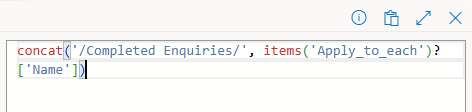
And here are the specifics for the condition in the Apply to Each loop, which is based on the output from the 'get files' action:
Folder to Move:
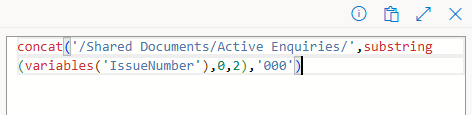
Destination Folder:
Do I need to include a data query in the Get Files action in order to improve the efficiency of this flow? From what I was reading online this seemed to be the case but whenever I tried to use a data query, it did not work (it failed to create any outputs from what I remember, as it was around two weeks ago when I tried to use the data query in particular).
Many thanks!





