web
You’re offline. This is a read only version of the page.
close
Skip to main content

Announcements

News and Announcements icon
Community site session details

Community site session details

Session Id :
Power Platform Community / Forums / Power Automate / PDF shows the placehol...
Power Automate
Unanswered

PDF shows the placeholder field names instead of actual value

(1) ShareShare
ReportReport
Posted on by 4

I’m working on a Power Automate flow that generates a Sample Analysis Report in PDF format using a Word Template stored in OneDrive. The process works almost as expected — but I’m running into a strange issue at the PDF conversion stage.

Trigger: Flow runs from a button in a model-driven app (Sample Analysis entity).Get data from Sample Analysis, Sample, Unit, and User tables.


  1. Populate a Word Template (stored in OneDrive).
    Create the populated DOCX file in OneDrive.
    Add a delay (10 seconds) to ensure file is saved.
    Convert the DOCX file to PDF.
    Upload the PDF to the Sample Analysis timeline (as a note/annotation).


    hat Works:
 

The DOCX file shows correct dynamic data (values for fields like sigb_result, sigb_service, etc.).


The PDF file is created and attached successfully.


Problem:

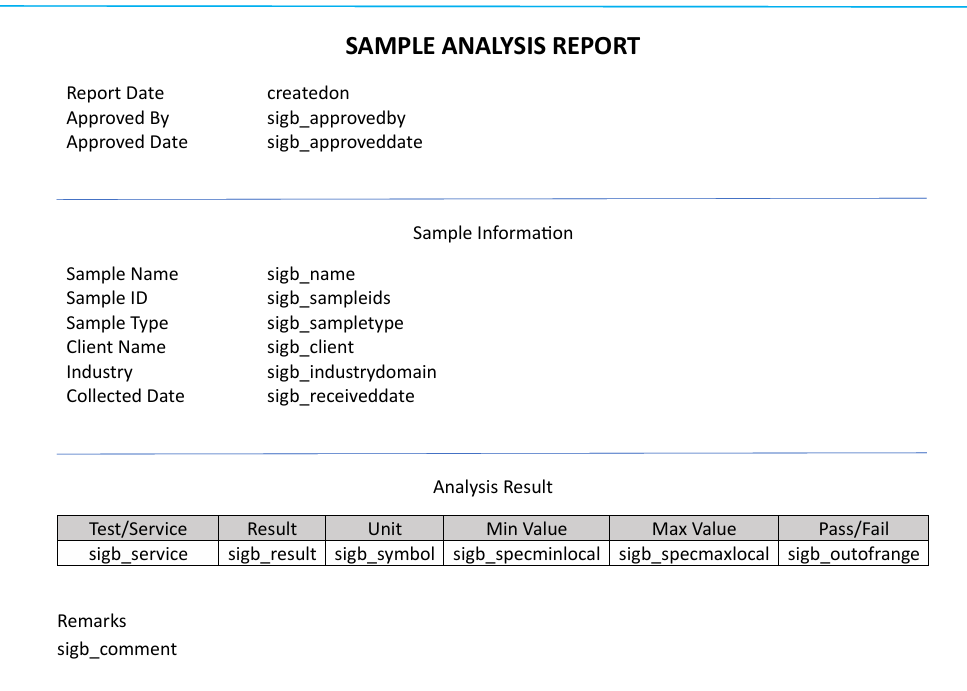
The PDF shows the placeholder field names instead of actual values.

Example output inside PDF:


What I’ve Tried:


Verified that Create File uses output from “Populate a Microsoft Word template”.

Added a Delay of PT10S after the Create File step.

Used the file ID from the Create File step in the Convert File action.

Gave the file a unique filename using timestamp (to avoid OneDrive caching).

Ensured conversion uses OneDrive for Business → Convert File action.


Word Template:

Created using Developer tab with plain text content controls, field names match schema.

Stored in OneDrive.

Populates correctly in DOCX, but not in the converted PDF.


Why is the populated DOCX showing values correctly, but the PDF shows only the schema/field names?


Is there a known OneDrive sync issue or an alternative conversion method to use?


Any help or guidance would be greatly appreciated!

Let me know if you'd like to see the flow structure or expressions.


Thanks in advance!

Categories:
I have the same question (0)
  • yashag2255 Profile Picture
    24,769 Super User 2024 Season 1 on at
     
    Have you tried using the convert to pdf action from the word online connector itself instead of the one from OneDrive? 
     
     
    I have seen this one work pretty good. The OneDrive convert action uses a different schema and sometimes the content is trimmed of there (generally with Excel to PDF and Word to PDF conversions). 
     
    Hope this Helps!
     
    If this reply has answered your question or solved your issue, please mark this question as answered. Answered questions helps users in the future who may have the same issue or question quickly find a resolution via search. If you liked my response, please consider giving it a thumbs up. THANKS!
  • AK-30061730-0 Profile Picture
    4 on at
    @yashag2255 tried this method. I resolved the issue by removing the original placeholder names from the Power Apps downloaded template and replacing them with new ones with names different to the schema names. This fixed the problem, and the dynamic data now populates correctly in the PDF.
  • yashag2255 Profile Picture
    24,769 Super User 2024 Season 1 on at
    @AK-30061730-0 Glad to hear that your issue is resolved. Can you please mark this post as answered so it can benefit others who face similar issues. 
     
    Thanks!

Under review

Thank you for your reply! To ensure a great experience for everyone, your content is awaiting approval by our Community Managers. Please check back later.

Helpful resources

Quick Links

Introducing the 2026 Season 1 community Super Users

Congratulations to our 2026 Super Users!

Kudos to our 2025 Community Spotlight Honorees

Congratulations to our 2025 community superstars!

Congratulations to the April Top 10 Community Leaders!

These are the community rock stars!

Leaderboard > Power Automate

#1
Vish WR Profile Picture

Vish WR 959

#2
Valantis Profile Picture

Valantis 872

#3
Haque Profile Picture

Haque 589

Last 30 days Overall leaderboard
