web
You’re offline. This is a read only version of the page.
close
Skip to main content

Announcements

News and Announcements icon
Community site session details

Community site session details

Session Id :
Power Platform Community / Forums / Power Automate / Cannot share a copy of...
Power Automate
Unanswered

Cannot share a copy of cloud flow with certain people in M365 mail group

(1) ShareShare
ReportReport
Posted on by 8
Hello, 
 
I am not sure if the issue relates to flow itself, so allow me to post to General Discussion.
 
My company is using Power Automate Free license (so we all use Poiwer Automate browser version), and we have created a cloud flow.
I try to share its copy with my co-workers, but I face the following issues: do you know any workaround or any way to solve the issue (account-related)?
 
1. I have created M365 mail group and sent copy to the group, but some members in the group cannot access to the shared template ("We couldn't find any templates that matches your search" is displayed in Templates > Share with me screen instead).
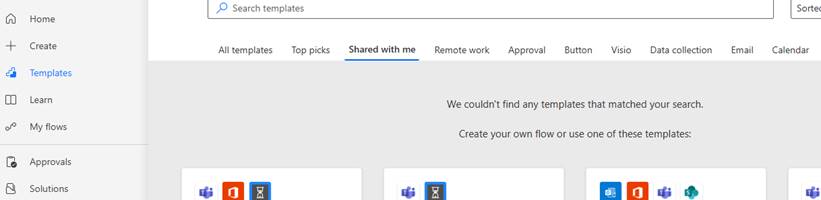
 
2. When I try to send a copy directly, the name of some members does not appear in suggestion. Her/his email address looks not recognized even though they are member.

I asppreciate your kind support.
 
Categories:
I have the same question (0)
  • Bezanca Profile Picture
    465 Super User 2026 Season 1 on at
     
     
    What environment is your flow in?
     
    Do the users that you can’t see have access to the environment?
     
    Thanks
    Adam
  • YI-15080447-0 Profile Picture
    8 on at
    Hello @
     
    My flow is in RWS environment, and yes, the users who cannot see the shared templates have access to the environment. Actually I have the same issue also...
  • YI-15080447-0 Profile Picture
    8 on at
    Hello, 
     
    It looks like that other people name in my organization are not displayed in "Suggested people". Could anybody please advise me for possible reasons for this issue?=
  • CU28060308-0 Profile Picture
    35 on at
    Hi,
     
    I myself have sent a copy of a workflow to a coworker under the same domain as me but when he clicks on the link contained in the email, he gets an error "We couldn't find or load the template" 
     
    What can I do to send a copy of a workflow to a coworker so he can create his own instance with his own connections?
     
    I'm trying to send a copy to multiple coworker and I don't want anybody to have access to the workflow of others so I have an environnement for each user, is it the right way of is there a way to group every user in one environnement and restrict access to workflow and connections?
     
    I have a Premium Power Automate licence.
     
    Thanks

Under review

Thank you for your reply! To ensure a great experience for everyone, your content is awaiting approval by our Community Managers. Please check back later.

Helpful resources

Quick Links

Introducing the 2026 Season 1 community Super Users

Congratulations to our 2026 Super Users!

Kudos to our 2025 Community Spotlight Honorees

Congratulations to our 2025 community superstars!

Congratulations to the March Top 10 Community Leaders!

These are the community rock stars!

Leaderboard > Power Automate

#1
Haque Profile Picture

Haque 594

#2
Valantis Profile Picture

Valantis 328

#3
David_MA Profile Picture

David_MA 281 Super User 2026 Season 1

Last 30 days Overall leaderboard
