web
You’re offline. This is a read only version of the page.
close
Skip to main content

Announcements

News and Announcements icon
Community site session details

Community site session details

Session Id :
Power Platform Community / Forums / Power Automate / Formatting in Work Ite...
Power Automate
Answered

Formatting in Work Item Description and Title

(2) ShareShare
ReportReport
Posted on by 6
Hi!
 
I am new to power automate and trying to automate Devops Bug creation and I have created a simple flow which should start in Microsoft Teams. I created an Adaptive Card for user to enter information which I shown below.
I pass the values but I have problem in some areas
 
  • Bug Title should have a prefix like "Team 1 -" and then entered Title should be added to prefix. Prefix is always fix value
  • Description should have specific format and entered values should be added each one
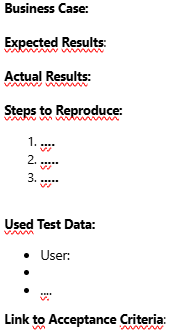
     
However I am not able to pass Prefix for Title neither the required formatting(bold text, spaces,...)
I have tried to add a compose and pass output but this didn't work either.
 
Any idea how can I achieve this?


Categories:
I have the same question (0)
  • Expiscornovus Profile Picture
    33,853 Most Valuable Professional on at
     
    The answer are in nested within the data property of the response. And you can use HTML instead of markdown.
     
    Below is an example
     
    This would be the expression for a textinput control with id BugTitle
    body('Post_adaptive_card_and_wait_for_a_response')['data']['BugTitle']

    The HTML for the Bug could be
    <b>Business Case:</b><br />
    @{body('Post_adaptive_card_and_wait_for_a_response')['data']['BusinessCase']}<br />
    <br />
    <b>Expected Results:</b><br />


    Happy to help out 😁

    I share more #PowerAutomate and #SharePointOnline content on my Blog, Bluesky profile or Youtube Channel
  • CU15041125-0 Profile Picture
    6 on at
    @Expiscornovus Thank you for your reply! 
    I am not sure If I understood, I am really new to this thema. 
     
    I have tried the steps you mentioned but could not get results :/ 
     
    My adaptive card is currently "manual", uses "operationId": "ForASelectedMessageV2" , which I start manually in Teams Workflow Chat.
     
    my "Create a work item" looks like this:
     
    {
      "type": "OpenApiConnection",
      "inputs": {
        "parameters": {
          "account": "XXX",
          "project": "XXX",
          "type": "Bug",
          "workItem/title": "AP Test - @{outputs('ComposeTitle')}",
          "workItem/description": "<p class=\"editor-paragraph\">&lt;b&gt;Business Case:&lt;/b&gt;&lt;br /&gt;@{triggerOutputs()?['body/cardOutputs/businessCase']}&lt;br /&gt;</p><p class=\"editor-paragraph\">&lt;br /&gt;</p><p class=\"editor-paragraph\">&lt;b&gt;Expected Results:&lt;/b&gt;&lt;br /&gt;@{triggerOutputs()?['body/cardOutputs/businessCase']}&lt;br /&gt;&lt;br /&gt;</p>",
          "workItem/priority": "@outputs('ComposePrio')",
          "workItem/area": "XXX\\Sandbox",
          "workItem/dynamicFields/System.AssignedTo": "@triggerOutputs()?['body/teamsFlowRunContext/messagePayload/from/user/displayName']",
          "workItem/dynamicFields/Microsoft.VSTS.TCM.ReproSteps": "<b>Business Case:</b><br />@{triggerOutputs()?['body/cardOutputs/businessCase']}}<br />\n<br /> \n<b>Expected Results:</b><br />@{triggerOutputs()?['body/cardOutputs/expectedResults']}<br /><br />",
          "workItem/dynamicFields/System.State": "New",
          "workItem/dynamicFields/System.Tags": "XXX Test"
        },
        "host": {
          "apiId": "/providers/Microsoft.PowerApps/apis/shared_visualstudioteamservices",
          "connection": "shared_visualstudioteamservices",
          "operationId": "CreateWorkItem"
        }
      },
      "runAfter": {
        "ComposePrio": [
          "Succeeded"
        ]
      },
      "metadata": {
        "operationMetadataId": "XXXXXXXXXXX"
      }
    }
     
    I get this in Devops, No formatting whatsoever :(

    Title: rtzzr
    Repro Steps:
    Business Case: xxx Expected Results:xxxx 
     
     
    Where do I go wrong you think?
  • Verified answer
    Expiscornovus Profile Picture
    33,853 Most Valuable Professional on at
     
    Apologies, I forgot to mention one thing for the description field, you need to switch that to code view first 😅


    Additionally, try some other HTML tags as well, for example the H3 header one, that one should also work.

    Below was my test result for the Repro Steps field


    Happy to help out 😁

    I share more #PowerAutomate and #SharePointOnline content on my Blog, Bluesky profile or Youtube Channel
  • CU15041125-0 Profile Picture
    6 on at
    Wow yes, this did the trick! Thanks a million! @Expiscornovus
    I can now see the formating as I wanted!

Under review

Thank you for your reply! To ensure a great experience for everyone, your content is awaiting approval by our Community Managers. Please check back later.

Helpful resources

Quick Links

Introducing the 2026 Season 1 community Super Users

Congratulations to our 2026 Super Users!

Kudos to our 2025 Community Spotlight Honorees

Congratulations to our 2025 community superstars!

Congratulations to the April Top 10 Community Leaders!

These are the community rock stars!

Leaderboard > Power Automate

#1
Vish WR Profile Picture

Vish WR 791

#2
Valantis Profile Picture

Valantis 582

#3
Haque Profile Picture

Haque 529

Last 30 days Overall leaderboard



