web
You’re offline. This is a read only version of the page.
close
Skip to main content

Notifications

Announcements

Community site session details

Community site session details

Session Id :
Power Platform Community / Forums / Power Automate / Move all emails from o...
Power Automate
Unanswered

Move all emails from one folder to another

(0) ShareShare
ReportReport
Posted on by 15

Hello,


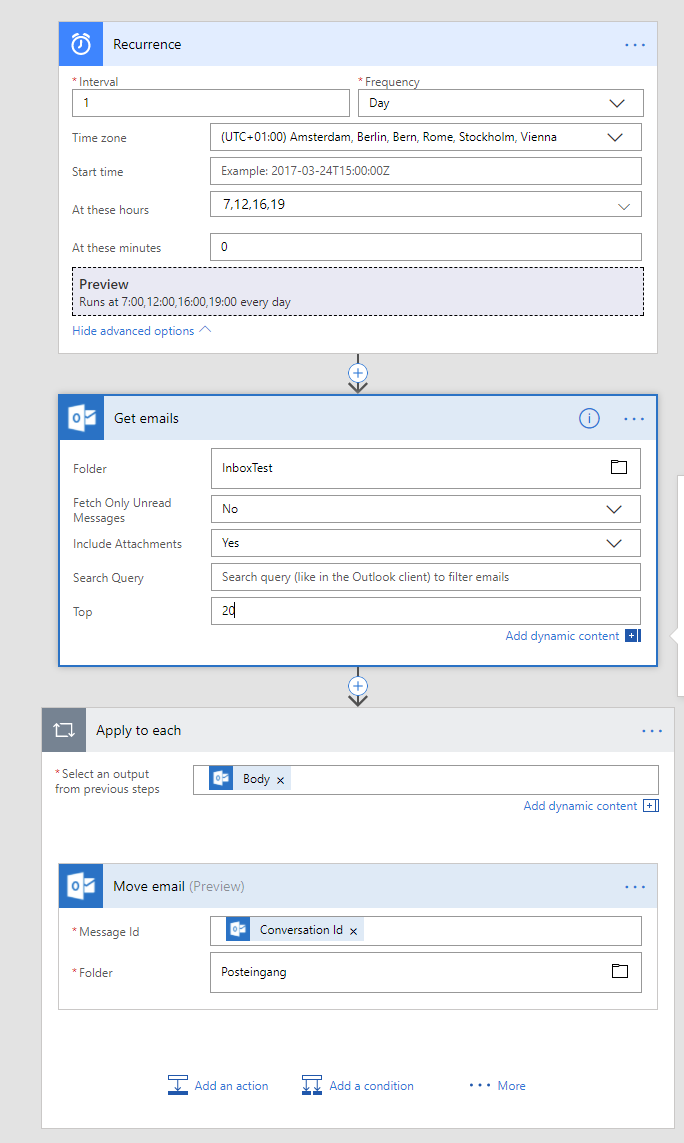
I want to create a flow that moves alle emails from one folder to another one. The flow should start for certain hours each day. 


Here is what I tried:


Trigger:

"Recurrence" says: "Runs at 7:00,12:00,16:00,19:00 every day"


Function:

"Get emails" configured for the folder from which I want to move all emails away (limit 20 shouldn't be more anyway and including all messages and inclucding attachments)


Apply for each:

Seleceted "Body" from the function before


Within apply for each:

Function: "Move email" with message id = Conversion Id and my target folger.


See below for the visual flow chart.


Whenever I run the flow I get the following error in the Foreach-part:

"ActionFailed. An action failed. No dependent actions succeeded."


Can anyone see what I did wrong?

Thanks!
Jan
 

Categories:
I have the same question (0)
  • JanTheofel Profile Picture
    15 on at

    Found it myself: I choosed "Conversion Id" instead of "Message ID".

  • v-yamao-msft Profile Picture
    on at

    Hi @JanTheofel,


    Thanks for updating.


    And yes, dynamic content Message Id is needed for the Message Id field.


    Please take this doc for a reference:
    https://docs.microsoft.com/en-us/connectors/office365/


    Best regards,
    Mabel Mao

Under review

Thank you for your reply! To ensure a great experience for everyone, your content is awaiting approval by our Community Managers. Please check back later.

Helpful resources

Quick Links

Forum hierarchy changes are complete!

In our never-ending quest to improve we are simplifying the forum hierarchy…

Ajay Kumar Gannamaneni – Community Spotlight

We are honored to recognize Ajay Kumar Gannamaneni as our Community Spotlight for December…

Leaderboard > Power Automate

#1
Michael E. Gernaey Profile Picture

Michael E. Gernaey 538 Super User 2025 Season 2

#2
Tomac Profile Picture

Tomac 405 Moderator

#3
abm abm Profile Picture

abm abm 252 Most Valuable Professional

Last 30 days Overall leaderboard
