web
You’re offline. This is a read only version of the page.
close
Skip to main content

Announcements

News and Announcements icon
Community site session details

Community site session details

Session Id :
Power Platform Community / Forums / Power Automate / Automating Email Remin...
Power Automate
Suggested Answer

Automating Email Reminders for 420h and 840h Evaluations

(0) ShareShare
ReportReport
Posted on by 15

Hi everyone,

I have an Excel file that tracks employees’ probationary periods, which involve two key checkpoints: a first evaluation at 420 hours and a second evaluation at 840 hours worked.

My goal is:

  1. Identify employees whose 420h or 840h evaluation date falls on the current day.
  2. Send an automated email reminder—one email per employee—that includes a brief summary (name, ID, hire date, manager, etc.).
  3. Update the Excel file to mark that the notification has been sent, so we don’t re-send future reminders for the same milestone.

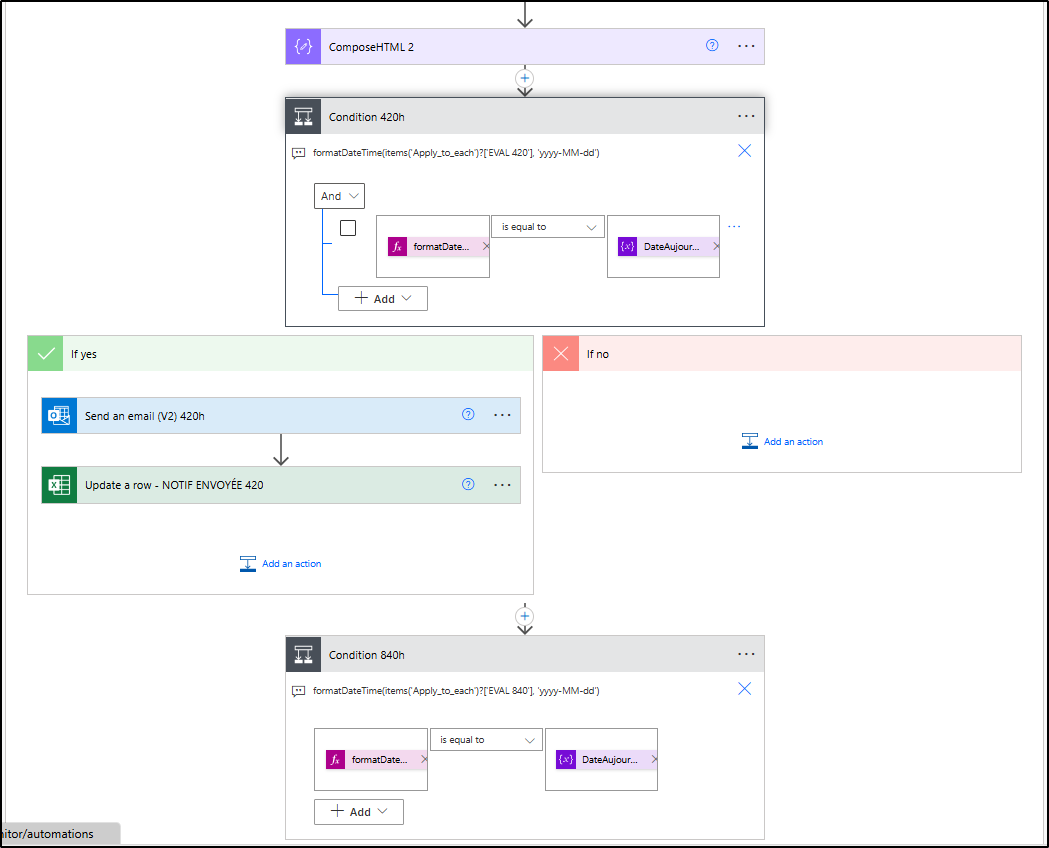
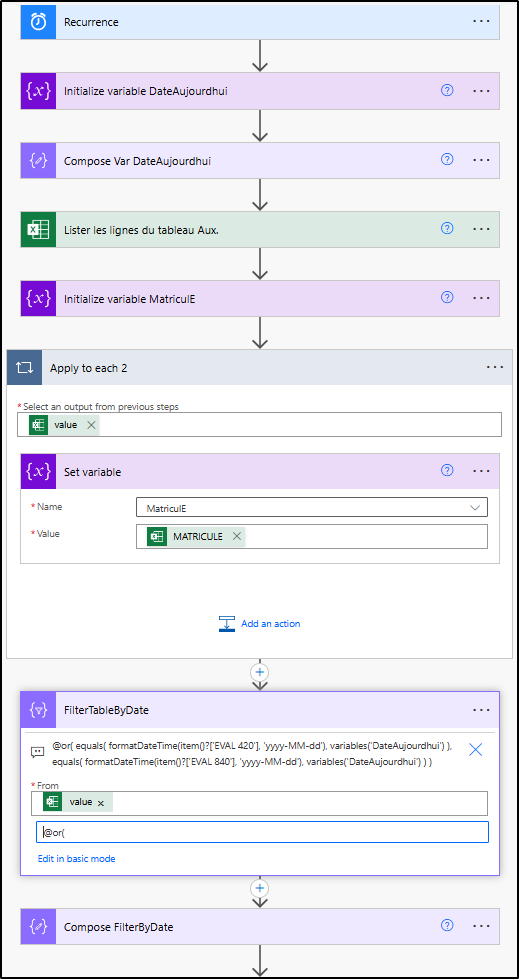
I’ve already set up a Power Automate flow that:

  • Reads the Excel file and filters rows where the 420h or 840h evaluation date equals today’s date.
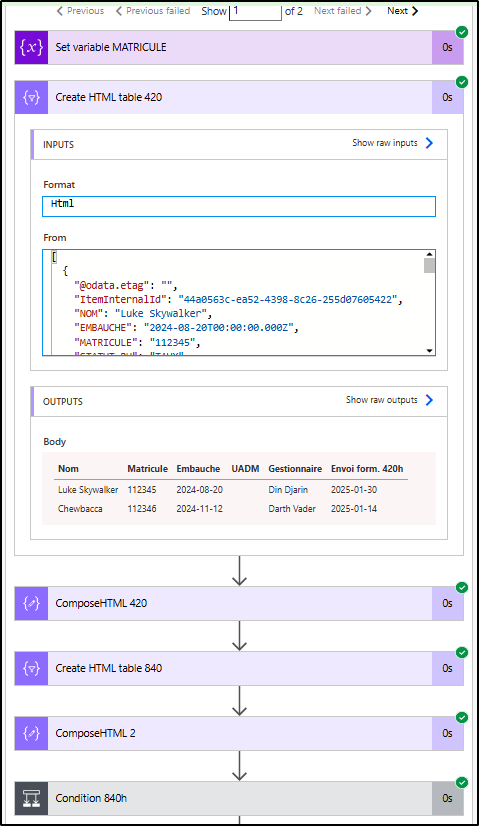
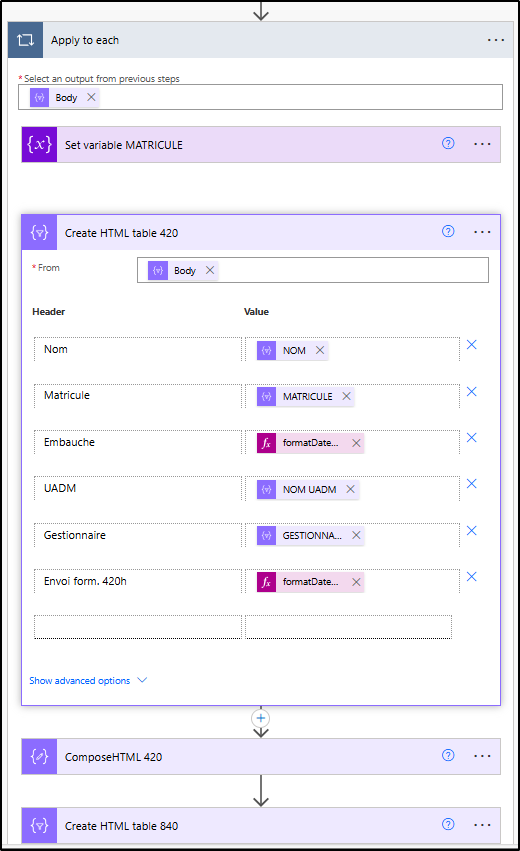
  • Loops through each filtered record to build a small HTML table containing just that employee’s data.
  • Sends an email reminder.
  • Updates a “NOTIF ENVOYÉE” (Notification Sent) column in Excel to avoid duplicates.

The expected outcome is to receive one email per employee at their 420h or 840h milestone, without listing other employees in the same message. This helps us streamline and track probation completion more effectively.

Do you have any suggestions or best practices on how to make this flow more robust or easier to maintain? Thanks in advance for your input!

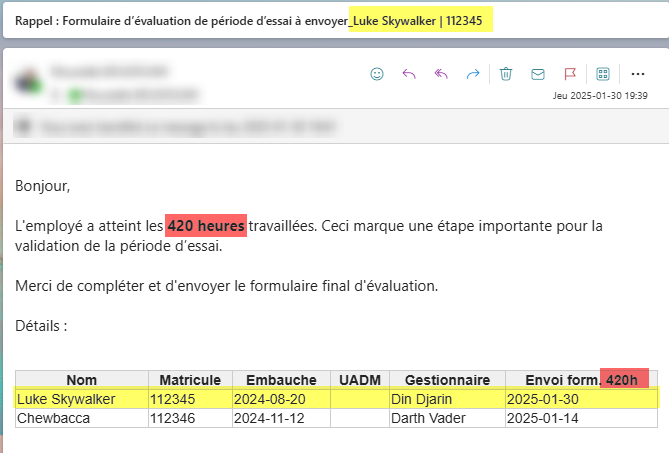
Snapshot email received :

As you can notice, the HTML output include Chewbacca, because the today date is displayed in another column, the 840 hours milestone.
Snapshot of the HTML table output :
Snapshot of the entire flow :
Categories:
I have the same question (0)
  • Suggested answer
    Nived_Nambiar Profile Picture
    18,136 Super User 2026 Season 1 on at
     
    one doubt here - from which actions output is this body dynamic contents ?


    I see there are multiple apply to each have been used, but i think we can make the flow simpler as well by avoiding using many loops.


    Thanks & Regards,
    Nived N

    Stay connected:
    LinkedIn | YouTube | Blogs

    Was this answer helpful?
    If yes, please mark it as the solution by selecting the checkbox in the discussion thread.
    Your feedback motivates me to keep contributing. Thank you!

    ​​​​​​​
     
  • 3xceln4ute Profile Picture
    15 on at
    Hi Nived,


    The next step will be to simplify the flow.
     
    Thanks.
  • Suggested answer
    Nived_Nambiar Profile Picture
    18,136 Super User 2026 Season 1 on at
    Hi,
     
    To make the flow working - what you have to do is instead of using filter array dynamic content in Create HTML Table action - use this expression 
     
     
    array(items('Apply_to_each'))
     
    This will help to create a single row table for each employee, do the same for create table for 840 hours based as well.
     
    Let me know whether that works for you :)
     

    Thanks & Regards,
    Nived N

    Stay connected:
    LinkedIn | YouTube | Blogs

    Was this answer helpful?
    If yes, please mark it as the solution by selecting the checkbox in the discussion thread.
    Your feedback motivates me to keep contributing. Thank you!

Under review

Thank you for your reply! To ensure a great experience for everyone, your content is awaiting approval by our Community Managers. Please check back later.

Helpful resources

Quick Links

Introducing the 2026 Season 1 community Super Users

Congratulations to our 2026 Super Users!

Kudos to our 2025 Community Spotlight Honorees

Congratulations to our 2025 community superstars!

Leaderboard > Power Automate

#1
Haque Profile Picture

Haque 557

#2
Valantis Profile Picture

Valantis 328

#3
David_MA Profile Picture

David_MA 264 Super User 2026 Season 1

Last 30 days Overall leaderboard