web
You’re offline. This is a read only version of the page.
close
Skip to main content

Notifications

Announcements

Community site session details

Community site session details

Session Id :
Power Platform Community / Forums / Power Automate / Trigger a condition on...
Power Automate
Suggested Answer

Trigger a condition only if the filename contains a specific words

(1) ShareShare
ReportReport
Posted on by 21
Hello, 
I am new to power automate and I am having trouble on what seems a really stupid question.
I want to trigger an avent when a file is created and doing some other things only if the filename contains a words (that is "Allegato).
I tried to trigger the event, but the condition is always false. This is my flux
 
 
This is how I set the condition:


I tested it and the condition result is "False". But this is the output generated:
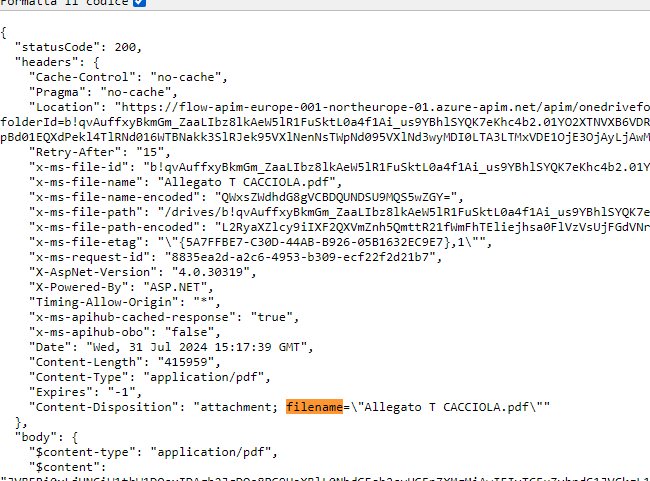
 
So, in the name I see that the word "Allegato" is contained. But I cannot understand Why the condition is false

Thank you
Categories:
I have the same question (0)
  • Suggested answer
    David_MA Profile Picture
    12,982 Super User 2025 Season 2 on at
    If you want the flow to only trigger when the filename contains Allegato, you would not use a condition as the flow will still trigger if the filename contains the word. What you want to do is add a trigger condition, which you correctly identified in the title of your post. It is just that the implementation is off.
     
    Go to the settings of your trigger and go to Trigger conditions. Press +Add to add an expression, which must evaluate to true for the flow to trigger. To check what you want, you would use this trigger condition:
    @contains(triggerOutputs()?['headers/x-ms-file-name-encoded'],'Allegato')
    A tip for building a trigger condition is to use a compose action and build the expression in it with the expression builder. You can then trigger the flow without the trigger condition set to make sure it returns true or false. Once you have it working, just copy the expression and put the @ symbol before it in the trigger condition:
  • HaveeLand Profile Picture
    74 on at
    Hello @Francescodono
     
    To me... you are on the right track with your Power Automate Flow.  You may only have to include the word "ALLEGATO" in Quotes for it to work.   I tried it and it worked for me.
     
    I believe that without quotations, it may try to process it as a variable or something else.  Try the Quotes and let me know.
     
  • francescodono Profile Picture
    21 on at
    @David_MA
    Thank you so much for your answer.
    I tried your solution but it seems that there is a problem. As you can see I uploaded the file in the specific folder I chose.
     
    But Nothing happens. I have this screenshot:


    This is my implementation:


    Edit: When I analyze my flow I have a message that is: "
    InvalidTemplate. Unable to process template language expressions for trigger 'When_a_file_is_created' at line '1' and column '46576': 'The template language function 'contains' expects its first argument 'collection' to be a dictionary (object), an array or a string. The provided value is of type 'Null'.'.

  • francescodono Profile Picture
    21 on at
    Hello @HaveeLand,
    Can I ask you how you implement the Compose that is in your image?
    Thank you!

Under review

Thank you for your reply! To ensure a great experience for everyone, your content is awaiting approval by our Community Managers. Please check back later.

Helpful resources

Quick Links

Forum hierarchy changes are complete!

In our never-ending quest to improve we are simplifying the forum hierarchy…

Ajay Kumar Gannamaneni – Community Spotlight

We are honored to recognize Ajay Kumar Gannamaneni as our Community Spotlight for December…

Leaderboard > Power Automate

#1
Michael E. Gernaey Profile Picture

Michael E. Gernaey 525 Super User 2025 Season 2

#2
Tomac Profile Picture

Tomac 324 Moderator

#3
abm abm Profile Picture

abm abm 232 Most Valuable Professional

Last 30 days Overall leaderboard



