web
You’re offline. This is a read only version of the page.
close
Skip to main content
Community site session details

Community site session details

Session Id :
Power Platform Community / Forums / Power Automate / Error in Naming of Sub...
Power Automate
Unanswered

Error in Naming of Subfolder

(0) ShareShare
ReportReport
Posted on by 5,323 Super User 2025 Season 2
I have created a flow that is creating PDF files in a SharePoint Library subfolder.

Everything is working except the naming convention formula.

My intent is to have the library present as Folder-subfolder-file
     Folder: Property Name
     Subfolder: Week Ending and Date

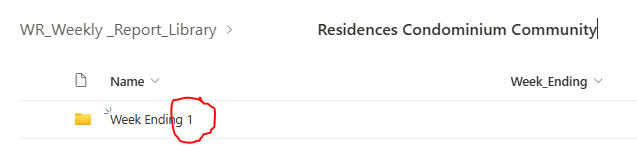
I am successfully pulling in this information as meta data, as shown in the last
screenshot - 'Week Ending' column shows desired content I want displayed as the
subfolder name.

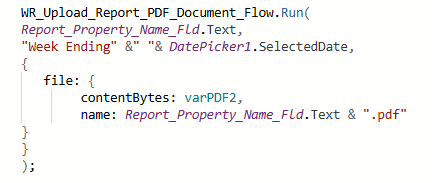
No matter what I've tried, flow keeps breaking up the date portion of the Week Ending
field, creating two additional - unwanted, subfolders.

How/What do I correct so that there is one main folder and one subfolder, with the
subfolder name being 'Week Ending 1/19/2025'

Flow -


SharePoint Button Formula -
SharePoint Library -
Categories:
I have the same question (0)
  • Verified answer
    NickWarner Profile Picture
    113 on at
    Error in Naming of Subfolder
    The slashes in your date format denote a folder change, you can't use them in your folder name. if you replace with dashes it should work as you expect.
  • Phineas Profile Picture
    5,323 Super User 2025 Season 2 on at
    Error in Naming of Subfolder
    That is the default formatting of the DatePicker.

    How would I change the slashes to dashes?
  • Suggested answer
    Phineas Profile Picture
    5,323 Super User 2025 Season 2 on at
    Error in Naming of Subfolder
    I figured it out -

         
    Text(DatePicker1.SelectedDate, "m-dd-yyyy")

Under review

Thank you for your reply! To ensure a great experience for everyone, your content is awaiting approval by our Community Managers. Please check back later.

Helpful resources

Quick Links

Forum hierarchy changes are complete!

In our never-ending quest to improve we are simplifying the forum hierarchy…

Ajay Kumar Gannamaneni – Community Spotlight

We are honored to recognize Ajay Kumar Gannamaneni as our Community Spotlight for December…

Leaderboard > Power Automate

#1
Michael E. Gernaey Profile Picture

Michael E. Gernaey 462 Super User 2025 Season 2

#2
Tomac Profile Picture

Tomac 456 Moderator

#3
abm abm Profile Picture

abm abm 243 Most Valuable Professional

Last 30 days Overall leaderboard
