Please note, your Error is bad, you are invoking it with the wrong number of parameters, so you will most likely throw this all the time, which defeats capturing failures, since I can just read it says you initiated the IF with 5 parameters. Thats a bug you have to fix.
Now.. to do what you want
There is a limitation that will not allow you to guarantee do what you want unless you are willing to single thread your loops.
The issue is.. they aren't exactly loops, not in a serial perspective.
What I mean is this:
- Imagine you have a Variable (integer) named SprintLoopCounter and you set it to 1
- Now you can image that for each "loop" you increase it by 1 and bingo you have your loop counter... No... because they are not single threaded by default. And since multiple instances can be running at once, the variable, that you would have to Set Variable or other "increment" to 2, 3, 4, 5 would happen on multiple threads at once, so that multiple threads simultaneously would then use the same #. So you need a way to identify it differently.
1 way is to click ... on the Apply to Each, and Click settings, then turn on Concurrency and Set it to 1. now it WILL only run 1 thread at a time, and you CAN create a counter.
It will slow your processing, but it will give you what you want.
YOU are going to want to write this to Excel, or SharePoint or Dataverse or Blob Storage. So I am going to assume you created some SharePoint List and will write the information there.
So follow this to do what you want.
1. Initialize a SprintLoopCounter
2. Initialize a TaskLoopCounter
3. Add an Apply to each (now please understand I am SKIPPING knowing what you are putting in the From value for the Apply to each.). I am showing you the Settings, and approach change to the Apply to each to make it single threaded so our counters work.
Now, go below these and I will continue
Your Sprint loop looks like this - and I will expand the Task Loop after so you can inside it
1. You have the Sprint loop
2. You have the Increment Variable Action so we can increase our SprintLoop by 1 each time it loops and in our case since we set it to Concurrency ON and 1 it IS a real single loop so our counter works properly
3. Next your Get calendar
4. Then your Task Loop
5. Then after your task loop, before the Next SprintLoop, we need to reset the TaskLoopCounter to 0 since we are in a new sprint
Now we put the error handling into the inner loop.
NOTE: You also need to click ... on the Apply to Each, turn on concurrency and set it to 1 for this to work properly
1. We add a Scope and call it Try
2. We add an increment variable action inside the Try
3. Add your Condition inside the try
4. in the Yes side, do whatever it is you are going to do that might fail
STEP 5 and beyond please go below this picture as its below the Try Scope
Ok Underneath the Try we need to add 2 parallel Scopes. One called Catch and one Called Success
It lines up the with lines above that are cut off below the try
1. Add the Catch (I put extra works to show you how to configure the Run after Property for both catch and Success)
2. Click the + sign above your Catch and click Add Parallel Branch. Then add another Scope and call it Success
3. Configure Run After for Catch Scope to Has Failed/Skip/Timeout
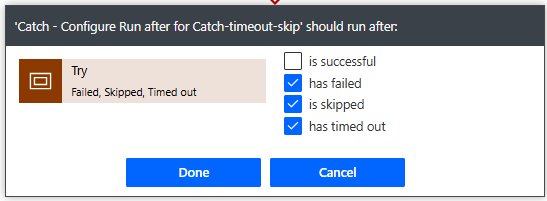
In the Catch Scope, it will go there if your condition or other lines fail.
Then I grab the Sprint and Loop Counters in a compose. It is NOT necessary you can simply add the variables directly to your Create Item in SharePoint, but I am trying to show the flow build up
Then grab the Error message which you get with the expression
result('Try')
remember its an expression NOT dynamic content, so type it in the expression
Get your story, however you have too
Write to SharePoint
Once done it will continue to loop through Tasks. Now please go further down, as we need one more action AFTER our Task Loop
Ok right after the TaskLoop, you saw above that we need to add the Reset Task Loop Counter, which is really the Set Variable action, and set it back to 0. Since you dont have Task loop 1 for Sprint 2, to start at anything else by 1, to do that it has to be reset to 0 so the first loop will increment it.
Now... it will give you what you asked for.
Although you need to fix the bug which is currently causing your error.
If these suggestions help resolve your issue, Please consider Marking the answer as such and also maybe a like.
Thank you!
Sincerely, Michael Gernaey


