I have a Microsoft Form called 'Attendance Action'. It has the following fields:
First Name
Last Name
DAS ID
Date of Discipline Action - Its in MM/dd/yyyy format
Which Point Bucket Was Discipline Action For - It has got 2 options. They are 'Absence' and 'Tardy'. Users need to select either of them
Action Type - There are 5 options and any one of these need to be selected. They are 'Verbal Warning', 'Written Warning', 'Termination', 'Dr Note' and 'FMLA'. The moment users select either of 'Verbal Warning', 'Written Warning' or 'Termination', another field called 'Date of Event' gets activated/visible and users need to select a date which is in MM/dd/yyyy format and then hit on Submit. Again, if the users select either of 'Dr Note' or 'FMLA' then 3 fields get activated/visible. They are 'Start Date', 'End Date' and 'Attachment'. 'Start Date' and 'End Date' fields are in MM/dd/yyyy format and 'Attachment' allows the users to attach/upload a document. It must be noted when either of 'Dr Note' or 'FMLA' is selected, we don't have the field 'Date of Event' anymore.
I have a SharePoint List called 'Attendance Action' with the same field/column names where I would like to get data from Forms to populate using Power Automate.
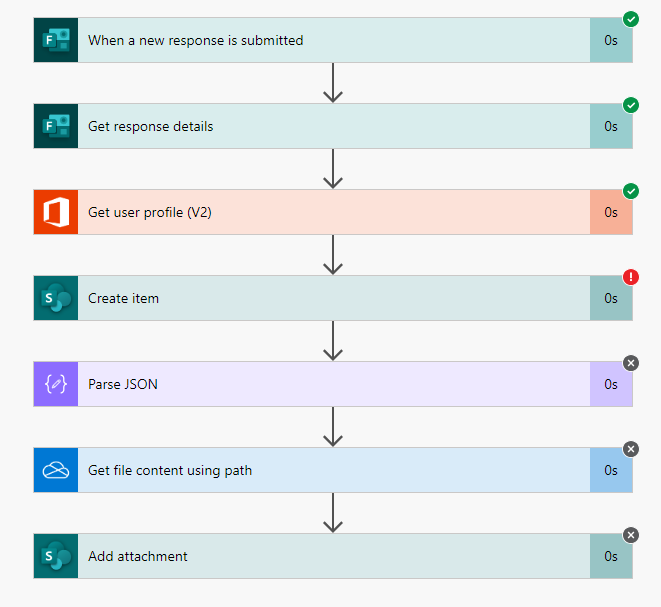
For your reference, I am sharing my Flow. No matter how I try, I always end up getting the below error:
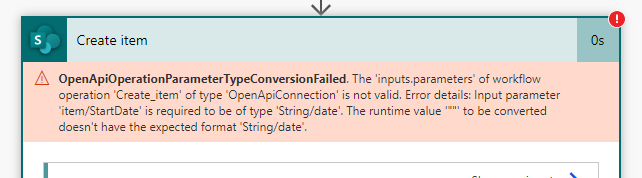
OpenApiOperationParameterTypeConversionFailed. The 'inputs.parameters' of workflow operation 'Create_item' of type 'OpenApiConnection' is not valid. Error details: Input parameter 'item/StartDate' is required to be of type 'String/date'. The runtime value '""' to be converted doesn't have the expected format 'String/date'.
Sometimes the error is on StartDate and if I select anything else in the Form then the error will refer to EventDate