

web
You’re offline. This is a read only version of the page.
close
Skip to main content

Notifications

Announcements

Community site session details

Community site session details

Session Id :
Power Platform Community / Forums / Power Automate / HTTP trigger action no...
Power Automate
Unanswered

HTTP trigger action not getting invoked from M365 Declarative Agent API plugin

(0) ShareShare
ReportReport
Posted on by 41
Hi, 
 
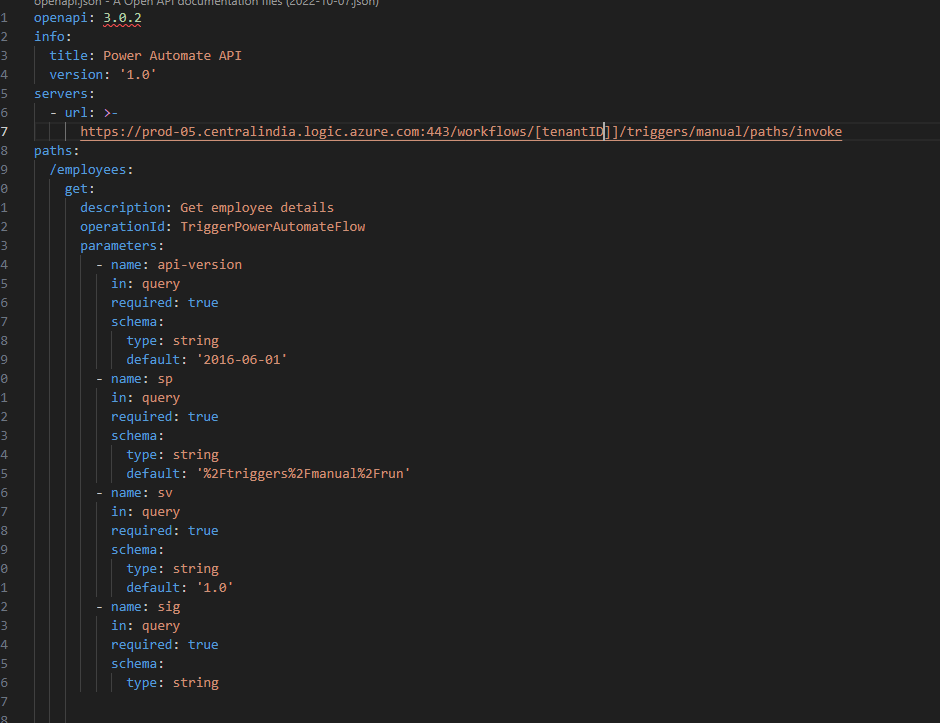
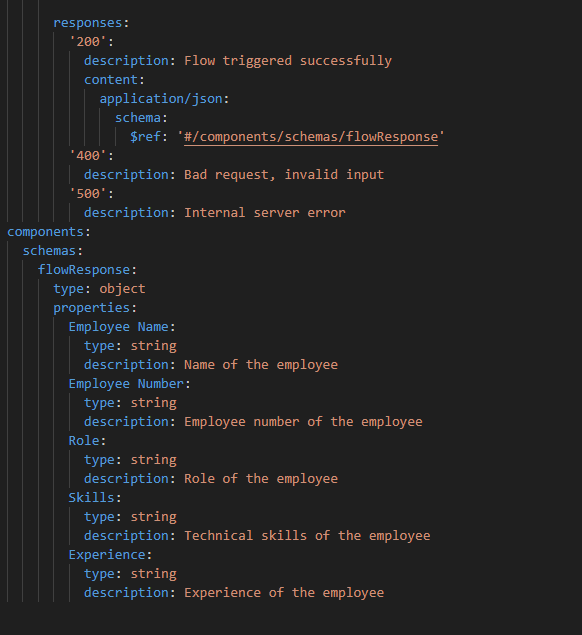
I've been trying to call a power automate flow with HTTP trigger from the API plugin part of Declarative agents for M365 copilot. However I have not been able to implement it as the copilot agent is not responding and the flow is not being invoked. The same is working in Postman and in browser as well as its a GET request. No authentication is set. Please provide guidance as to how to achieve this. 
 
 
Thank you
__________________________________________________________________________________________
 
Flow HTTP trigger:
 
 
_______________________________________________________________________________________________________________________
 
 
OpenAPI.yaml:
 
1. 
 
2. 
________________________________________________________________________________________________________
 
Bot Response:
 
__________________________________________________________________________________________________________
 
Please check if some modifications are to be made to make the API call successfully achieved. 
Categories:
I have the same question (0)
  • Suggested answer
    David_MA Profile Picture
    12,966 Super User 2025 Season 2 on at
    I am pretty sure you are using this action, and your screen shot is from the new designer:
    If so, you need to use a POST instead of a GET request. While it is not required, I don't know how useful this will be without specifying some kind of data in the body of the request. With the above, sending the item ID of the SharePoint list item allows me to get the item in the flow that has been called with a SharePoint Get item action and using the value passed in the http request in the ID field.

Under review

Thank you for your reply! To ensure a great experience for everyone, your content is awaiting approval by our Community Managers. Please check back later.

Helpful resources

Quick Links

Forum hierarchy changes are complete!

In our never-ending quest to improve we are simplifying the forum hierarchy…

Ajay Kumar Gannamaneni – Community Spotlight

We are honored to recognize Ajay Kumar Gannamaneni as our Community Spotlight for December…

Leaderboard > Power Automate

#1
Michael E. Gernaey Profile Picture

Michael E. Gernaey 522 Super User 2025 Season 2

#2
Tomac Profile Picture

Tomac 364 Moderator

#3
abm abm Profile Picture

abm abm 243 Most Valuable Professional

Last 30 days Overall leaderboard


