web
You’re offline. This is a read only version of the page.
close
Skip to main content

Announcements

News and Announcements icon
Community site session details

Community site session details

Session Id :
Power Platform Community / Forums / Power Apps / Searching on a field b...
Power Apps
Answered

Searching on a field belonging to a reference table

(0) ShareShare
ReportReport
Posted on by 28

There are two tables in postgresql which are being used in powerapps through a gateway.

One is projects the other is companies .

Project table references company table.
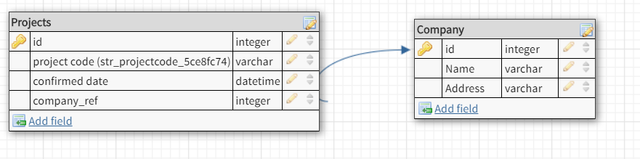
 project tables and company table

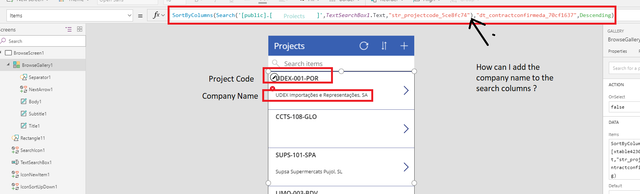
I would like to show a vertical list with the project codes and company names and do a Search on both columns which is of the delegated type (means can handle above 500 entries with no issue).

I’m not being able to do it.


Search function on powerapps:

Search('[public].[projects]',TextSearchBox1.Text,"str_projectcode",<company field name here>)


I don't know what I should put on <company field name here> in order to search over a field from a referenced table (company).

So I don’t know how I can filter the projects based on the “name” field of the company.
 

Categories:
I have the same question (0)
  • Drrickryp Profile Picture
    Super User 2024 Season 1 on at
    Hi Lazevido, Add the company name to the Items property of the projects gallery. by using the AddColumns() function as follows. Search(AddColumns('[public].[projects]',"CompanyfName",Lookup("[Company]" ,id=company_ref, Name)), "TextSearchBox1.Text, "str_projectcode", "CompanyName") then you can search on it.
  • Drrickryp Profile Picture
    Super User 2024 Season 1 on at
    You could also create a collection in the OnSelect property of the screen with ClearCollect(colProjects, AddColumns('[public].[projects]',"CompanyName",Lookup("[Company]" ,id=company_ref, Name))). then you could substitute colProjects in the Items property of the gallery: Search(colProjects, "TextSearchBox1.Text, "str_projectcode", "CompanyName") Using the collection method would provide an extremely fast search for the User. You could try it both ways and see which works best for you.
  • Drrickryp Profile Picture
    Super User 2024 Season 1 on at
    For some reason I can't edit my posts but there is an error in my search string. There should not be a " before the TextSearchBox1.Text element in the formula.
  • lazevedo Profile Picture
    28 on at

    Thanks for the quick reply.

    Just tried the first approach with the AddColumns, no error but the gallery simply doesn't load, it's on an infinit "searching" status, at least the list is empty and the "loading" dots on top keep moving (image below).

    I'm going to try the second approach but any ideas on why I don't get any results ?


    loading.png

  • lazevedo Profile Picture
    28 on at

    Tried the second approach of the colection by adding the following function to the BrowseScreen onStart field:

    ClearCollect(projects,AddColumns('KIM Projects',"CompanyName",LookUp('KIM Companiess' ,lid=ref_15cf77be, str_firma_037e76ad)))

    Means I've just created a new collection called "projects" with the new column "CompanyName".

    But then I just try to show it on the gallery by putting "projects" on the function and nothing is shown:

    collection1.png

    collections-2-empty.PNG


  • Drrickryp Profile Picture
    Super User 2024 Season 1 on at

    Hi @lazevedo

    If you put it in the OnStart property of the screen, you will need to close your app and reopen it before it will work.  Put it in the OnVisible property of the screen.  One reason why the first method seems to stall could be that your table is large. Plus, you could run into delegation issues if you have more than 2000 rows in the table. 

  • Mr-Dang-MSFT Profile Picture
    Microsoft Employee on at

    @lazevedo,

    Just a hunch, but if you're not seeing any data I'm thinking you may be experiencing a bug with the 'explicit column selection' feature. I suggest turning it off in App Settings.


    See the last note here:

    https://powerapps.microsoft.com/en-us/support/


  • lazevedo Profile Picture
    28 on at

    Thanks for the quick replies, I just tried it but doesn't seem that anything is happening, simply doesn't show anything, even when I click the "play" button to "run" the app:

    screen-onvisible.png

     Only when I use the AddColumn expression directly on the data of the gallery does it show the entries, but not when I reference the created collection.

    gallery-empty.png

  • Verified answer
    Drrickryp Profile Picture
    Super User 2024 Season 1 on at

    Hi @lazevedo,

    It doesn't seem possible that the formula works as the Items property of the gallery but you can't make a collection using that same formula.  You should be able to create a Collection simply by using ClearCollect(collectionname, Formula) as the OnSelect function of a button or in the OnVisible property of a screen.  You should be able to see if the Collect() function works by looking at the View -Collections.Capture.PNG


  • Mr-Dang-MSFT Profile Picture
    Microsoft Employee on at
    I see the issue. You're attempting to Search your SQL table against a formula. You can always check if a given function is delegable in a filter or search, but my rule of thumb is that the more complicated your filter is, the less likely it is delegable. https://docs.microsoft.com/en-us/powerapps/maker/canvas-apps/delegation-overview The good news is that you could easily create a SQL View that joins the two tables with the Company as a column added to the original table. Note that you cannot write to the view of course, but you could easily match it up with the actual record in your table since they would both have the same primary keys. https://powerapps.microsoft.com/en-us/blog/using-sql-server-views-in-powerapps/

Under review

Thank you for your reply! To ensure a great experience for everyone, your content is awaiting approval by our Community Managers. Please check back later.

Helpful resources

Quick Links

Introducing the 2026 Season 1 community Super Users

Congratulations to our 2026 Super Users!

Kudos to our 2025 Community Spotlight Honorees

Congratulations to our 2025 community superstars!

Congratulations to the March Top 10 Community Leaders!

These are the community rock stars!

Leaderboard > Power Apps

#1
11manish Profile Picture

11manish 530

#2
WarrenBelz Profile Picture

WarrenBelz 459 Most Valuable Professional

#3
Haque Profile Picture

Haque 314

Last 30 days Overall leaderboard
