web
You’re offline. This is a read only version of the page.
close
Skip to main content

Announcements

News and Announcements icon
Community site session details

Community site session details

Session Id :
Power Platform Community / Forums / Power Automate / Auto-reply email based...
Power Automate
Answered

Auto-reply email based on subject value

(0) ShareShare
ReportReport
Posted on by 73
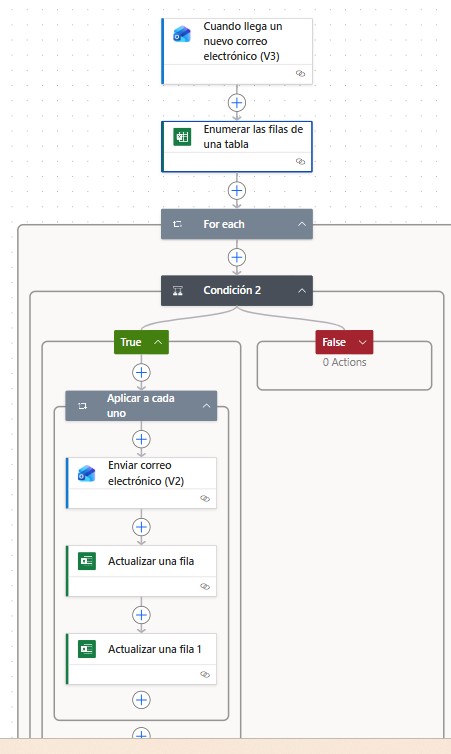
I currently have a power automate flow to automatically respond to personalized information request emails.
When we receive an email that includes the word “contributions” in the subject, with power automate we automatically respond to the email with the amount of the contributions received by the employee.
This amount is located in a table called “data”, in OneDrive that has the following fields
Cod_empl, email, amount, shipped and date.
Cod_empl corresponds to the employee's code, email, is the employee's email, amount, is the amount that has corresponded to him in the contributions, sent is a field that has value Yes, if we have sent a reply email and date is the date of sending the reply email.
This year we are going to make a bonus payment instead of making another flow, I intend to integrate this new response sending into the current flow. In the data table I will add a new field called type, with the values "A" for contributions and "B" for bonuses.
My question is how to modify the flow so that when it receives emails in which the subject includes the word "Contributions", the flow looks in the table for the amount of code "A" and responds to the email with that amount. If the received email has the word "Bonus" in the subject, the flow looks in the table for the amount of code "B" and replies to the email with that amount.
Please, how would I have to modify the flow??
 
Categories:
I have the same question (0)
  • Suggested answer
    stampcoin Profile Picture
    5,158 Super User 2026 Season 1 on at
    Here some draft steps for your reference:
    1.  When a new Email arrives(V3)
    2. If Subject contains contributions or bonus, if true then continue the flow.
    3.  Get a row (Excel table). make sure your table in excel has unique records, for example use email as the key.
    4.  Compose for value from contributions/Bonues.
    5.  Another condition to respond to either contributions or bonus.
    below is an example:

    Enjoy Power Platform and have a great day 🚀 |  My LinkedIn

    If the answer helps, please consider 👍, Thanks.


  • Verified answer
    Rafa_Gr Profile Picture
    73 on at
     
    Thank you for attending my question and for your time.
     
    Could you please tell me the details of the code or the instructions that correspond to the steps that I mark in yellow?
     
     
    Best regards!!
     
  • Suggested answer
    stampcoin Profile Picture
    5,158 Super User 2026 Season 1 on at
     
    you have to adjust it accordingly by your own requirement, for example use upper() to compare the subject key word, etc.


    excel table columns:


    Enjoy Power Platform and have a great day 🚀 |  My LinkedIn

    If the answer helps, please consider 👍, Thanks.

  • Rafa_Gr Profile Picture
    73 on at

    Hi! @stampcoin
    Thanks again for answering my query and for the time you have dedicated to me.
    I have been reviewing your proposal and I have some questions.
    In my initial query, I mentioned that to differentiate between Contributions and Bonus, I would include a new column in the table called “type,” with the value A for Contributions and B for Bonus, so that when receiving the request email, if the subject contained “bonus,” the table would be filtered by two fields: the email and the type (in this case, the value B). In your response, you create two columns, one for each amount. The problem with this proposal is that, for example, if I receive an email requesting the bonus amount, when sending the reply, the “sent” field is updated to Yes, so if the Contributions amount is requested in a later message, it will not reply because the value of “sent” is Yes.


    On the other hand, can you confirm that in “Get a Row,” the value of Key Column should be “email” and the Key Value should be “From,”? Is this the correct way to filter the table by the requester’s email to retrieve the corresponding amount?

    Best regards
     

  • stampcoin Profile Picture
    5,158 Super User 2026 Season 1 on at
    My example is just an example not exactly the one which totally matches your scenario.
    You can use your current table (A&B value for that column) for sure, you can also use more columns for example has flag column for  sending email and resending email, or use 0,1 and greater than 1 for other actions.
    try you best to reduce the invoke against the Excel.
    Regarding the key column, one like you said is use 'from', that will work.
     
    let me know if you have any other questions.
  • Rafa_Gr Profile Picture
    73 on at
    @stampcoin
    Thank's again for your help!!
    One more question, how would the condition be established in the flow so that, depending on the subject of the email, it selects the amount of code A or B. Keep in mind that the same person can have 1 or 2 records in the table with the same values except the type and the amount since there may be people who have contributions or bonus or both.
     

Under review

Thank you for your reply! To ensure a great experience for everyone, your content is awaiting approval by our Community Managers. Please check back later.

Helpful resources

Quick Links

Introducing the 2026 Season 1 community Super Users

Congratulations to our 2026 Super Users!

Kudos to our 2025 Community Spotlight Honorees

Congratulations to our 2025 community superstars!

Congratulations to the April Top 10 Community Leaders!

These are the community rock stars!

Leaderboard > Power Automate

#1
Vish WR Profile Picture

Vish WR 801

#2
Valantis Profile Picture

Valantis 602

#3
Haque Profile Picture

Haque 581

Last 30 days Overall leaderboard



