web
You’re offline. This is a read only version of the page.
close
Skip to main content

Notifications

Announcements

Community site session details

Community site session details

Session Id :
Power Platform Community / Forums / Power Automate / Time Zone not Matching...
Power Automate
Suggested Answer

Time Zone not Matching Power Automate output in Sharepoint List

(0) ShareShare
ReportReport
Posted on by 39
Hi, i need some assistance with my flow.
Trigger - new auto email is received from system
I need to extract certain data from the email to input into a Sharepoint list. 
I have successfully done the other fields, however i see to be failing to convert the 'email received time' to Australian Eastern Standard Time. 
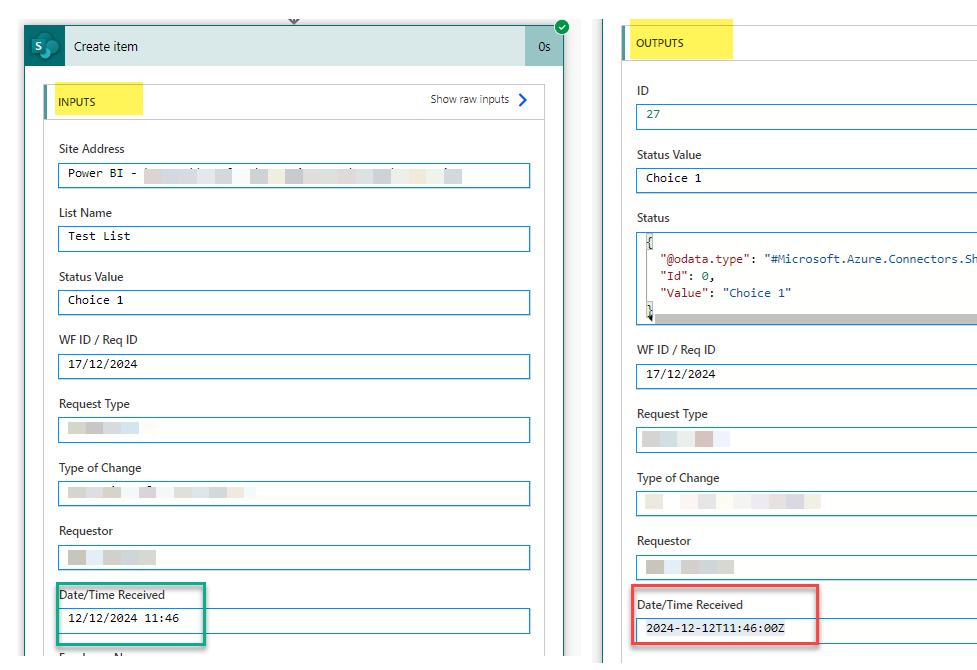
My 'Create Item' input is correct, however the output is incorrect. I have tried numerous options, changed all outlook and sharepoint timezones to ensure it matches AEST and still it's not reflecting correctly. I'm not sure if sharepoint is simply not taking 'daylight saving' into consideration

formatDateTime(convertTimeZone(utcNow(), 'UTC', 'AUS Eastern Standard Time'), 'yyyy-MM-dd HH:mm')
convertTimeZone(triggerOutputs()?['body/receivedDateTime'], 'UTC''AUS Eastern Standard Time')
formatDateTime(parseDateTime(split(outputs('Get_ReceivedTime'), '.')[0]), 'dd/MM/yyyy HH:mm', 'en-AU')

Where am i going wrong? thanks!!!


Categories:
I have the same question (0)
  • Suggested answer
    Ellis Karim Profile Picture
    11,683 Super User 2025 Season 2 on at
     
    The format of the output you are seeing is correct.
     
    SharePoint stores all date-times in UTC using ISO 8601 format : yyyy-MM-ddTHH:mm:ssZ.  The presence of the ‘Z’ at the end of the date-time string tells us that it is UTC.

      For your Date/Time Received column:
      • convert the "email is received date time" to UTC

      • and use the following date format:  'yyyy-MM-ddTHH:mm:ssZ' in the Create Item action. 

      The convertToUtc() function will convert the date time string to UTC (the default settings will correctly format the output for our needs):

      convertToUtc('2024-12-12T11:46:34.0000000', 'AUS Eastern Standard Time')
       
      Here is an example using "2024-12-12T11:46:34.0000000" AUS Eastern Standard Time:
       
      This is my site's Regional Settings
       
       
      SharePoint displays dates according to the site’s regional settings.  And this is the output of my Create Item action as seen inside the SharePoint list:


      Ellis Karim
      Ellis Karim
    • Createit31 Profile Picture
      39 on at
      Thanks @EKarim for your response! 
      you are correct that Sharepoint changes the date based on the regional settings. I think it needed 24 hours from when i changed the regional settings to reflect correctly. So i removed all expressions, and now when i simply add 'Dynamic Content field 'Received Time'' into my Create Item its auto correcting the UTC date/time to AEST.

      However i still need to change the format of the date to be dd/MM/yyyy:


      These are my Regional Settings:


    • Ellis Karim Profile Picture
      11,683 Super User 2025 Season 2 on at
      Your settings are the same as mine.
       
      Did you try refreshing / reloading the page? Sometimes it may take a minute or two for the settings to update.
      Try:
      • Refresh the page (or clear your browser cache)
      • Sign out and sign back in to SharePoint.
      • Or login using a browser in Private/Incognito mode. What date format do you see?


      If you still getting time displayed incorrectly, you might want to fix the time zone setting for your own MS 365 account/profile:
      My Account - Settings & Privacy


      Ellis Karim
    • Createit31 Profile Picture
      39 on at
      Thank you for the suggestion, unfortunately i have tried all those options and it still displays as 12/17/2024. i will keep searching for a solution!  
    • David_MA Profile Picture
      12,970 Super User 2025 Season 2 on at
      The expressions you show are not correct. The format of the expression should be with the exception I am using my time zone since I cannot confirm that 'AUS Eastern Standard Time' is valid: 
      1. convertTimeZone(utcNow(), 'UTC', 'Eastern Standard Time', 'yyyy-MM-dd hh:mm')
      2. convertTimeZone(triggerOutputs()?['body/receivedDateTime'], 'UTC', 'Eastern Standard Time', 'yyyy-MM-dd hh:mm')
      3. I am not sure about the third expression you show, as I cannot figure out where that is coming from based on your post.
      If the field in your SharePoint list is a date field, then the date should be stored in ISO8601 format, which is needed by the expression. And as others have said, SharePoint stores dates in UTC time.

    Under review

    Thank you for your reply! To ensure a great experience for everyone, your content is awaiting approval by our Community Managers. Please check back later.

    Helpful resources

    Quick Links

    Forum hierarchy changes are complete!

    In our never-ending quest to improve we are simplifying the forum hierarchy…

    Ajay Kumar Gannamaneni – Community Spotlight

    We are honored to recognize Ajay Kumar Gannamaneni as our Community Spotlight for December…

    Leaderboard > Power Automate

    #1
    Michael E. Gernaey Profile Picture

    Michael E. Gernaey 503 Super User 2025 Season 2

    #2
    Tomac Profile Picture

    Tomac 321 Moderator

    #3
    abm abm Profile Picture

    abm abm 237 Most Valuable Professional

    Last 30 days Overall leaderboard