Trying to update the document Library Folder path by updating the canvasContent1. The current Folder path points to a folder named "TempC" and I want to change that to another folder. Then name of the new folder is stored in variable named ChannelFolderName.
This is my overall flow:
I get the canvasContent1 by a Pages request like this:
Then I use a Compose action called HTML to extract the canvasContent1 and perform the replace
This is the raw output of this Compose Action to update the canvasContent1
"[{\"position\":{\"layoutIndex\":1,\"zoneIndex\":1,\"zoneId\":.....(MORE CONTENT).....true,\"selectedListId\":\"4e84fed4-f368-49cc-8e71-226192715d2c\",\"selectedListUrl\":\"/sites/SESProjects/Shared Documents\",\"webRelativeListUrl\":\"/Shared Documents\",\"webpartHeightKey\":4,\"selectedViewId\":\"a7454b32-c85b-4868-a235-784976a6fb02\",\"selectedFolderPath\":\"CPT0304B\",\"selectedFolderKey\":\"id=%2Fsites%2FSESProjects%2FShared%20Documents%2FCPT0304B&listurl=%2Fsites%2FSESProjects%2FShared%20Documents\"},\"containsDynamicDataSource\":true}},{\"position\.....(MORE CONTENT).....\"isLowQualityImagePlaceholderEnabled\":true}}}]"
I then check out the page then I send a request to update the page adding my HTML Compose output to the body of the request and this is where I always get the Bad Gateway error:
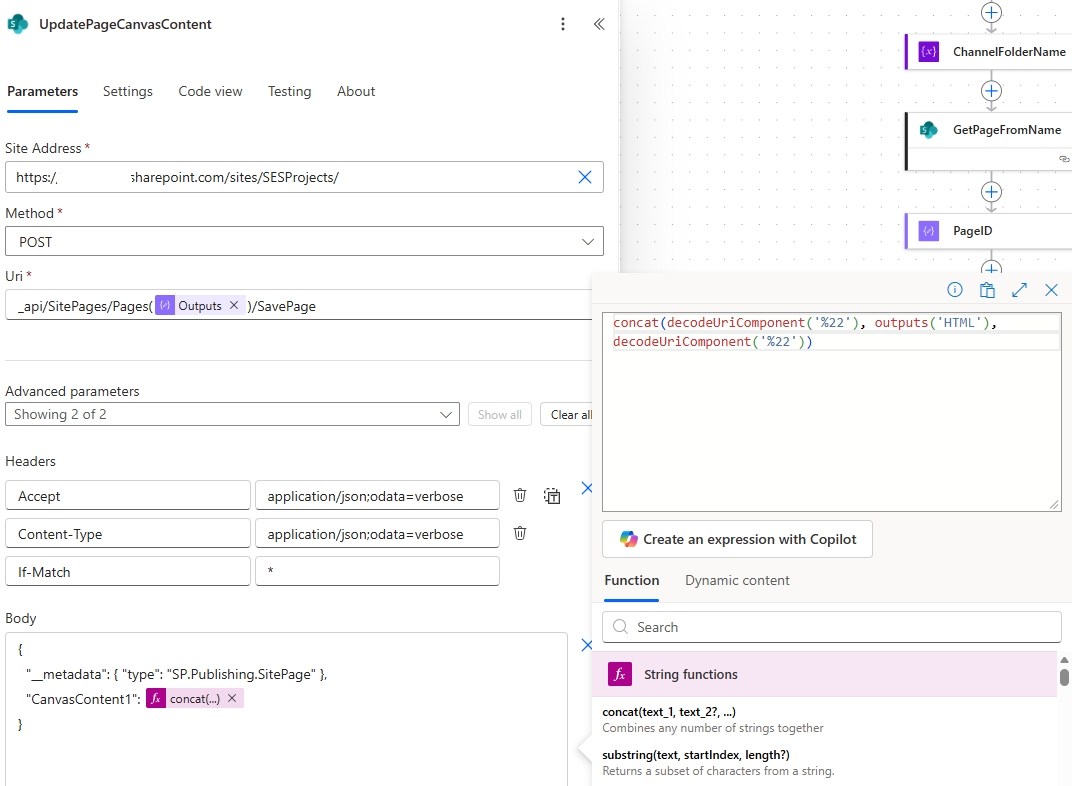
This is the Raw input of this request to update the canvasContent1 and that fails every time.
{
"host": {
"connectionReferenceName": "shared_sharepointonline",
"operationId": "HttpRequest"
},
"parameters": {
"dataset": "https://xxxxxxxx.sharepoint.com/sites/SESProjects/",
"parameters/method": "POST",
"parameters/uri": "_api/SitePages/Pages(52)/SavePage",
"parameters/headers": {
"Accept": "application/json;odata=verbose",
"Content-Type": "application/json;odata=verbose",
"If-Match": "*"
},
"parameters/body": "{\n \"__metadata\": { \"type\": \"SP.Publishing.SitePage\" },\n \"CanvasContent1\": \"[{\"position\":{\"layoutIndex\":1,\"zoneIndex\":1,\"zoneId\...(MORE CONTENT).......\"selectedListUrl\":\"/sites/SESProjects/Shared Documents\",\"webRelativeListUrl\":\"/Shared Documents\",\"webpartHeightKey\":4,\"selectedViewId\":\"a7454b32-c85b-4868-a235-784976a6fb02\",\"selectedFolderPath\":\"CPT0304B\",\"selectedFolderKey\":\"id=%2Fsites%2FSESProjects%2FShared%20Documents%2FCPT0304B&listurl=%2Fsites%2FSESProjects%2FShared%20Documents\"},\"containsDynamicDataSource\":true}}.......(MORE CONTENT).......LowQualityImagePlaceholderEnabled\":true}}}]\"\n}\n\n\n\n\n"
}
}
The page does get checked out successfully, when my flow fails I always have to go back and discard the check out before my next test. Is my approach all wrong or is there something wrong with the way I edit the canvasContent1 or adding it to the body of the request?





