web
You’re offline. This is a read only version of the page.
close
Skip to main content

Notifications

Announcements

Community site session details

Community site session details

Session Id :
Power Platform Community / Forums / Power Automate / Get/Update item from M...
Power Automate
Answered

Get/Update item from Ms Form into SharePoint List based on YesNo

(0) ShareShare
ReportReport
Posted on by 4
Hi, I am currently creating a flow to get input from Ms Form into SharePoint list. 
 
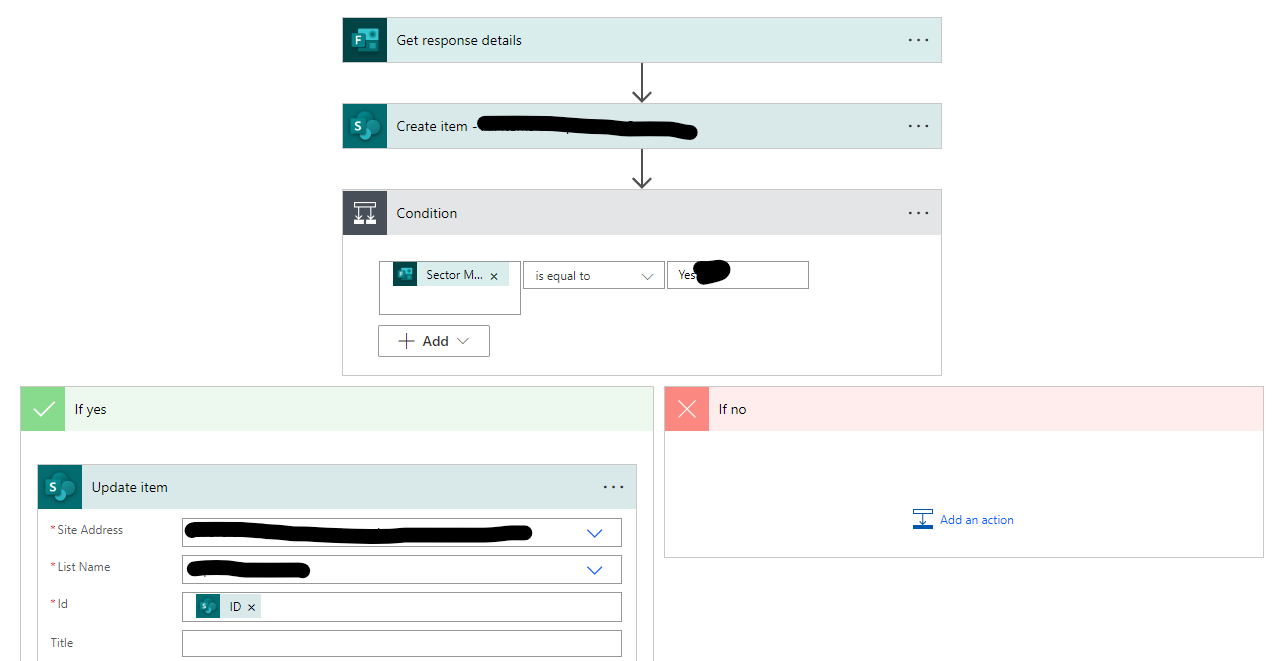
There are special questions in Ms Form, whereby once users select 'Yes' for first question (let call it 'A'), then next question (call it 'B') will appear to ask for values. These 'AB' type of questions have 10 sets of them.
 
I managed to create the flow to keep all inputs using 'Create Item', and keep condition values ('B') based on ('A') using 'Update item'. (as attached). However, it would be too repetitive if I make 10 condition steps. 

May I know if anyone have same experience and ways to enhance it?
 
Any help is much appreciated. Thank you.
Categories:
I have the same question (0)
  • Verified answer
    Gopala_Krishna Profile Picture
    1,495 on at
    Instead of using Update item each time, you can use expressions in Power Automate to create if condition statement and update the columns in the create item action itself instead of putting a condition and doing it in update item.
    if(equals(<<Insert value to evaluate by selecting from dynamic content>>,'Yes'),<<Select output to update if the condition is true>>,<<Select output to update if the condition is false>>)
     
    Condition would look similar to the above shared code, you can use the expression and replace the values as indicated.
    To insert expressions in Power Automate action hit slash "/" on the column where you want to enter the expression and select insert expression.
     
     
    For more information on the Power Automate expressions kindly check the video
  • KC-17100708-0 Profile Picture
    4 on at
    I tried the formula suggested by Gopala_Krishna. It works! Thanks a lot.

Under review

Thank you for your reply! To ensure a great experience for everyone, your content is awaiting approval by our Community Managers. Please check back later.

Helpful resources

Quick Links

Forum hierarchy changes are complete!

In our never-ending quest to improve we are simplifying the forum hierarchy…

Ajay Kumar Gannamaneni – Community Spotlight

We are honored to recognize Ajay Kumar Gannamaneni as our Community Spotlight for December…

Leaderboard > Power Automate

#1
Michael E. Gernaey Profile Picture

Michael E. Gernaey 525 Super User 2025 Season 2

#2
Tomac Profile Picture

Tomac 324 Moderator

#3
abm abm Profile Picture

abm abm 232 Most Valuable Professional

Last 30 days Overall leaderboard
