Ok, so this may be a little convoluted, but this is what I’m trying to do:
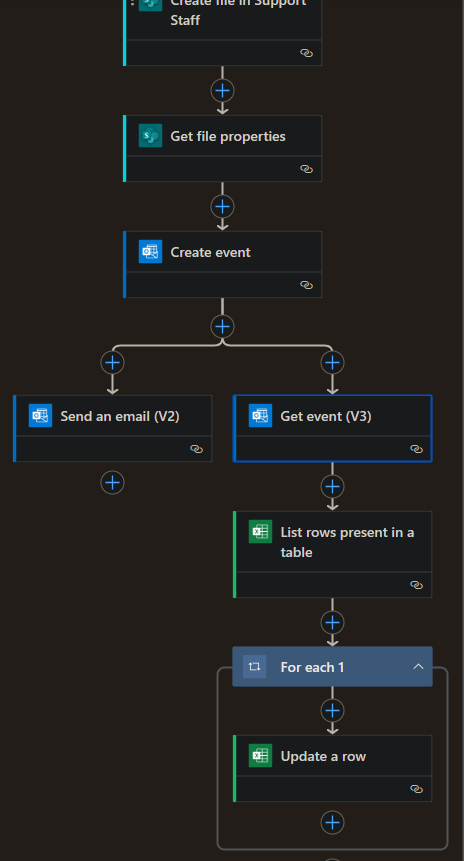
I’ve already successfully set up two flows that have run flawlessly. Users submit a task request using Microsoft Forms for a survey they need to perform, which has start and end dates, and the first flow takes their response, adds their attachment to the required location in Sharepoint, creates a calendar event (categorized by request type), and then sends them a confirmation email (second half shown here):
 The second flow runs at 6am every day and sends an email reminder to the other users responsible for fulfilling this task request five business days prior (5BP) to the user’s start dates. This 5BP date is an extra column on the Excel form response sheet that calculates the 5BP date based on the start date of the survey for each row. It’s a basic flow that will only send a reminder when today’s date matches the 5BP date. For specific unimportant reason, these tasks cannot be started prior to the 5BP date:
 Both flows work great, unless the user submits their request on or later than that 5BP date. The reminder flow won’t pick it up since it runs at 6am each morning and only checks for the 5BP date matching today’s date. I originally tried getting the users to respond to their confirmation emails to notify us of their late response, but it’s a hit or miss.
What I’m trying to do now is make that irrelevant. I figure the best way to do this is to change the second flow to send reminders for any 5BP dates less than or equal to today’s date, meaning it will still pick up late submissions. However, we’re often able to fulfill the requests on the day we receive the reminder, and once they’ve been fulfilled, we add a “Done” category to changes the color of the event on the calendar to gray.
My solution: I want to be able to send reminders for only the requests that haven’t been categorized as Done yet, so we don’t get duplicate reminders. I started by creating a new column on the Excel sheet called “Done?” and a third flow to add a Y in the corresponding row when the calendar event is categorized as Done.
My dilemma: I’m not sure how to relate the calendar events to their respective rows when each is updated. I tried using the “Update a row” command, but using the ID column on the Excel sheet (auto-generated numerically for each new response) as the Key Column/Value doesn’t work. I tried going back to my first flow to potentially add the calendar event ID onto the Excel sheet so I can use that as my Key Column/Value for my third flow, but when I run a test, it adds the ID to every row in the table. I don’t know if that’s due to the first flow not using the Excel sheet at all (I did add the “List rows present…” command), but I’ve hit a wall now. I’m also getting an error on my third flow, I think because I tried setting a trigger condition to only run the flow when the category is changed to “Done”
Both flows work great, unless the user submits their request on or later than that 5BP date. The reminder flow won’t pick it up since it runs at 6am each morning and only checks for the 5BP date matching today’s date. I originally tried getting the users to respond to their confirmation emails to notify us of their late response, but it’s a hit or miss.
What I’m trying to do now is make that irrelevant. I figure the best way to do this is to change the second flow to send reminders for any 5BP dates less than or equal to today’s date, meaning it will still pick up late submissions. However, we’re often able to fulfill the requests on the day we receive the reminder, and once they’ve been fulfilled, we add a “Done” category to changes the color of the event on the calendar to gray.
My solution: I want to be able to send reminders for only the requests that haven’t been categorized as Done yet, so we don’t get duplicate reminders. I started by creating a new column on the Excel sheet called “Done?” and a third flow to add a Y in the corresponding row when the calendar event is categorized as Done.
My dilemma: I’m not sure how to relate the calendar events to their respective rows when each is updated. I tried using the “Update a row” command, but using the ID column on the Excel sheet (auto-generated numerically for each new response) as the Key Column/Value doesn’t work. I tried going back to my first flow to potentially add the calendar event ID onto the Excel sheet so I can use that as my Key Column/Value for my third flow, but when I run a test, it adds the ID to every row in the table. I don’t know if that’s due to the first flow not using the Excel sheet at all (I did add the “List rows present…” command), but I’ve hit a wall now. I’m also getting an error on my third flow, I think because I tried setting a trigger condition to only run the flow when the category is changed to “Done”





 2
2






 Share
Share Report
 All responses (
 Answers (





