Hi Everyone,
Have to say at the beginning that i'm a complete newbie at this and definitely learning here so i apologize if there is something simple that i'm just not seeing.
I have a visual table in Powerbi that i want to use to send out weekly emails to teams.
Have two data sources in power bi.
HIMS_Team with columns "partner", "team"
pcli_vcenter with columns "partner, "vcenterbuild" etc..
so my powerbi table looks like this
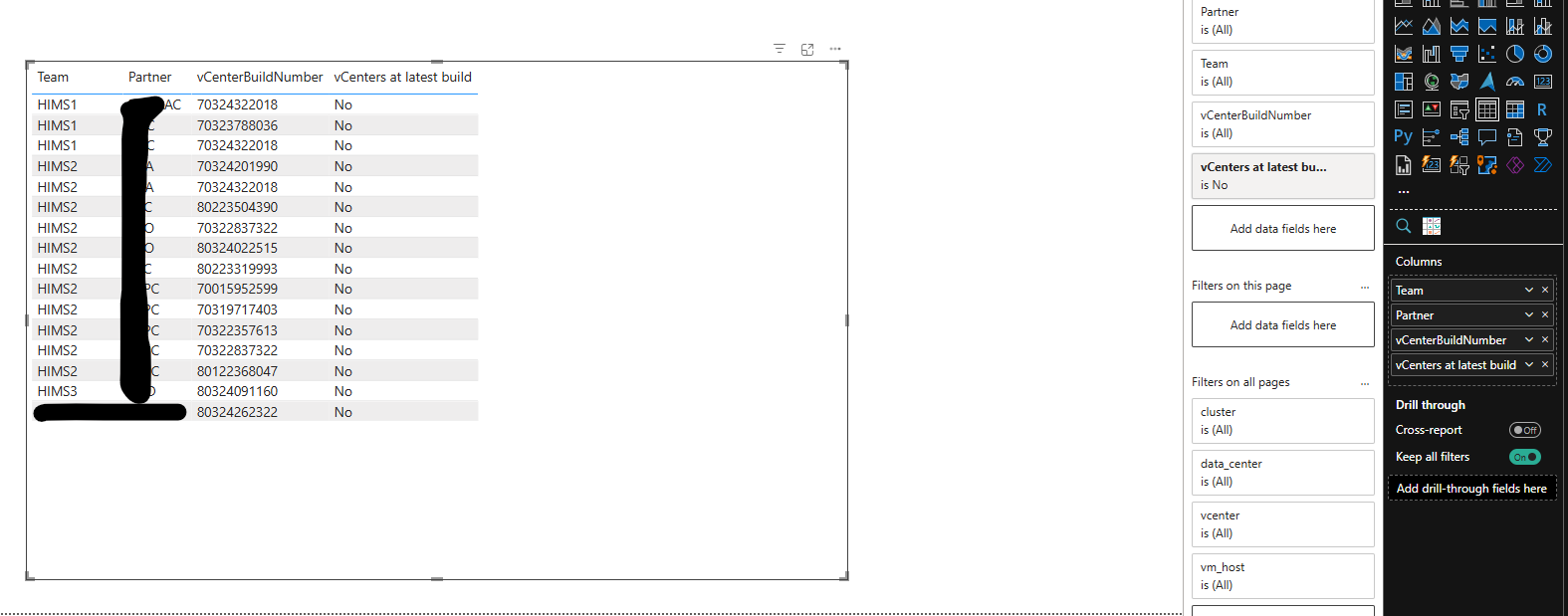
and my power automate flow looks like this:
query:
DEFINE
VAR __DS0FilterTable =
TREATAS({"No"}, 'pcli_vcenter'[AllPartnersHaveHighestVCenterBuild])
VAR __DS0Core =
SELECTCOLUMNS(
KEEPFILTERS(
FILTER(
KEEPFILTERS(
SUMMARIZECOLUMNS(
'HIMS_Teams'[Team],
'HIMS_Teams'[Partner],
'pcli_vcenter'[vCenterBuildNumber],
'pcli_vcenter'[AllPartnersHaveHighestVCenterBuild],
__DS0FilterTable,
"CountRowspcli_host", COUNTROWS('pcli_host'),
"CountRowspcli_vcenter", COUNTROWS('pcli_vcenter')
)
),
OR(
OR(
OR(
NOT(ISBLANK('HIMS_Teams'[Team])),
NOT(ISBLANK('HIMS_Teams'[Partner]))
),
NOT(ISBLANK('pcli_vcenter'[vCenterBuildNumber]))
),
NOT(ISBLANK('pcli_vcenter'[AllPartnersHaveHighestVCenterBuild]))
)
)
),
"'HIMS_Teams'[Team]", 'HIMS_Teams'[Team],
"'HIMS_Teams'[Partner]", 'HIMS_Teams'[Partner],
"'pcli_vcenter'[vCenterBuildNumber]", 'pcli_vcenter'[vCenterBuildNumber],
"'pcli_vcenter'[AllPartnersHaveHighestVCenterBuild]", 'pcli_vcenter'[AllPartnersHaveHighestVCenterBuild]
)
VAR __DS0PrimaryWindowed =
TOPN(
501,
__DS0Core,
'HIMS_Teams'[Team],
1,
'HIMS_Teams'[Partner],
1,
'pcli_vcenter'[vCenterBuildNumber],
1,
'pcli_vcenter'[AllPartnersHaveHighestVCenterBuild],
1
)
EVALUATE
__DS0PrimaryWindowed
then i parse it
{
"tables": {
"type": "array",
"items": {
"type": "object",
"properties": {
"rows": {
"type": "array",
"items": {
"type": "object",
"properties": {
"HIMS_Teams[Team]": {
"type": "string"
},
"HIMS_Teams[Partner]": {
"type": "string"
},
"pcli_vcenter[vCenterBuildNumber]": {
"type": "string"
},
"pcli_vcenter[AllPartnersHaveHighestVCenterBuild]": {
"type": "string"
}
},
"required": [
"HIMS_Teams[Team]",
"HIMS_Teams[Partner]",
"pcli_vcenter[vCenterBuildNumber]",
"pcli_vcenter[AllPartnersHaveHighestVCenterBuild]"
]
}
}
},
"required": [
"rows"
]
}
}
}
and the idea is to create an html table that i can send out to the teams. problem is that the only way the create table gives me any data is if use input like this:
and even if picking custom columns... i dont have the option to pick a table column.
what am i doing wrong here?
the email that i get is something like this
and in creating the html table i can't name the columns or anything.
any help would be really appreciated. Again.. total newbie to powerbi and power automate







 Share
Share Report
 All responses (
 Answers (


 464
464


