web
You’re offline. This is a read only version of the page.
close
Skip to main content

Notifications

Announcements

Community site session details

Community site session details

Session Id :
Power Platform Community / Forums / Power Automate / Send Email V2 How to s...
Power Automate
Suggested Answer

Send Email V2 How to send multiple attachment with dynamic number of file

(2) ShareShare
ReportReport
Posted on by 6
Hi.

I'm having trouble adding multiple attachment using file path to send an email (v2). I try to using custom object to store the Name and ContentBytes, then pass the custom object to the List. But I encountered some error "Cannot convert the literal '%BinaryData%' to the expected type 'Edm.Binary'"
 
this is my custom object
 
I try to hardcode the attachment and success with this list
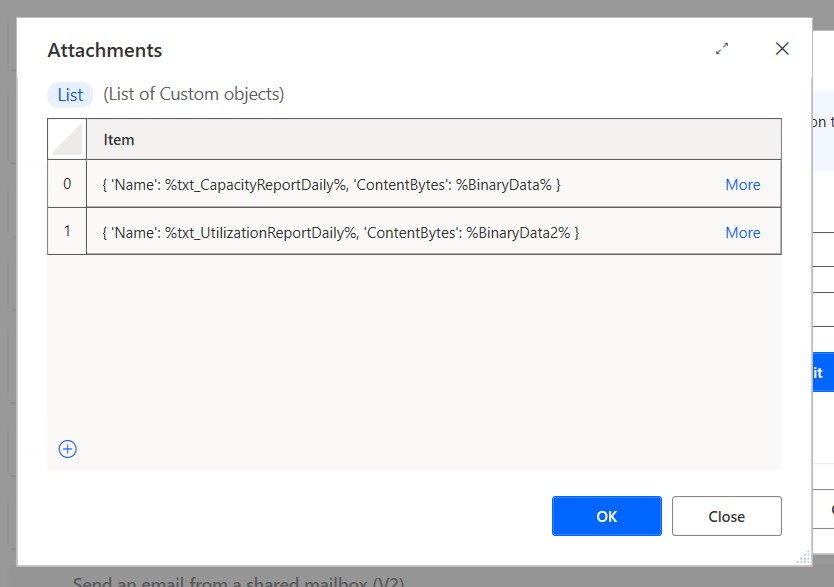
 
And this is the list I create using custom object
 
The error is 
Cannot convert the literal '%BinaryData%' to the expected type 'Edm.Binary'
 
this look like similar list to me, please anyone, thank you in advance
 
I have the same question (0)
  • Suggested answer
    eetuRobo Profile Picture
    4,204 Super User 2025 Season 2 on at
    Your ListAttachments binary data on the second item seems to be missing %-signs around it. BinaryData2 seems to be just text and not a variable.

  • Suggested answer
    CU03100533-0 Profile Picture
    2 on at
    Thank you for reply, that is my test list, but this is the final list I have edit the BinaryData2 as var, but still have the same error, actually the error is in BinaryData, not the BinaryData2, the error is "message": "Unable to read message or attachment content.\r\nclientRequestId: b7db16f1-99e0-4191-bc28-736815c7ba2d,b08b9e67-9a42-449a-a1fa-3688b815f7a5\r\nserviceRequestId: f38c6c6d-aec6-a035-fc17-29ed39e442f2",
        "error": {
          "message": "Unable to read message or attachment content.",
          "code": "RequestBodyRead",
          "originalMessage": "Cannot convert the literal '%BinaryData%' to the expected type 'Edm.Binary'."
        },
        "source": "office365-sea.azconn-sea-001.p.azurewebsites.net"
      },
  • Suggested answer
    eetuRobo Profile Picture
    4,204 Super User 2025 Season 2 on at
    Make sure your BinaryData -variables are refering to variables and not text.
    Like so:


    So no quotation signs around BinaryData -variables:


    Should look like this:


    Send an email (V2) Attachments field is not very responsive and I suggest you clear it and select the variable again. That fixed bad request error for me even when my flows logic correct. 
  • MtryDoc Profile Picture
    55 on at
    Here is how I was taught to get this working.  I am getting my attachments from a SPO List.
     
     
    Here is very good breakdown in video form
     
  • CU02101828-0 Profile Picture
    6 on at
    Thank you all for the reply, this issue was solved by make sure the file name and binary is variable instead of string, big thanks for eetuRobo for the advice. Thanks to for MtryDoc  but I'm using Power Automate Desktop that have a different approach with Cloud one, but the issue is already solved. Thanks all for the reply and have a nice day!

Under review

Thank you for your reply! To ensure a great experience for everyone, your content is awaiting approval by our Community Managers. Please check back later.

Helpful resources

Quick Links

Forum hierarchy changes are complete!

In our never-ending quest to improve we are simplifying the forum hierarchy…

Ajay Kumar Gannamaneni – Community Spotlight

We are honored to recognize Ajay Kumar Gannamaneni as our Community Spotlight for December…

Leaderboard > Power Automate

#1
Michael E. Gernaey Profile Picture

Michael E. Gernaey 501 Super User 2025 Season 2

#2
Tomac Profile Picture

Tomac 323 Moderator

#3
abm abm Profile Picture

abm abm 237 Most Valuable Professional

Last 30 days Overall leaderboard



