web
You’re offline. This is a read only version of the page.
close
Skip to main content

Notifications

Announcements

Community site session details

Community site session details

Session Id :
Power Platform Community / Forums / Power Automate / Draft Email in Power A...
Power Automate
Suggested Answer

Draft Email in Power Automate Shows Tags Instead of Plain Text

(0) ShareShare
ReportReport
Posted on by 25

Hi Team,

I’m using Power Automate to draft emails using data from an Excel file.

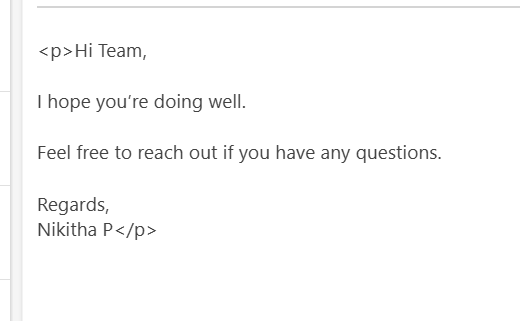
However, when the email is drafted, the body shows <p> tags automatically, even though my Excel file only has plain text and no HTML tags.

Can you please help me understand:

✅ Why Power Automate is adding <p> automatically in the drafted email body?

✅ How can I avoid these <p> tags and ensure my drafted emails display as clean, plain text?

Thank you for your help!
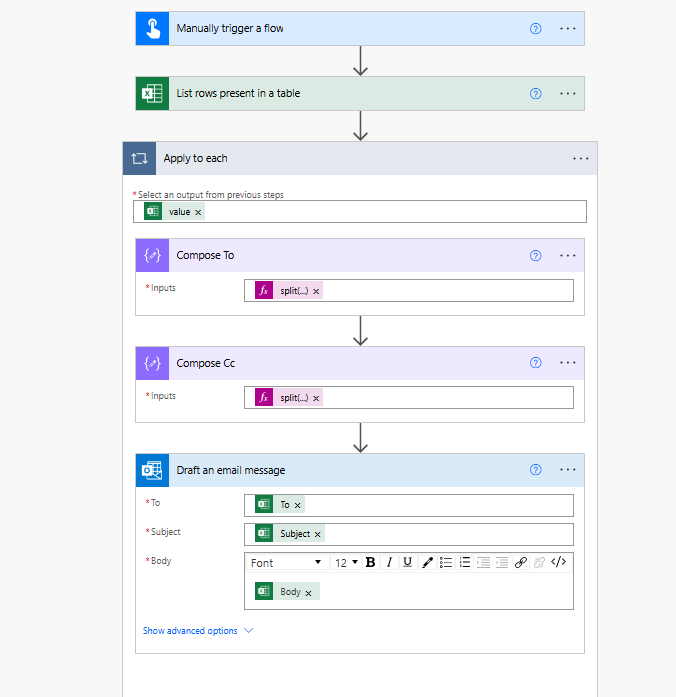
below is my flow.

In my flow the compose is used to split my recipient in To and Cc as I have multiple user.
Categories:
I have the same question (0)
  • Suggested answer
    David_MA Profile Picture
    12,982 Super User 2025 Season 2 on at
    Based on what I see, the data in the Excel spreadsheet must be formatted with the HTML tags. Since you do not have the Outlook action in HTML mode, those tags get rendered as plain text. Do this:
    1. Delete the Body value in the Outlook action.
    2. Click on the </> button in the Outlook body toolbar.
    3. Insert the Body value from Excel.
    4. This puts the Outlook action into HTML code view, and when the e-mail is sent the tags from Excel should then be rendered correctly in the e-mail.
  • Community member Profile Picture
    25 on at
    @David_MA Thanks 
    Much helpful

    however just a question 
    why im not able to edit to my font and Size
    it is default to Segoe UI 12

    also while saving in draft it is not editable i need to click Switch to HTML

    there is any solution to fix this?
    Instead of plain txt
    how can i add to HTML?

    after i clicked on <> im not getting the tag but im not able to edit the body in the draft
    any solution please?

  • David_MA Profile Picture
    12,982 Super User 2025 Season 2 on at
    When you switch to HTML mode in the Outlook action, it expects you to format the entire message using HTML. If you want to define the font and size, you can either add that to the HTML coding you are doing in Excel, or add style tags before the Excel body tag in the body of the e-mail.
     
    I've tried to post an example in this post, but for some reason it will not post if I include HTML even if I add it with the code insert tool. Hopefully a screen shot will allow this to post:
     
  • Community member Profile Picture
    25 on at
    Thank you much helpful :)

Under review

Thank you for your reply! To ensure a great experience for everyone, your content is awaiting approval by our Community Managers. Please check back later.

Helpful resources

Quick Links

Forum hierarchy changes are complete!

In our never-ending quest to improve we are simplifying the forum hierarchy…

Ajay Kumar Gannamaneni – Community Spotlight

We are honored to recognize Ajay Kumar Gannamaneni as our Community Spotlight for December…

Leaderboard > Power Automate

#1
Michael E. Gernaey Profile Picture

Michael E. Gernaey 519 Super User 2025 Season 2

#2
Tomac Profile Picture

Tomac 296 Moderator

#3
abm abm Profile Picture

abm abm 232 Most Valuable Professional

Last 30 days Overall leaderboard



