web
You’re offline. This is a read only version of the page.
close
Skip to main content

Announcements

News and Announcements icon
Community site session details

Community site session details

Session Id :
Power Platform Community / Forums / Power Automate / Creating a task in a P...
Power Automate
Unanswered

Creating a task in a Planner from SharePoint issue list and assign to team member

(0) ShareShare
ReportReport
Posted on by 5

Hello


I'm new to Office 365 and I'm trying to increase the productivity of the team I manage and improve the way we interact with our clients on a more collaborative approach.

I tried to look up for a solution to my problem in the community but i could not find it and any help is appreciated.


We work on B2B and we sell machinery to our clients thus projects


To test the framework I created a team and group with some colleagues and some other people outside of my company domain without Office 365 acting as client and vendor (therefore a team and a group of people with same company domain and other outside of it)


I created sharepoint site when I created an Issue list to share and collaborate on.

I create a Project Plan in Planner with same users as the team above described.


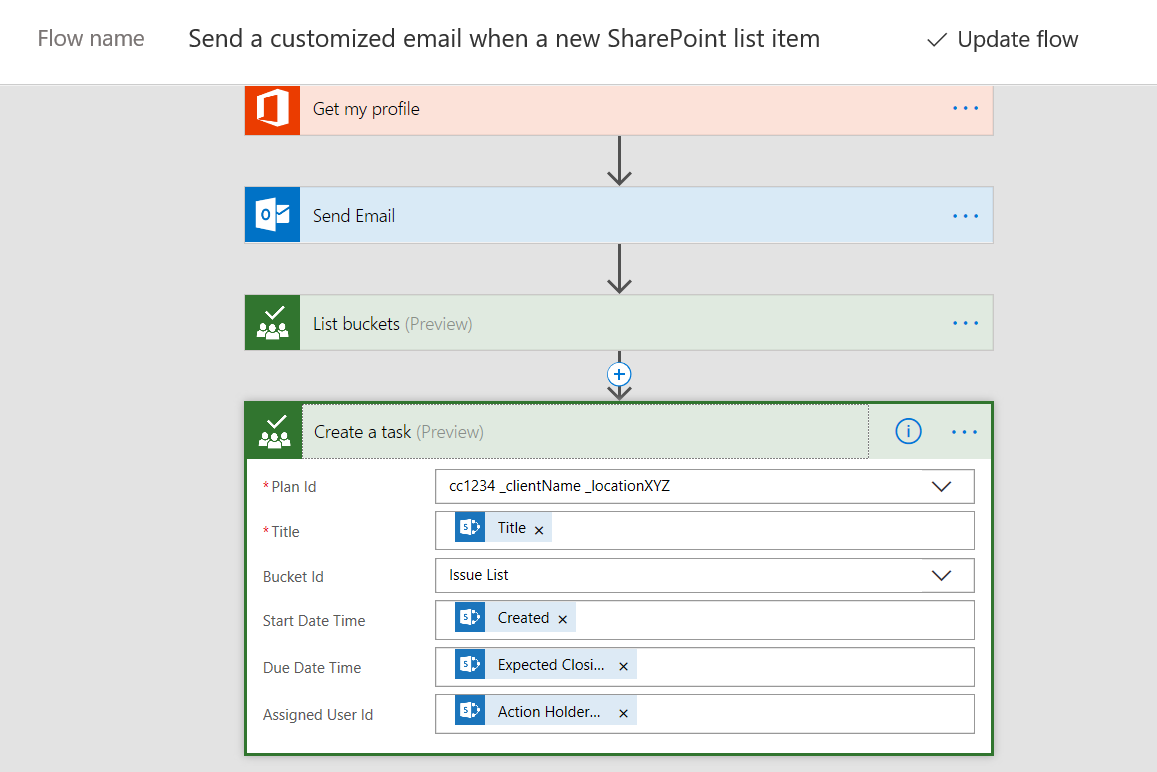
I created a workflow that everytime an new item is added to the sharepoint Issue list, a mail it is sent to people in the team and mainly to the mail / person is responsible for. At the same time the same item is added to Planner related Bucket

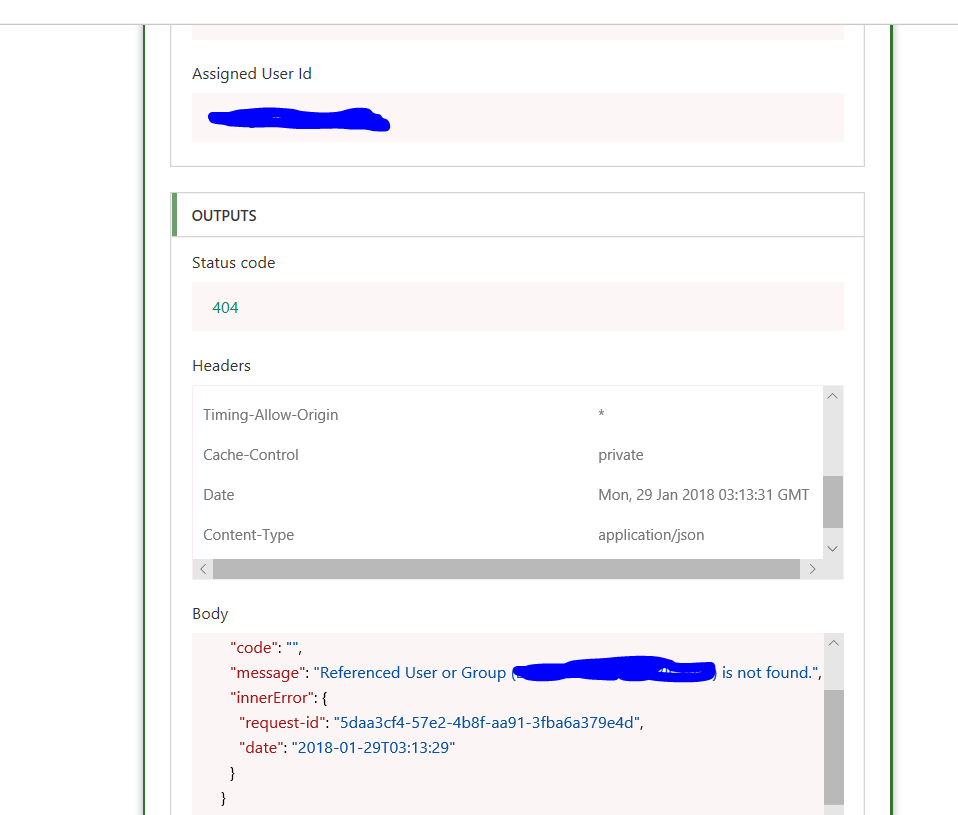
Although the mail is automatically generated with the workflow I have an error related to the part in Planner. The task in planner bucket is not created.


This is the error in the workflow.

Referenced User or Group (same mail added in the item in share point) is not found.
 

Image

Can anyone recommend me how to do it?

below the workflow
 

Image


franco

Categories:
I have the same question (0)
  • faustocapellanj Profile Picture
    1,662 on at

    Hi @LowKeyDude,


    I tried to follow your Flow steps as close as possible, and I was able to create a Planner Task just fine. For the Assigned User Id, which property are you using from the "When an item is created" step?


    Regards,

    Fausto Capellan, Jr

  • LowKeyDude Profile Picture
    5 on at

    Hi Fausto


    thank you for your support

    I can also create an items but when I allcote the user it does not work

    I use the ID of the mail I write on a customer column with property person or group (with only single person selection)


    The trigger "When an item is created" is related to my sharepoint site and the issue list. No user ID


    Thanks

    franco


  • faustocapellanj Profile Picture
    1,662 on at

    Hi Franco,


    The email ID is from an O365 user or an external one?

  • LowKeyDude Profile Picture
    5 on at
    Fausto

    It is external. With internal I tried and it worked

    Franco
  • faustocapellanj Profile Picture
    1,662 on at

    Hi @LowKeyDude


    With external users it won't work unless somehow you can add an external user to your Office 365 tenant and grant the respective access to your resources. Let's see if someone from the Flow team can respond with an actual solution for your issue.


    Regards,

    Fausto Capellan, Jr

  • v-xida-msft Profile Picture
    Microsoft Employee on at

    HI @LowKeyDude,


    I agree with @faustocapellanj's thought almost. The Assigned User Id field of "Create a task" action is required to fill the id or email address of the user who is a member of your Office 365 group or organization. If you fill the id or email address of the user who is not a member of your Office 365 group or organization within Assigned User Id field, the "Create a task" action would fail.


    In addition, if you want to assign the task to the user who is not a member of your Office 365 group or organization, you could consider take a try to add the user as a member of your Office 365 group or organization.


    I afraid that there is no way to assign a Planner task to the external user (who is not a member of your Office 365 group or organization) in Microsoft Flow currently.


    Best regards,

    Kris

Under review

Thank you for your reply! To ensure a great experience for everyone, your content is awaiting approval by our Community Managers. Please check back later.

Helpful resources

Quick Links

Introducing the 2026 Season 1 community Super Users

Congratulations to our 2026 Super Users!

Kudos to our 2025 Community Spotlight Honorees

Congratulations to our 2025 community superstars!

Congratulations to the March Top 10 Community Leaders!

These are the community rock stars!

Leaderboard > Power Automate

#1
Valantis Profile Picture

Valantis 641

#2
Vish WR Profile Picture

Vish WR 640

#3
Haque Profile Picture

Haque 495

Last 30 days Overall leaderboard
