web
You’re offline. This is a read only version of the page.
close
Skip to main content

Notifications

Announcements

Community site session details

Community site session details

Session Id :
Power Platform Community / Forums / Power Automate / HELP - Date populated ...
Power Automate
Unanswered

HELP - Date populated by a formula in excel not pulling in to get a row

(1) ShareShare
ReportReport
Posted on by 108
Hello, 
 
I really need some support with dates i currently have in an excel table pulling in to the 'get a row' function. 
 
I've set up this process a hundred times and rarely have issues, but this one particular flow keeps failing. I currently reference one of the dates from excel in an expression in an email, but it keeps returning a blank in get a row, therefore the email fails to send. I've tested so many times, re-added the get a row function in, re-added the expression in, have a delay function to allow time for the excel to populate, checked the columns are date fields (which shouldn't matter in this scenario), and yet they're still appearing as blank in the 'get a row' when i view the flow run, despite the dates clearly being in the excel doc. 
 
Can anyone explain to me why these dates highlighted in yellow wouldn't be appearing in the get a row function? is it because they're populated by formulas? (never had this issue before)
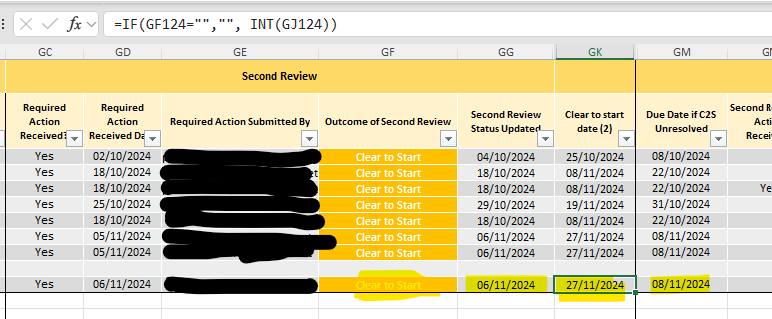


PLEASE can someone help me! I'm at a loss now and i've spent so much time trying to figure this out but i'm not getting anywhere with it. 
 
Thanks in advance, 
Sophie 
 
Categories:
I have the same question (0)
  • Suggested answer
    trice602 Profile Picture
    15,402 Super User 2025 Season 2 on at
    Hi,
     
    It's somewhat impossible to determine without seeing your flow or the get a row action.  So I will guess the most likely root cause.
     
    The row that is being returned here is not the row you are looking at.  See if there is another row with the same key.  
     
     
    ------------------------------------------------


    If this was helpful, please like and/or mark as a verified answer to help others find this too!


    Always glad to help! 💯💯💯💯💯

    Tom 

    Follow me on LinkedIn - Thomas Rice, PMP | LinkedIn


  • sophieclark Profile Picture
    108 on at
    Hi @trice602
     
    Hopefully you'll see this as i can't see where to directly reply to your message. 
     
    Thanks for your reply. Unfortunately this isn't the issue. I've double checked the rest of the data in the excel row compared to the get a row data and it is correct. I use a unique ID which is allocated when the original data is first submitted via an MS form, and then this ID is used throughout the flow. 
  • Verified answer
    sophieclark Profile Picture
    108 on at
    Ok, to anyone that may read this having the same issue, I seem to have found a fix. 
     
    I basically re-added the get a row function, not duplicating or copying anything, and then ran a brand new test through it (rather than resubmitting an old test) and that seems to have worked. 
     
    So basically delete the existing get a row, add a brand new one, then run a brand new test through the flow and fingers crossed that pulls all the data through, including dates.

Under review

Thank you for your reply! To ensure a great experience for everyone, your content is awaiting approval by our Community Managers. Please check back later.

Helpful resources

Quick Links

Forum hierarchy changes are complete!

In our never-ending quest to improve we are simplifying the forum hierarchy…

Ajay Kumar Gannamaneni – Community Spotlight

We are honored to recognize Ajay Kumar Gannamaneni as our Community Spotlight for December…

Leaderboard > Power Automate

#1
Michael E. Gernaey Profile Picture

Michael E. Gernaey 522 Super User 2025 Season 2

#2
Tomac Profile Picture

Tomac 364 Moderator

#3
abm abm Profile Picture

abm abm 243 Most Valuable Professional

Last 30 days Overall leaderboard
