web
You’re offline. This is a read only version of the page.
close
Skip to main content

Announcements

News and Announcements icon
Community site session details

Community site session details

Session Id :
Power Platform Community / Forums / Power Automate / Request to Azure Resou...
Power Automate
Answered

Request to Azure Resource Manager failed with error: '

(0) ShareShare
ReportReport
Posted on by 79
Hi,
I want to setup a flow which can send calendar invites by the person who initiates the request and not by my name who owns it.
Error: Request to Azure Resource Manager failed with error: '{"error":{"code":"InvokerConnectionOverrideFailed","message":"Could not find any valid connection for connection reference name 'shared_office365' in APIM header."}}'.
Here is a flow setup:
screen where I setup Run-only user:
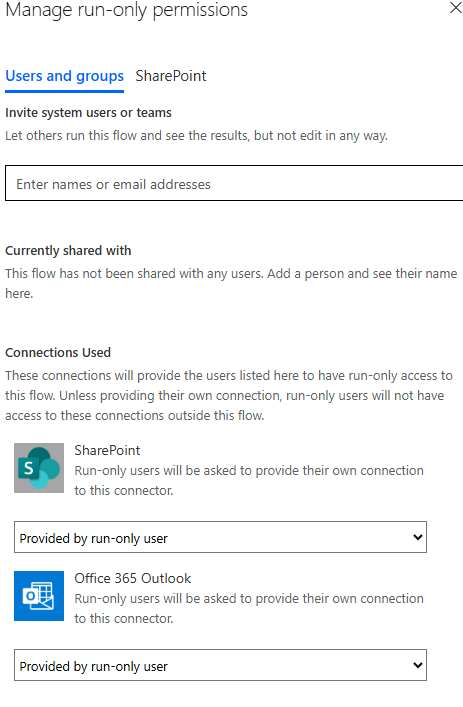
If I switch it back to 'Use this connection (my email)' then error disappears. What am I missing in run-only user option?
Categories:
I have the same question (0)
  • Suggested answer
    Srini007 Profile Picture
    3,463 Super User 2026 Season 1 on at
     
    The error Could not find any valid connection for connection reference name 'shared_office365' in APIM header. By setting to the user in Run-only  user to your user name then it will works or else you need to login to the service account which you created the connection, that way also it works
     
    As the connection is not fully shared to you, so either setting up Run-only user through your userID or login to the service account and set the share_office365 will works, also make sure you created the connection in your user account
     

    (If this answers your question you can mark as Answered and give it a Like)

    Regards,
    Srini
  • Newbee321 Profile Picture
    79 on at
    Thanks for your reply but I don't understand it.
    So far, only I have been building flows using my normal user account. We all have basic license. I can see my account has admin privileges but don't have any service account involved.
     
    When I added Calendar Event connector on the flow then I went to 'Run only Users' -> Edit -> changes Office 365 Outlook's setting from my personal connection to 'Provided by run-only user' option. So, when someone else let's say XXX kicks of the flow from the app I have build then it sends Calendar invite by XXX to required attendee.
     
    Now can you please explain me what is the missing puzzle piece here? 
     
     
  • Newbee321 Profile Picture
    79 on at
    I watched below video and realized that I missing users. Added a user and a group in 'Invite system users or teams' but still error won't disappear :(
     
     
    I think connection /connection reference for 'Shared Office365' should be created automatically but in my case it is not. Does anyone found a solution? 
  • stampcoin Profile Picture
    5,146 Super User 2026 Season 1 on at
    The invited person has to run it at least once, when the app get the approval, the connection will be established.
    Did you invite anyone for testing ? Is the error message from the person ?
  • Newbee321 Profile Picture
    79 on at
     
    The error I was experiencing went away by refreshing the flow connection in my Power App.
     
    then @stampcoin - I did invite the person to access my Power App. They fill out the data and click on submit button (OnSelect - submitform(Form1); and on Form1's  OnSuccess event the Flow kicks off) .
     
    Flow fails with Error -  Action 'Create_event_(V4)' failed: The specified object was not found in the store. clientRequestId: e3
     
    but works perfectly fine when I hit the submit from my account!
    I'm so lost, why is such simple thing feel very hard?
  • stampcoin Profile Picture
    5,146 Super User 2026 Season 1 on at
    Now you got different error.
    How did you manage the Create event (v4) step ?
    can you create a basic flow which contains create event (v4) with the same settings and share to the person for testing ?
     
  • Newbee321 Profile Picture
    79 on at
    @stampcoin - I did ask my user to try below very basic flow which kicks of once they press 'Submit' button from my app. Required Attendee has my email ,their email and a shared calendar. Which I tried with just my email but still no luck. Could it be Calendar Id fetching problem that it works for me but not for the other user, I have allowed to run the flow with?
     
  • stampcoin Profile Picture
    5,146 Super User 2026 Season 1 on at
    Totally agree with you, the Calendar might be the biggest suspect.
    You mentioned that the calendar is a shared one, so the calendar id you have to make sure it's totally correct, and others they have the proper right to create event.
     
    Another one, consider use Create a group event (V2). It belongs to Office 365 group connector.
    You can ask help from M365 admin of your Org.
     
  • Verified answer
    Newbee321 Profile Picture
    79 on at
    It worked out using Get calendars event first.

Under review

Thank you for your reply! To ensure a great experience for everyone, your content is awaiting approval by our Community Managers. Please check back later.

Helpful resources

Quick Links

Introducing the 2026 Season 1 community Super Users

Congratulations to our 2026 Super Users!

Kudos to our 2025 Community Spotlight Honorees

Congratulations to our 2025 community superstars!

Congratulations to the March Top 10 Community Leaders!

These are the community rock stars!

Leaderboard > Power Automate

#1
Haque Profile Picture

Haque 594

#2
Valantis Profile Picture

Valantis 328

#3
David_MA Profile Picture

David_MA 281 Super User 2026 Season 1

Last 30 days Overall leaderboard
