web
You’re offline. This is a read only version of the page.
close
Skip to main content

Notifications

Announcements

Community site session details

Community site session details

Session Id :
Power Platform Community / Forums / Power Automate / Need help creating SQL...
Power Automate
Unanswered

Need help creating SQL-style INNER JOIN or LEFT JOIN (employee-manager) flow in Power Automate

(0) ShareShare
ReportReport
Posted on by 4
Hi Power Automate community,
I'm trying to recreate a SQL query in Power Automate that lists employees with their manager information any (INNER JOIN OR LEFT JOIN style). Here's my SQL logic:
SELECT 
    e.EMPLOYEE_ID,
    e.FIRST_NAME AS EMPLOYEE_FIRST_NAME,
    e.LAST_NAME AS EMPLOYEE_LAST_NAME,
    e.MANAGER_ID,
    m.FIRST_NAME AS MANAGER_FIRST_NAME,
    m.LAST_NAME AS MANAGER_LAST_NAME
FROM employees e
JOIN employees m ON e.MANAGER_ID = m.EMPLOYEE_ID       --LEFT JOIN employees m ON e.MANAGER_ID = m.EMPLOYEE_ID
 
NEED my result with power automate like this:
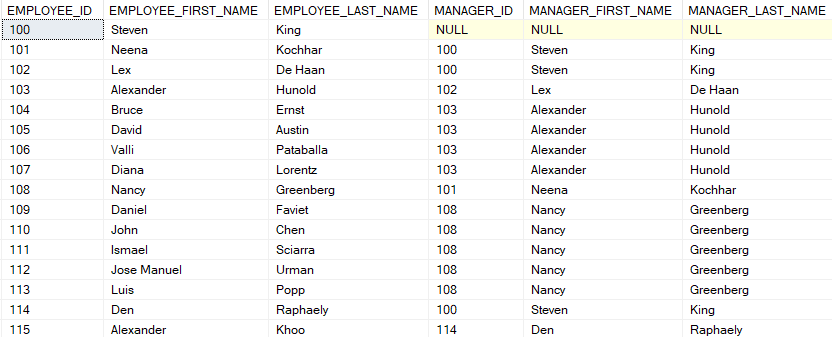
 
My setup:

Specific challenges:
How to properly handle cases where MANAGER_ID is null
Best practice for structuring the output
What I've tried:
Filter array approaches 
Nested "Get item" calls 
Tried Parse JSON but struggling with the syntax
Can anyone share:
A complete flow example for this JOIN pattern?
Optimization tips for 500+ records?
How to properly specify columns to avoid errors?
Thanks in advance for any guidance!
Categories:
I have the same question (0)
  • Tomac Profile Picture
    3,951 Moderator on at
    Looks like this blog post can point you in the right direction, using XPATH to mimic SQL Join functions:
     
     
    That said, it doesn't address all of your challenges:
    • The coalesce() function can skip null inputs
    • Structure of the output depends on how you plan to store and use the data, this will be highly specific to your environment
     
  • SRZ Profile Picture
    4 on at
    @tomac
    Thanks for the suggestion, but XPATH isn’t the right fit for this scenario. I’m specifically looking for a straightforward way to:
    Look up a manager’s ID from an Excel table based on an employee ID (simple key-value match), Handle cases where the lookup fails or returns null.
     
    The core issue is correct syntax for:
    Error/null handling in Excel data lookups
    Outputting a clean JSON structure

    If anyone has direct experience with these exact Power Automate expressions (especially for Excel data), I’d appreciate the help!

Under review

Thank you for your reply! To ensure a great experience for everyone, your content is awaiting approval by our Community Managers. Please check back later.

Helpful resources

Quick Links

Forum hierarchy changes are complete!

In our never-ending quest to improve we are simplifying the forum hierarchy…

Ajay Kumar Gannamaneni – Community Spotlight

We are honored to recognize Ajay Kumar Gannamaneni as our Community Spotlight for December…

Leaderboard > Power Automate

#1
Michael E. Gernaey Profile Picture

Michael E. Gernaey 501 Super User 2025 Season 2

#2
Tomac Profile Picture

Tomac 323 Moderator

#3
abm abm Profile Picture

abm abm 237 Most Valuable Professional

Last 30 days Overall leaderboard
