web
You’re offline. This is a read only version of the page.
close
Skip to main content

Announcements

News and Announcements icon
Community site session details

Community site session details

Session Id :
Power Platform Community / Forums / Power Automate / Help! MS Approvals sto...
Power Automate
Unanswered

Help! MS Approvals stopped working.

(0) ShareShare
ReportReport
Posted on by 30
Hi everyone,
 
Last week Tuesday, everything was working well. I was writing my User Guides and getting screenshots for step by step for the automation and all of a sudden my approvals is no longer going through.
 
Essentially the Power Automate flow is as follows:
 
1. When the user submits an MS Forms, the flow will get triggered.
2. The system will identify if its a new submission or a re-submission. 
3. Then the Forms information and tracking information will be added onto a SharePoint list.
4. Then if theres an attachment or not that will also be added onto the SharePoint List.
5. A folder for the associated item is also created where you can see the attachments, the reciept the users receive after submitting their requests and any communications until the final status update.
6. An email summarizing user request will be sent to the user.
7. An MS Approvals request is created by the system, it gets sent ONE reviewer who would then choose between Granted, More Information Required and Not Granted (This is where my issue is happening)
8. When the reviewer chooses the outcome, the system will then create a final status update email which would get sent to the user and the reviewer for copy.
9. The date completed will be added onto SharePoint site.
10. The flow is done.
 
On step 7, an Approvals is sent to the reviewer, the reviewer receives that notification adn they are able to choose the outcome (this is received in both Outlook and Teams). But, Power Automate doesnt seem to be receiving that outcome. The automate is not failing, it is just running.  
 
An example of one of my approvals flow is this:
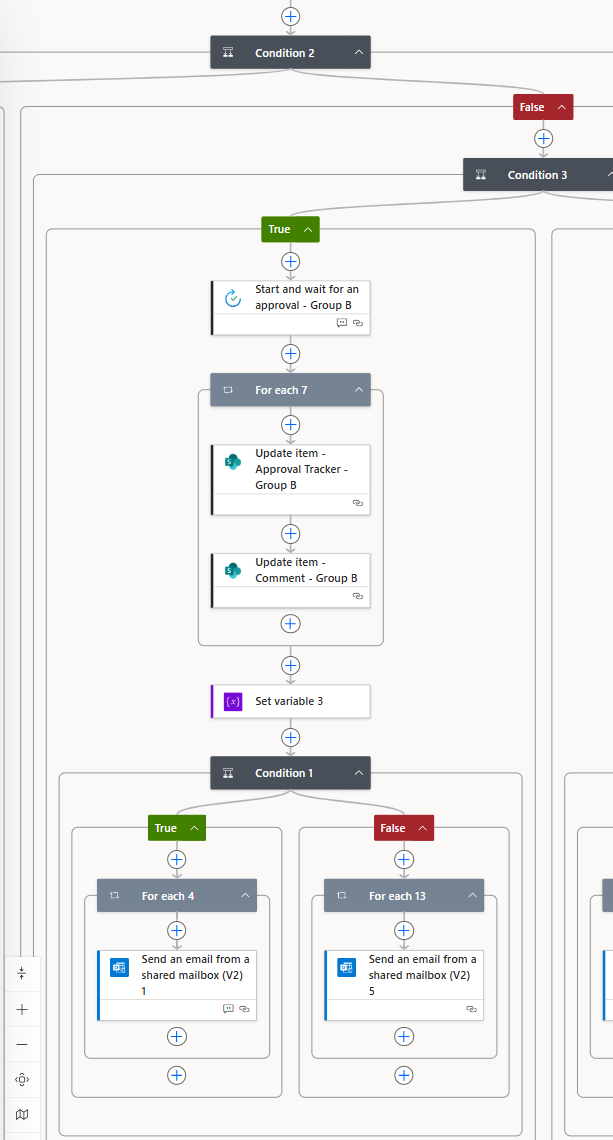
 
I tried changing the action from Start and wait for an approval to two separate actions: Create an approval and Wait for an approval; but it's still not working.
 
Is anyone else having any issues with their Approvals?
Categories:
I have the same question (0)
  • srduval Profile Picture
    1,760 Moderator on at
    So the flow is creating the approval as expected, but the approvers response is not making it back to the flow? If so double check that the approval action is set to only 1 person has to response (first to respond I believe) and/or there is no other person listed as the approver.
     
    I've had off and on issues with outlook approval selection going through, but teams has never failed to send a response. 
  • cristineisles Profile Picture
    30 on at
    So I have "Custom Responses - Wait for one response"
     
     
    I have it assigned to me at the moment, I tried my other colleagues but its not working. I reconnected the connections and Ive used both Outlook and Teams but both of them doesn't seem to be working. 
  • cristineisles Profile Picture
    30 on at
    I also wanted to add I dont know if there was an MS Approvals update recently but on Tuesday, once the approver provides an outcome this is what would show on my Teams notification:
     
     
    When my flow started having problems, this is what I get now:
     
     
    Before when it was working fine, when the approver selects an outcome I would receive an automated notification that would say "Final Status: Completed"
     
    Now, I receive an automated notification that says "XYZ responded your request" (which is also grammatically wrong)
  • srduval Profile Picture
    1,760 Moderator on at
    That's a bit weird. I just ran an approval and it went through fine. Maybe it could be a regional issue and my region isn't impacted. Try adding a new approval action before the current approval action (save you from deleting and readding) and see if that works. If not, try creating a new flow with an approval action. We're just trying to prove that approvals is working for you somewhere. Then we can circle back and see what if anything is wrong with the flow.
  • cristineisles Profile Picture
    30 on at
    So its really weird, but this morning when I tried it out again everything is working as intended. I didnt make any changes to the flow at all. Thank you for your help too!

Under review

Thank you for your reply! To ensure a great experience for everyone, your content is awaiting approval by our Community Managers. Please check back later.

Helpful resources

Quick Links

Introducing the 2026 Season 1 community Super Users

Congratulations to our 2026 Super Users!

Kudos to our 2025 Community Spotlight Honorees

Congratulations to our 2025 community superstars!

Congratulations to the March Top 10 Community Leaders!

These are the community rock stars!

Leaderboard > Power Automate

#1
Haque Profile Picture

Haque 592

#2
Valantis Profile Picture

Valantis 340

#3
11manish Profile Picture

11manish 284

Last 30 days Overall leaderboard
