web
You’re offline. This is a read only version of the page.
close
Skip to main content

Announcements

News and Announcements icon
Community site session details

Community site session details

Session Id :
Power Platform Community / Forums / Power Automate / Extract fields from Qu...
Power Automate
Answered

Extract fields from Quiz to SharePoint List

(1) ShareShare
ReportReport
Posted on by 6

Hello,

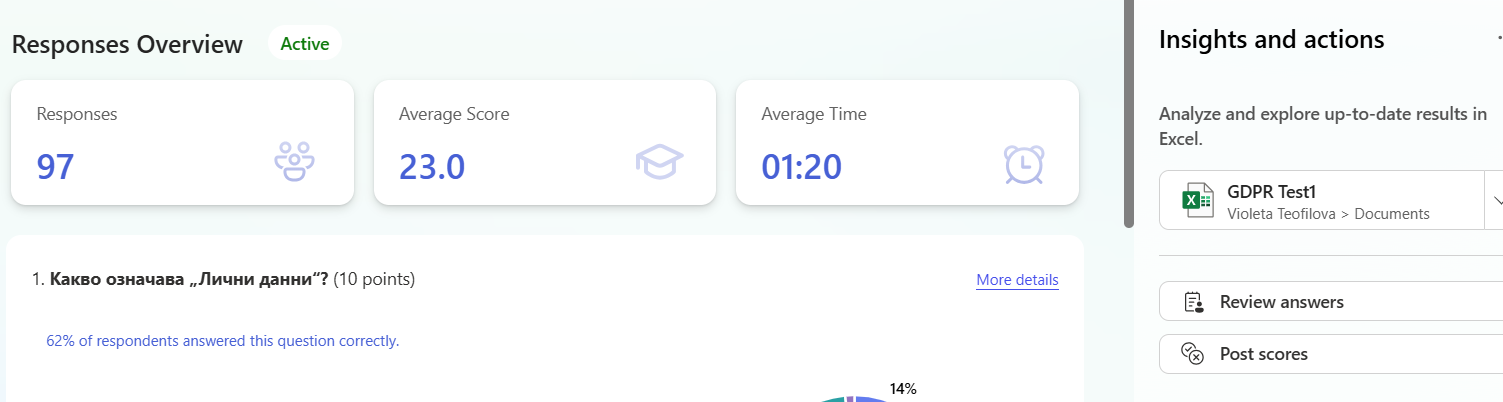
I have a Form Quiz, and its results are recorded in an XLS file. I am creating a SharePoint List where I populate the data from the Excel file. However, I am unable to read the "Total Points" field from this Excel file in Power Automate. It does not appear at all in Power Automate.

Where am I making a mistake? This field is essential for me to calculate the test success percentage.

Thank you!
 

Categories:
I have the same question (0)
  • Verified answer
    Michael E. Gernaey Profile Picture
    53,969 Moderator on at
    Hi
     
    Please share the actual flow and what you see etc.
     
    Also in Excel is that a calculated column? 
     
    If so thats why.
     
  • VT-10021414-0 Profile Picture
    6 on at
    Hi, this is my workflow. The Total points column is calculated automatically, based on the answers from the Form quiz. There are 5 questions in total. Each correct answer to a question carries 10 points.
     
  • VT-10021414-0 Profile Picture
    6 on at

    Actually, my ultimate goal is to calculate the test success percentage for a given user based on the Total Points.

    • If the score is above 70%, the exam is successfully passed, and a certificate will be generated.
    • If the score is below 70%, the exam is considered unsuccessful, and the user will receive an email to retake the test.
  • Expiscornovus Profile Picture
    33,830 Most Valuable Professional on at
     
    As far as I am aware currently the Get Response details action does not return the points per question or the total points per respondent.
     
    However, you can interact with the Forms API instead.
     
    I shared this approach on StackOverflow. Only at this point in time you need to use the Invoke an HTTP request (preauthorized) action instead of the Send an HTTP request to SharePoint action.
     
    Below is an example
     
    https://forms.office.com/formapi/api/<tenantid>/users/<userid>/forms('<formid>')/GetAggregateQuizData


    Happy to help out 😁

    I share more #PowerAutomate and #SharePointOnline content on my Blog, Bluesky profile or Youtube Channel
  • VT-10021414-0 Profile Picture
    6 on at
    Is there no other way than through the API? I don't know exactly how to do it.

Under review

Thank you for your reply! To ensure a great experience for everyone, your content is awaiting approval by our Community Managers. Please check back later.

Helpful resources

Quick Links

Introducing the 2026 Season 1 community Super Users

Congratulations to our 2026 Super Users!

Kudos to our 2025 Community Spotlight Honorees

Congratulations to our 2025 community superstars!

Congratulations to the March Top 10 Community Leaders!

These are the community rock stars!

Leaderboard > Power Automate

#1
Haque Profile Picture

Haque 592

#2
Valantis Profile Picture

Valantis 340

#3
11manish Profile Picture

11manish 284

Last 30 days Overall leaderboard

