Hi everybody.
I have been struggling for quite some time on building up an HTML-rendered scheduled cloud flow that takes data queried from a Power BI table and renders it into an email. Specifically, the missing part here is that there are some columns that are hyperlinks, and the table renders them as text within the email, making the table lenghty.
I have been trying to troubleshoot from multiple perspectives: cahnging the Power BI to read web URL's with an icon, and then; on Power Automate, I have been trying to set up a data operation with a variable name and an array appending to change the column; but the dynamic content is never able to reach the columns to apply certain transformations on them before transforming into HTML to embed the tables into an email. For your own simplicity, this is how the current flow looks like without the data transformation, which would work well if there were no URL columns:
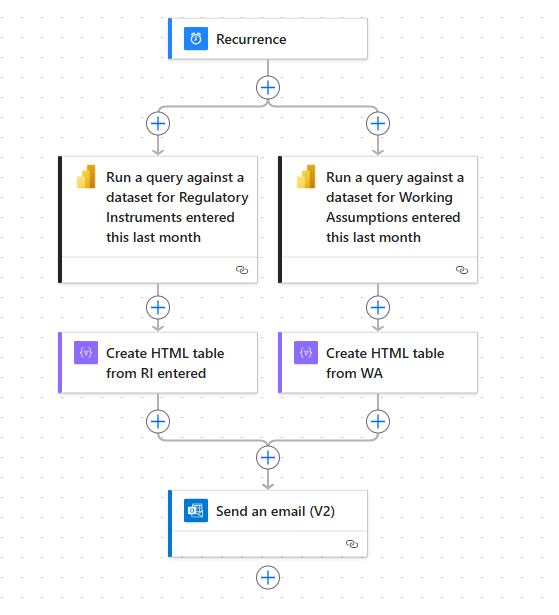
What I have been trying is something that generally speaking, can be achieved using a flow similar to the following (example from an automated Power Automate button, not a scheduled cloud flow). The problem is that with the aforementioned case, there is no way to iterate over the columns using dymanic content, by any mean; while in this, it is possible thanks to calling in the "Apply to each" the call to triggerBody()?['entity']?['Power BI values'].
For you to see the issue, now this is the current output:
By any chance would someone have any practical advice on how to transform the specific column which is a URL into a shortned hyperlink? It would mean life to me!







