web
You’re offline. This is a read only version of the page.
close
Skip to main content

Announcements

News and Announcements icon
Community site session details

Community site session details

Session Id :
Power Platform Community / Forums / Power Automate / Power AutomateでSharePo...
Power Automate
Suggested Answer

Power AutomateでSharePointの日時列がtriggerBody()やempty()で条件判定できない問題

(0) ShareShare
ReportReport
Posted on by 2

Power AutomateでSharePointリストの日時列(返却日時)を条件分岐で判定したいのですが、うまくいきません。

非null値評価をしたいが、できない。
条件判定が期待通りにいく方法を教えてください。

【やりたいこと】

「返却日時」列が空ではない場合に処理を実行したい。

【試したこと】

@empty(triggerBody()?['OData__x8fd4__x5374__x65e5__x6642_'])

@empty(triggerOutputs()?['body/返却日時'])

@empty(triggerOutputs()?['OData__x8fd4__x5374__x65e5__x6642_'])

@equals(triggerBody()?['OData__x8fd4__x5374__x65e5__x6642_'], null)

@equals(triggerOutputs()?['body/OData__x8fd4__x5374__x65e5__x6642_'], null)
他、画像の通り。右側条件式に"や''も試した。
triggerBodyやは、triggerOutputsは次の関数を評価できませんでしたと表示される。

画像は返却日時が空の状態です。
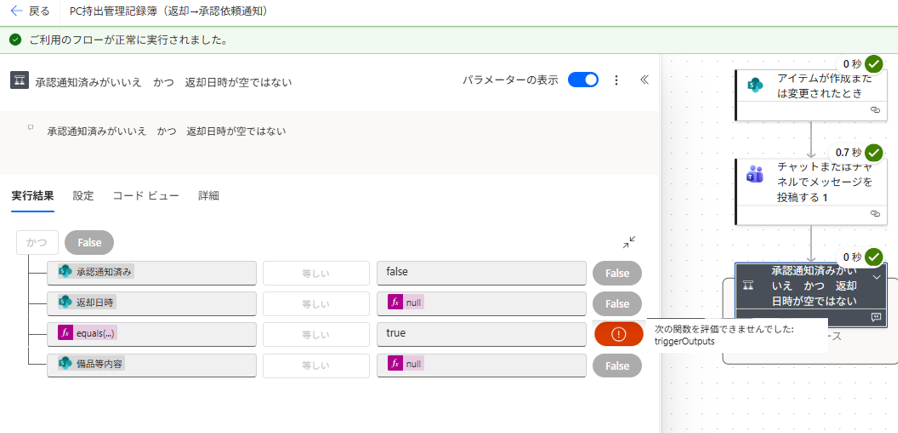
 

~

I'm trying to use conditional branching on a SharePoint list date and time column (return date and time) in Power Automate, but it's not working.
I'm trying to evaluate a non-null value, but I can't.
Please tell me how to get the conditional branching to work as expected.
[What I want to do]
I want to execute a process if the "return date and time" column is not empty.
[What I tried]
@empty(triggerBody()?['OData__x8fd4__x5374__x65e5__x6642_'])
@empty(triggerOutputs()?['body/ReturnDateTime'])
@empty(triggerOutputs()?['OData__x8fd4__x5374__x65e5__x6642_'])
@equals(triggerBody()?['OData__x8fd4__x5374__x65e5__x6642_'], null)
@equals(triggerOutputs()?['body/OData__x8fd4__x5374__x65e5__x6642_'], null)
Others, as shown in the image. I also tried using " and '' in the condition expression on the right.
For triggerBody and triggerOutputs, it displays the message "The following function could not be evaluated."
The image shows the return date and time left blank.
Categories:
I have the same question (0)
  • Suggested answer
    Michael E. Gernaey Profile Picture
    53,978 Moderator on at
     
    I am not sure if your column is a string or a date time for sure (I know you said the value is but) you may need to check it like this instead
     
    empty(triggerBody()?[' OData__x8fd4__x5374__x65e5__x6642_']) is not equal to false <== (as an expression)
     
    I am not sure I follow this different names you are showing but
     
    empty(triggerOutputs()?[' body/ReturnDateTime']) is not equal to false <== (as an expression)
     
    so you are essentially saying "if its not null" then return true
     
    Is it for sure a Date time column and not a string?
     
    As it should return null or a date time if its a Date Time

    If these suggestions help resolve your issue, Please consider Marking the answer as such and also maybe a like.

    Thank you!
    Sincerely, Michael Gernaey
     
  • Suggested answer
    CU18110519-0 Profile Picture
    2 on at


Under review

Thank you for your reply! To ensure a great experience for everyone, your content is awaiting approval by our Community Managers. Please check back later.

Helpful resources

Quick Links

Introducing the 2026 Season 1 community Super Users

Congratulations to our 2026 Super Users!

Kudos to our 2025 Community Spotlight Honorees

Congratulations to our 2025 community superstars!

Congratulations to the March Top 10 Community Leaders!

These are the community rock stars!

Leaderboard > Power Automate

#1
Vish WR Profile Picture

Vish WR 881

#2
Valantis Profile Picture

Valantis 823

#3
Haque Profile Picture

Haque 485

Last 30 days Overall leaderboard
