web
You’re offline. This is a read only version of the page.
close
Skip to main content

Announcements

News and Announcements icon
Community site session details

Community site session details

Session Id :
Power Platform Community / Forums / Power Automate / Invalid Expression Err...
Power Automate
Suggested Answer

Invalid Expression Error for Field Input Using Dynamic Field Value in PA Flow

(1) ShareShare
ReportReport
Posted on by Microsoft Employee

Hi Community,

I’m facing an error in my Power Automate cloud flow where an AzureDevops work item creation node is throwing an “invalid expression” error, even when only referencing an input parameter directly from the trigger node (When an agent calls the flow).

Scenario

I have a flow triggered using “When an agent calls the flow” (Copilot Studio / Agent trigger). One of the inputs is:

a Handoff date (Date field type)
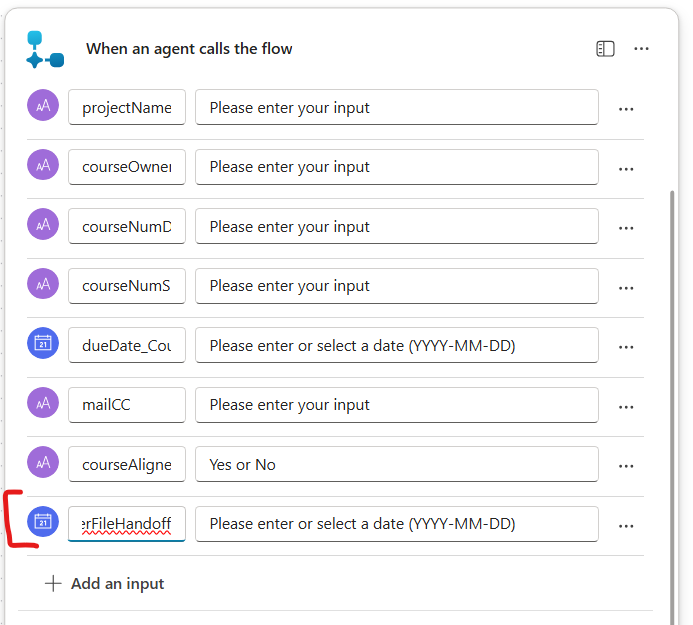
I am referencing this field value inside the Create work item action node of Azure DevOps connector, using dynamic content referencing formula- triggerBody()?['date_1']. 
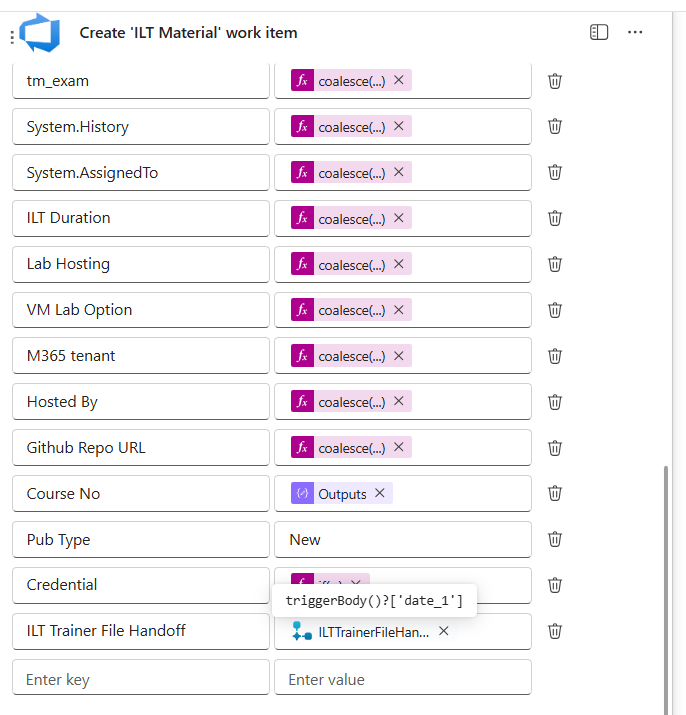
The expression is not giving any error message when updating/adding the power fx,

However, the node is throwing the following error upon 'Publish':

“The input parameter(s) of operation 'Create_work_item' contains invalid expression(s). Fix invalid expression(s) for the input parameter(s) of operation 'Create'_work_item'.”

The possibility of the issue being caused by any other expression used in the same node is ruled out, as the flow publishes successfully once this particular field is removed. Additionally, the technical ADO name of the field is also correctly being referred. 


what has been tried but didn't work-

  • changing the field type to 'text' in the trigger node
  • wrapping the field in coalesce() & other date manipulation formulas
  • using the expression in a  separate 'compose' node

What’s confusing

  • I am not using any complex expression for this field.
  • I’m simply referencing the input value from When an agent calls the flow.
  • Other trigger inputs in the same action are working correctly.
  • The issue is only happening for the Handoff field.


I am wondering if this is an intrinsic glitch/quirk of powerautomate flow itself, or any logical error. Thank you in advance for any tips, suggestions, or guidance.

Screenshot 2026-0...

Your file is currently under scan for potential threats. Please wait while we review it for any viruses or malicious content.

Categories:
I have the same question (0)
  • Tomac Profile Picture
    4,105 Moderator on at
     
    Please copy/paste your screenshots into the comment body section instead of uploading as an attachment. Attachment virus scanning is broken right now and never completes, so we won't be able to see the screenshot.
     
    We'll need to see the action "Create work item" with any expressions used copy/pasted as text so we can evaluate where the issue might be.
  • PK-18050816-0 Profile Picture
    Microsoft Employee on at
    Thanks for answering & bringing that to attention! I have updated the post with the relevant screenshots., including the expression raising the error. Let me know if any other screenshots or info is required. 
  • Tomac Profile Picture
    4,105 Moderator on at
    @PK-18050816-0 Thanks for the follow up.
     
    In a failed flow run, can you copy/paste the output of the trigger so we can see what fields are being delivered to your flow?
     
    Also, have you tried manually typing that expression into the actions instead of copy/pasting it? Sometimes copy/paste from a chatbot will include weird character encoding.
  • Suggested answer
    Haque Profile Picture
    3,197 on at
    Hi @PK-18050816-0,
     

    If you suspect date is one of the reasons, then I would suggest avoid Direct Dynamic Content Without Formatting. Means, directly referencing triggerBody()?['date_1'] without formatting can cause errors if the data type or format is incompatible.

    Hence, the date input from the agent trigger may be a string, but Azure DevOps expects a date/time value in a specific ISO 8601 format (e.g., yyyy-MM-ddTHH:mm:ssZ). If the input is just a date (without time), you may need to convert or format it explicitly.


    In this case,  let's use expression to convert or Format Date: Use Power Automate expressions like formatDateTime() to convert the input to the correct format. Example: formatDateTime(triggerBody()?['date_1'], 'yyyy-MM-ddTHH:mm:ssZ'), this ensures the date is in the proper ISO format Azure DevOps expects.

    If that is not the case, I will suggest narrow down number of inputs, let's say, you try first with 1(projectName)/2(projectName, courseOwner) fields, if they don't raise any issue increase one by one - ah tedious! But we have to find it out first who is giving trouble!


    I am sure some clues I tried to give. If these clues help to resolve the issue brought you by here, please don't forget to check the box Does this answer your question? At the same time, I am pretty sure you have liked the response!

Under review

Thank you for your reply! To ensure a great experience for everyone, your content is awaiting approval by our Community Managers. Please check back later.

Helpful resources

Quick Links

Introducing the 2026 Season 1 community Super Users

Congratulations to our 2026 Super Users!

Kudos to our 2025 Community Spotlight Honorees

Congratulations to our 2025 community superstars!

Congratulations to the April Top 10 Community Leaders!

These are the community rock stars!

Leaderboard > Power Automate

#1
Vish WR Profile Picture

Vish WR 801

#2
Valantis Profile Picture

Valantis 602

#3
Haque Profile Picture

Haque 581

Last 30 days Overall leaderboard



