web
You’re offline. This is a read only version of the page.
close
Skip to main content

Announcements

News and Announcements icon
Community site session details

Community site session details

Session Id :
Power Platform Community / Forums / Power Automate / Cancel flow if step fails
Power Automate
Answered

Cancel flow if step fails

(2) ShareShare
ReportReport
Posted on by 9
Hi.  I am trying to build a simple flow that does the following: Check email sent in Outlook against a list of email address in Excel.  If the email address exists in Excel, then update a column in that row of Excel with the date that the email was sent.
 
I am able to get the flow to work but I run into an issue when the email address does not exist in the Excel.  When that happens, the flow continuously fails and it is eventually automatically turned off. 
 
Is there a way to set a condition such that if the step for looking up the email address in Excel fails, the entire flow does not fail?  It is okay that the email doesnt exist in the Excel -- I just dont want it to run the flow.  I cannot seem to get a condition to work.
 
Any thoughts are much appreciated!
Screenshot 2024-07-31 171254.png
Categories:
I have the same question (0)
  • Verified answer
    rzaneti Profile Picture
    4,476 Super User 2026 Season 1 on at
    Hi,
     
    You can achieve it by working with the Run after setting. Start by adding a new step as parallel branch, like highlighted in the image below: 
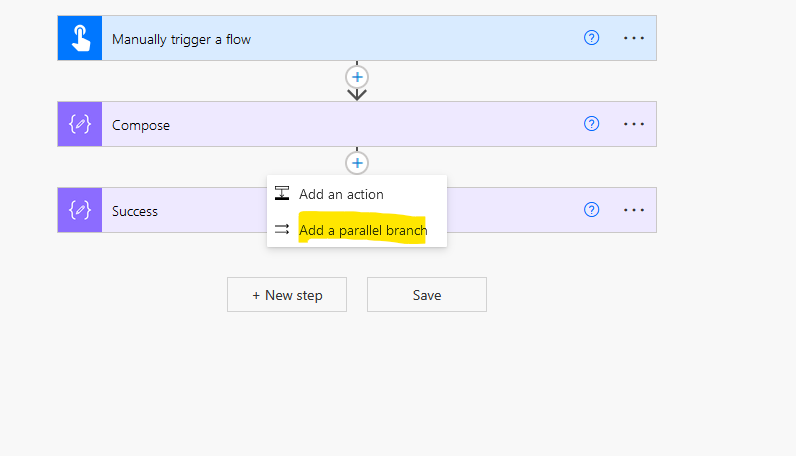
     
     
    Then search for the Terminate action:
     
     
    You can set its status to Cancelled, Failed or Succeeded. Based on your description, you must select Succeeded:
     
     
    So far, both actions from my flow (Success and Terminate) will run concurrently if the Compose action succeeds. As we want to terminate the flow only if we have a failure in the Compose, we must now work with the run after settings.
     
    In the Terminate action, click in the ellipsis(...) (highlighted in blue) and in Configure run after (highlighted in yellow)
     
    Then unselect the is successful checkbox, and select all the others, and click in Done:  


    After changing this configuration, you must notice that the arrow in your Terminate branch will be dashed and an info button will appear (highlighted in yellow) to let you know that this step will run only under the Run after configuration:
     
     
    Now let's test the flow. I intentionally put an expression that must fail the action in the Compose. After running it, the Compose action failed, as expected, and the Terminate action was fired (red arrow). As a result, the flow ran successfully (blue arrow) even with a failure in the Compose action:
     
     
    Let me know if it works for you or if you need any additional help!
    -------------------------------------------------------------------------
    If this is the answer for your question, please mark the post as Solved.
    If this answer helps you in any way, please give it a like.
     
     
  • MD-31072107-0 Profile Picture
    9 on at
    @rzaneti -- thank you so much.  This works perfectly now.  Huge help!

Under review

Thank you for your reply! To ensure a great experience for everyone, your content is awaiting approval by our Community Managers. Please check back later.

Helpful resources

Quick Links

Introducing the 2026 Season 1 community Super Users

Congratulations to our 2026 Super Users!

Kudos to our 2025 Community Spotlight Honorees

Congratulations to our 2025 community superstars!

Congratulations to the April Top 10 Community Leaders!

These are the community rock stars!

Leaderboard > Power Automate

#1
Vish WR Profile Picture

Vish WR 791

#2
Valantis Profile Picture

Valantis 582

#3
Haque Profile Picture

Haque 529

Last 30 days Overall leaderboard



