web
You’re offline. This is a read only version of the page.
close
Skip to main content

Notifications

Announcements

Community site session details

Community site session details

Session Id :
Power Platform Community / Forums / Power Automate / Send an Email with Sen...
Power Automate
Suggested Answer

Send an Email with Sensitivity type added (Not showing up in purview but email is labeled)

(1) ShareShare
ReportReport
Posted on by 2,563
Replicate the issue as following.
 
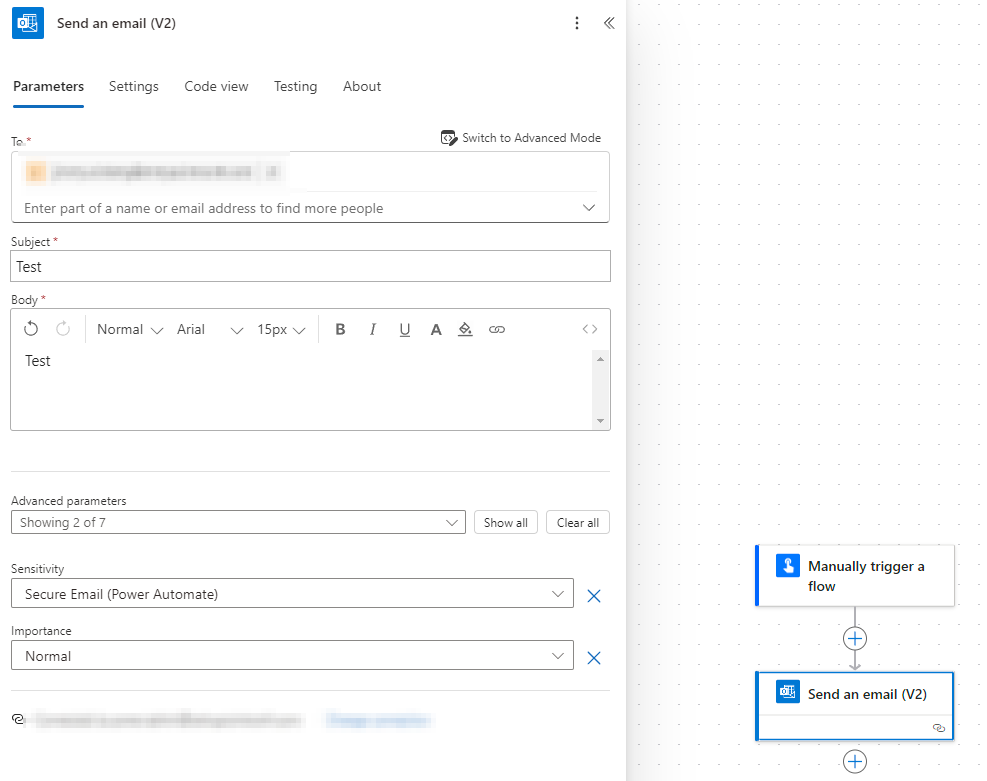
Create a manual flow.
- Send Email v2
- Set a sensitivity label.
- Send email
 
This works and I can see the email gets encrypted due to the sensitivity label settings.
I can also see that in the message details of the sent item actually have the label.
msip_labels: MSIP_Label_25257012-567b-4c40-b48b-69d2ed233264_ActionId=be971090-0916-4642-8f6e-fd5e69273018;MSIP_Label_25257012-567b-4c40-b48b-69d2ed233264_ContentBits=0;
MSIP_Label_25257012-567b-4c40-b48b-69d2ed233264_Enabled=true;MSIP_Label_25257012-567b-4c40-b48b-69d2ed233264_Method=Privileged;MSIP_Label_25257012-567b-4c40-b48b-69d2ed233264_SiteId=05dc4370-49fa-46a1-8b8b-2dd3063cd475;
When I then check Purview on items for the specific label, nothing shows up.
Actually out of 6 emails I have 1 showing up, the first test.
This is really strange, but I can replicate the issue.


Categories:
I have the same question (0)
  • Suggested answer
    Michael E. Gernaey Profile Picture
    53,493 Super User 2025 Season 2 on at
    Hi
     
    There are things missing and is why you should always share your flow and flow run details.
     
    You said offhandedly , it shows up for the 1st and then not the others. This tells me you have a bug in your flow, most likely but your flow isn't shown so no way to take a guess.
     
     
  • JimmyW Profile Picture
    2,563 on at
    @FLMike
     
    I just stated u can replicate the issue, there is nothing wrong with my flow I can replicate the issue with a new label.
    And i also stated that i can confirm the label is applied.
    And i also written the flow is send an email and you select a sensitivity label, thats all.
    I written the replication method one action, Send Email v2 select a sensitivity label.
     
    Im not sure why you would need an image of that.

    Just to make it more clear, you can replicate the steps on a new label same issue happens.
    And its a flow with one action its send email its not like you can do something wrong here.
    Also adding image from purview activity explorer that we can see the label is applied and as i confirmed before this also checks out on the email itself.

    But when you then try to find all emails with the label it will only say 1 item labeled.


    Hope this image helps you
    ​​​​​​​

Under review

Thank you for your reply! To ensure a great experience for everyone, your content is awaiting approval by our Community Managers. Please check back later.

Helpful resources

Quick Links

Forum hierarchy changes are complete!

In our never-ending quest to improve we are simplifying the forum hierarchy…

Ajay Kumar Gannamaneni – Community Spotlight

We are honored to recognize Ajay Kumar Gannamaneni as our Community Spotlight for December…

Leaderboard > Power Automate

#1
Michael E. Gernaey Profile Picture

Michael E. Gernaey 519 Super User 2025 Season 2

#2
Tomac Profile Picture

Tomac 296 Moderator

#3
abm abm Profile Picture

abm abm 232 Most Valuable Professional

Last 30 days Overall leaderboard



