web
You’re offline. This is a read only version of the page.
close
Skip to main content

Announcements

News and Announcements icon
Community site session details

Community site session details

Session Id :
Power Platform Community / Forums / Power Automate / Bad Request Error in "...
Power Automate
Suggested Answer

Bad Request Error in "List rows present in a table"

(1) ShareShare
ReportReport
Posted on by 6

I have a Power Automate flow that is triggered when an Excel bulk file is uploaded via Forms and placed in a SharePoint Document Library. This setup worked correctly when I initially designed and tested the flow using my personal account.

However, after copying the flow to our organization’s shared Power Automate account and updating the connections to link to other SharePoint lists and libraries, I am now encountering a "Bad Request" error on the "List rows present in a table" action. I have checked and adjusted the connections and settings, but the issue persists.

I would appreciate your assistance in identifying the cause and providing a solution.

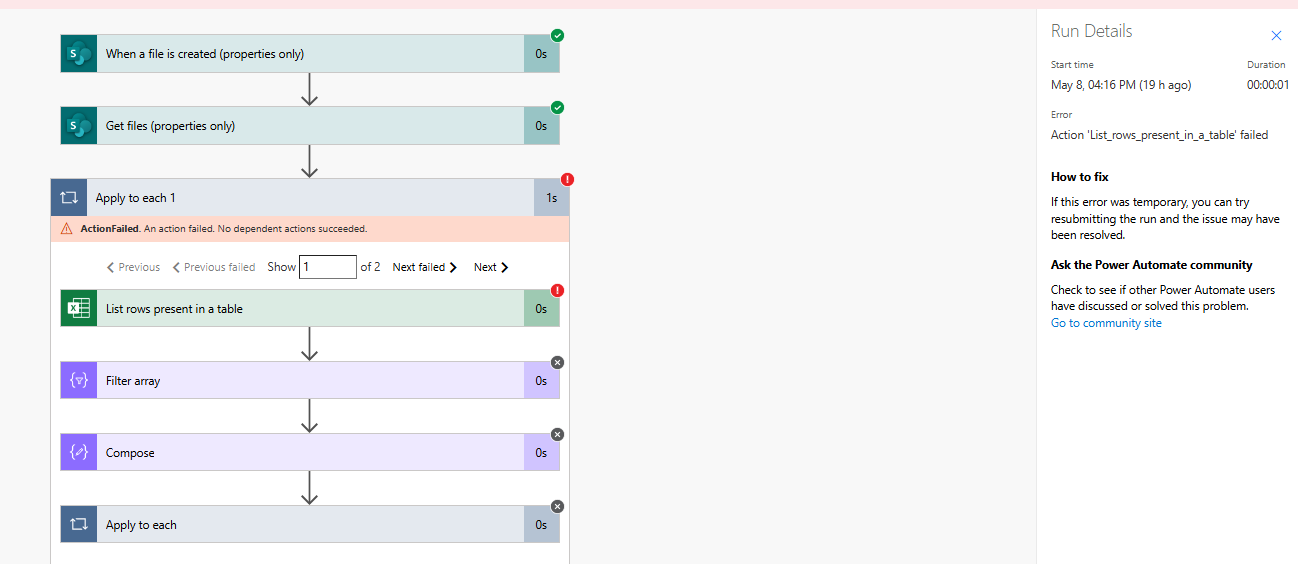
This is the flow and error:
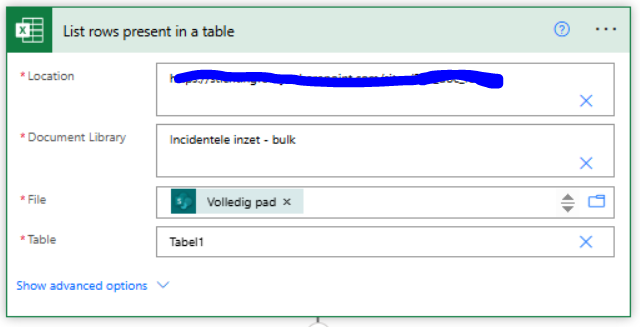
This is the actoin List rows present in a table
Categories:
I have the same question (0)
  • David_MA Profile Picture
    14,499 Super User 2026 Season 1 on at
    Based on how you have the List rows present in a table action, I don't understand why it is in the Apply to each 1 action. Move it outside of the apply to each and see if that resolves the error. 
     
    You may also want to blackout your site URL for data privacy reasons. There is no need for anyone to know the URL of your tenant. It may seem rather innocuous, but I am pretty sure I can figure out where you work and are located just from that piece of information.
  • Suggested answer
    LE-09050954-0 Profile Picture
    6 on at

    Thank you for your suggestion. I tried moving the List rows present in a table action outside of the Apply to each 1 loop, but I received the following error message:


    From what I understand, this is likely due to the use of the dynamic content Full Path in File. Let me know if there's a recommended workaround for handling this. As mentioned, the flow worked perfectly fine when I tested it using my personal account.

  • stampcoin Profile Picture
    5,153 Super User 2026 Season 1 on at
    If you can manually choose the file rather than assign it with variable , will that work ?
     
  • LE-09050954-0 Profile Picture
    6 on at
    Thanks for the suggestion! Unfortunately, manually selecting a file isn’t an option in this case, as the flow is triggered by a new Excel file being uploaded. The file path is therefore dynamic and needs to be retrieved automatically from the trigger or from the “Get files” action.  That’s why I’m using the dynamic content “FullPath”. But I suspect the issue might be related to the dynamic content I'm using? 
  • David_MA Profile Picture
    14,499 Super User 2026 Season 1 on at
    I don't think I will be able to help you with this, but let me see if I understand your process:
    • Your trigger, when a file is created, is related to the spreadsheet where you need to get the rows?
      • If yes, what is the purpose of the Get files action since the trigger is the Excel spreadsheet you need to work with?
      • If no, I don't understand your process as you've explained it. The path isn't dynamic since it comes from the trigger action and is thus known.
    • If the trigger is the Excel file you need to list the rows from, then I would suggest this:
      • First, you need to add some logic to make sure that the file that is created is a spreadsheet. What prevents this flow from triggering on any other type of file created?
      • Then once you've validated that the new file is an Excel spreadsheet, I would use the list tables to get the tables in the spreadsheet.
      • You can then use the data from this action to list the rows in the table(s).

Under review

Thank you for your reply! To ensure a great experience for everyone, your content is awaiting approval by our Community Managers. Please check back later.

Helpful resources

Quick Links

Introducing the 2026 Season 1 community Super Users

Congratulations to our 2026 Super Users!

Kudos to our 2025 Community Spotlight Honorees

Congratulations to our 2025 community superstars!

Congratulations to the April Top 10 Community Leaders!

These are the community rock stars!

Leaderboard > Power Automate

#1
Vish WR Profile Picture

Vish WR 959

#2
Valantis Profile Picture

Valantis 872

#3
Haque Profile Picture

Haque 589

Last 30 days Overall leaderboard
