web
You’re offline. This is a read only version of the page.
close
Skip to main content

Notifications

Announcements

Community site session details

Community site session details

Session Id :
Power Platform Community / Forums / Power Automate / Auto-sequence number f...
Power Automate
Unanswered

Auto-sequence number field in list or document library

(0) ShareShare
ReportReport
Posted on by

Hi,


I need to create a document library where we can store our controlled documents with the following additional columns like Fiscal Year, Team, Document Type and Sequence Number.

The fields except for the Sequence Number field will be manually filled up by the user however I want the Sequence Number field to be automatically filled up so the user won't have to look at the current contents of the library to determine what should be the sequence number of the file. This Sequence number cannot be based on the ID field because the number will depend on the other fields I mentioned earlier. For example, there could be many documents that has the same sequence number, 001 for example, because they are the first one from a specific combination of Fiscal Year, Team and Document Type. See example below:
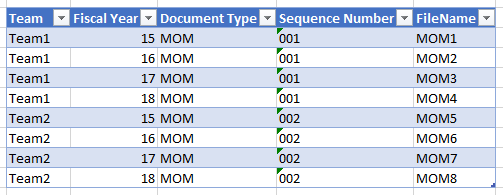
Image

I was able to automate the sequence number field using a flow that triggers when a document is created/uploaded however this won't work for a library that requires check-in/out because the flow can't edit a checked out item (at least as far as I know).


How can I implement this? Are there other means aside from Flow? PS: Workflows are currently not an option.

Categories:
I have the same question (0)
  • v-yuazh-msft Profile Picture
    on at

    Hi @ PetersonBriones,

    What is the specific combination rule of Fiscal Year, Team and Document Type for the “sequence number” column in sharepoint library?


    I have made a test on my side, the flow could edit a checked out item in sharepoint library.


    I have created a sharepoint library with an checked out item as screenshots below:

    10.png

    A flow to update the checked out item in sharepoint library as screenshots below:

     11.png

    The flow would run successfully as below:

     12.png

    And the checked out item would be updated as below:

    13.png


    Regards,
    Alice Zhang

  • Community Power Platform Member Profile Picture
    on at

    Hi Alice


    Thanks for your reply.

    Was this document checked out to you? If so, then the flow should work. However, the problem would be when the document was created and checked out by another user because the credentials used by the flow are mine (flow creator) and not his/hers.

  • ez1138 Profile Picture
    218 on at

    What's the best practice for auto-generating the next number purely from a list?

  • bdc604 Profile Picture
    158 on at
    Store the NextNum in a separate single record list (SystemList or whatever), get this value, apply to document record, increment variable, update SystemList.

Under review

Thank you for your reply! To ensure a great experience for everyone, your content is awaiting approval by our Community Managers. Please check back later.

Helpful resources

Quick Links

Forum hierarchy changes are complete!

In our never-ending quest to improve we are simplifying the forum hierarchy…

Kudos to our 2025 Community Spotlight Honorees

Congratulations to our 2025 community superstars!

Leaderboard > Power Automate

#1
trice602 Profile Picture

trice602 315 Super User 2026 Season 1

#2
David_MA Profile Picture

David_MA 273 Super User 2026 Season 1

#3
Power Platform 1919 Profile Picture

Power Platform 1919 117 Super User 2026 Season 1

Last 30 days Overall leaderboard
