web
You’re offline. This is a read only version of the page.
close
Skip to main content

Notifications

Announcements

Community site session details

Community site session details

Session Id :
Power Automate
Answered

CRLF in "Create File"

(0) ShareShare
ReportReport
Posted on by 85

Hello All,


Please kindly have a look below 🙂


I have a problem with a Flow, where I need to insert a breakline (CRLF) at the end of a line. This is proving difficult in my Flow.

See Flow process below:
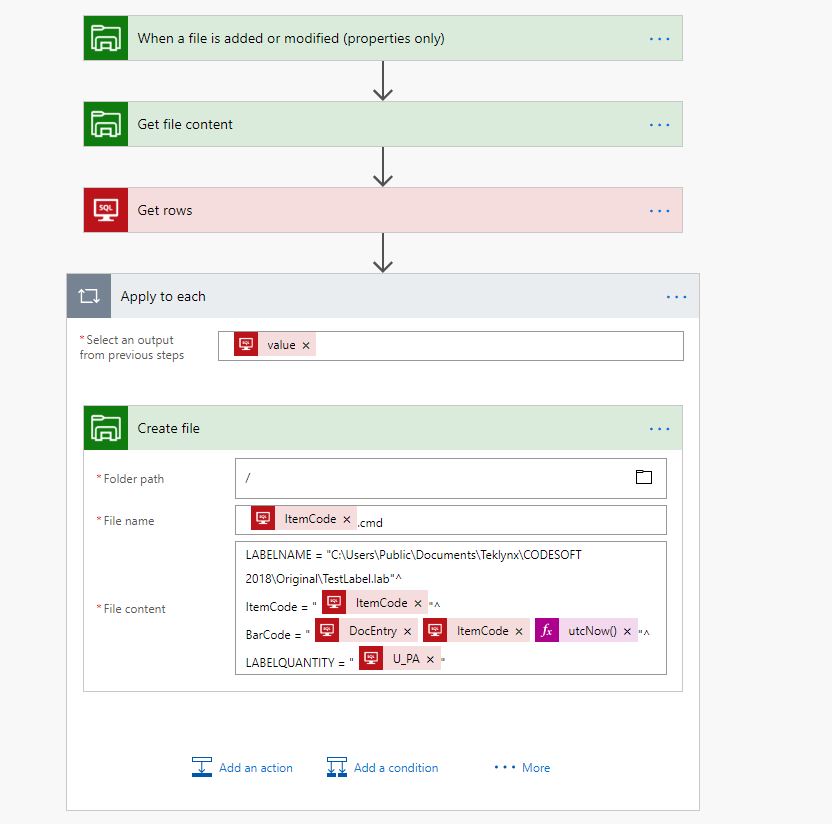


How do I add a 'CRLF' at the end of each line?


I have tried <br> - this just outputs "<br>".


Top image is what the Flow does, bottom image is what I want it to do.

Capture.JPGCapture2.JPG


Thanks.


Categories:
I have the same question (0)
  • v-yamao-msft Profile Picture
    on at

    Hi @originalltd,


    It seems that you are trying to start a new line in the created file. Please try to use the HTML break tag <br/> to see if it will work for you.


    I have made the following test using flow to try to create a .doc file in File system. It is configured likes below and the created file displays fine.

    1.PNG2.PNG


    Hope it could be your reference.


    Best regards,

    Mabel Mao

  • originalltd Profile Picture
    85 on at

    @v-yamao-msft


    This did not work. It still puts "LF" as the break line. It needs to be 'CRLF' as the break line.


    If you manually created a .txt file in Windows Explorer, created a few lines and then opened the document in Notepad ++, you would see that by default it has created CRLF as it's break line.


    Flow seems to be placing LF line breaks (Unix) rather than CRLF Breaklines (Windows).

  • originalltd Profile Picture
    85 on at

    @v-yamao-msft


    Any ideas?


    Is this a bug?

  • Saikumar Profile Picture
    12 on at

    I have an easier solution for you. Probablly would help.


    1. Build a new variable(supposedly named "CRLF") using action "Initialiaze Variable"

    2. Set the type of this variable as "String"

    3. In the value field just place the cursor in it and hit the enter key(Return key).


    Now you can use this variable "CRLF" to introduce the line break you are looking for by using concat() expression.


    Hope that worked. If so, please vote my reply as the solution.

  • originalltd Profile Picture
    85 on at

    @Saikumar


    Unfortunatly, that did not work. Still uses 'LF' endings instead of 'CRLF' 😞


    I don't think there is resolution for this until Microsoft change the way "Create File" works for it's output. I am baffled as to why it outputs in a Unix format instead of Windows. 

  • Dennis1Jung Profile Picture
    8 on at

    Hey, did you find a solution?

    I faced the same issue today, and i also tried to create cmd files for codesoft / sentinel.

  • originalltd Profile Picture
    85 on at

    @Dennis1Jung - No solution from Microsoft I am afriad.


    Codesoft are useless. An imported file with 'LF' endings crashes the application. Their solution to this problem? - Ensure the file outputs CRLF... (how about, fix your broken application?!)


    I have a PowerShell script that monitors a folder and converts the file to CRLF endings if that helps? - It's not the best solution by far, but the only workaround I have.

  • LozzieD Profile Picture
    203 on at

    I'm trying to do this too.


    Seems incredible that this hasn't been reported and fixed already.


    Outputting files from Flow with no ability to put a CRLF - wtf?

  • Dennis1Jung Profile Picture
    8 on at

    It is working for me now, i changed the definition for each block to LF on the sentinel software.


    sentinel.PNG

  • Verified answer
    SidhuSaab Profile Picture
    21 on at

    I have used expression


    uriComponentToString('%0D') for carriage return and

    uriComponentToString('%0A') for line feed


    successfuly in create file flow.Setting the flowSetting the flow


    Flow output as seen on NP++Flow output as seen on NP++


Under review

Thank you for your reply! To ensure a great experience for everyone, your content is awaiting approval by our Community Managers. Please check back later.

Helpful resources

Quick Links

Forum hierarchy changes are complete!

In our never-ending quest to improve we are simplifying the forum hierarchy…

Ajay Kumar Gannamaneni – Community Spotlight

We are honored to recognize Ajay Kumar Gannamaneni as our Community Spotlight for December…

Leaderboard > Power Automate

#1
Michael E. Gernaey Profile Picture

Michael E. Gernaey 501 Super User 2025 Season 2

#2
Tomac Profile Picture

Tomac 323 Moderator

#3
abm abm Profile Picture

abm abm 237 Most Valuable Professional

Last 30 days Overall leaderboard
