web
You’re offline. This is a read only version of the page.
close
Skip to main content

Announcements

News and Announcements icon
Community site session details

Community site session details

Session Id :
Power Platform Community / Forums / Power Apps / Taking First value of ...
Power Apps
Answered

Taking First value of individuals, then adding those sums together

(0) ShareShare
ReportReport
Posted on by 364

Hi there,


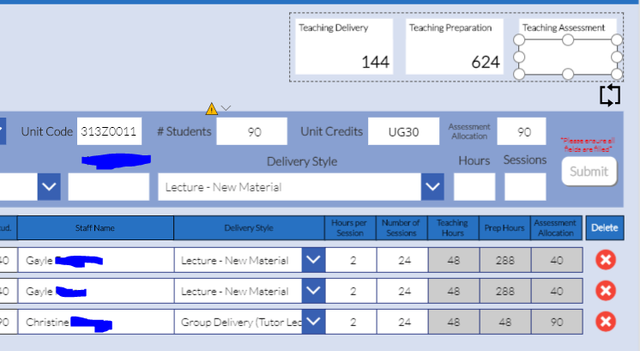
I would like to be able to SUM the First record of Assessment Hours for each individual, then add those sums together. This is so I don't duplicate figures in my totals. 


Capture

So, Gayle would have 40, Christine would have 90, and in the Teaching Assessment Box above it would show 130. I can't seem to get First and Sum to cooperate in my formulas. I've tried:


Sum(ueUnits,Sum(LookUp(ueUnits,MMU_ID = 'UE Gal Staff ID Value'.Text)First('Assessment Hours'))

But I am very aware that is all kinds of wrong! Is what I want even possible?

Categories:
I have the same question (0)
  • PavanKumar Profile Picture
    479 on at
    Hi, Somehow am bit confused with the question. Is it possible for you to elaborate? Regards, Pavan Kumar Garlapati
  • PavanKumar Profile Picture
    479 on at

    Hi, Somehow am bit confused with the question. Is it possible for you to elaborate? Regards, Pavan Kumar Garlapati

  • EpicTriffid Profile Picture
    364 on at

    Hi @PavanKumar 


    So, I can have multiple records relating to different things, but because of the constraints I'm working under with the database, many of them will have the numbers repeated. For example, in my gallery, I might have the below:


    Matt           50

    Connor      90

    Connor      90

    Matt          50

    Connor      90


    Now, I need to know the value for each person, but not the sum, as I would be multiplying and that would give me a wrong number. So, essentially I need to say, for each name, give me the first number, which in this case would be:


    Matt          50

    Connor      90


    Then add those together:


    Total: 140


    I hope that makes a little more sense. I think I need to use some combination of filter, first and sum, but I don't know in what order!

  • PavanKumar Profile Picture
    479 on at

    HI @EpicTriffid ,


    Think you can get the distinct records and sum it for example


     Distinct( Units, Countcolumn )


    Then sum it up


    -------------------------------------------------------------------------------------------

    if this answers your question mark it as verified and give it a thumbsup

    Regards,

    Pavan Kumar Garlapati

  • EpicTriffid Profile Picture
    364 on at

    Hmm, I can't seem to get it to work


    Sum('Unit Gal'.AllItems,Distinct('Unit Gal'.AllItems,'Hours'))
  • Verified answer
    yashag2255 Profile Picture
    24,769 Super User 2024 Season 1 on at

    Hey @EpicTriffid 


    Can you try to update your expression as:
    Sum(AddColumns(GroupBy('Unit Gal'.AllItems,"Name","Grouped"),"Score",First(Sort(Grouped,'Assessment Hours',Descending)).'Assessment Hours'),Score)
     
    Here, Name needs to be replaced with the column name that holds Staff Name.
     
    Hope this Helps!
     
    If this reply has answered your question or solved your issue, please mark this question as answered. Answered questions helps users in the future who may have the same issue or question quickly find a resolution via search. If you liked my response, please consider giving it a thumbs up. THANKS!
  • EpicTriffid Profile Picture
    364 on at

    Yup. Could totally kiss you right now!

Under review

Thank you for your reply! To ensure a great experience for everyone, your content is awaiting approval by our Community Managers. Please check back later.

Helpful resources

Quick Links

Season of Sharing Community Challenge Winners!

Congratulations to our community stars!

Kudos to our 2025 Community Spotlight Honorees

Expanding mentorship, skilling, and AI innovation

Congratulations to the June Top 10 Community Leaders!

These are the community rock stars!

Leaderboard > Power Apps

#1
WarrenBelz Profile Picture

WarrenBelz 325 Most Valuable Professional

#2
11manish Profile Picture

11manish 165

#3
MS.Ragavendar Profile Picture

MS.Ragavendar 88 Super User 2026 Season 1

Last 30 days Overall leaderboard
