web
You’re offline. This is a read only version of the page.
close
Skip to main content

Notifications

Announcements

Community site session details

Community site session details

Session Id :
Power Platform Community / Forums / Power Automate / How to cary a date for...
Power Automate
Answered

How to cary a date formula from Excel Table into Word Template

(1) ShareShare
ReportReport
Posted on by
Hello!  
 
Can anyone help me figure out why a date isn't coming through in a date formula?   Below are a couple screen shots that show my flow:  
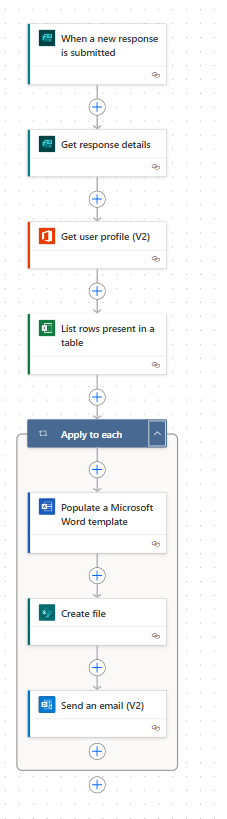
 
I'm using dynamic connectors to pull data from a table and insert it into the word template. in this case the Adj Start Date comes over as a random number instead of a date format.  The column in the table is formated as a date, and the in the "List Rows Present in a Table" is set to Date Time Format.  
I have tried to use the following expression instead of the dynamic connector under AdjHireDate, but when I added it, the flow stop populating the template all together:  
 
Orignial (which pulled a random number but not the date)
 
I tried replacing it with (which stopped the flow from populated the template):
 formatDateTime(items('apply_to_each')?['AdjHireDate'],'yyyy-MM-dd')


Below is an image of the parameters in the Populate a Word Template action:


Any ideas would be greatly appreciated!
Categories:
I have the same question (0)
  • Verified answer
    lbendlin Profile Picture
    8,479 Super User 2025 Season 2 on at
    You must always use ISO8601 datetimezone strings.
  • Michael E. Gernaey Profile Picture
    53,362 Super User 2025 Season 2 on at
    Yeah what @lbendlin said,
     
    Excel is the most annoying, hair ripping out date and omg don't get me started on Hours /facepalm.
     
    I bet if you could do a count on everytime someone asked or had issues with Excel time/date formats etc, it would be in the top... 3 of questions
     
    Agree @lbendlin?
  • lbendlin Profile Picture
    8,479 Super User 2025 Season 2 on at

Under review

Thank you for your reply! To ensure a great experience for everyone, your content is awaiting approval by our Community Managers. Please check back later.

Helpful resources

Quick Links

Forum hierarchy changes are complete!

In our never-ending quest to improve we are simplifying the forum hierarchy…

Ajay Kumar Gannamaneni – Community Spotlight

We are honored to recognize Ajay Kumar Gannamaneni as our Community Spotlight for December…

Leaderboard > Power Automate

#1
Michael E. Gernaey Profile Picture

Michael E. Gernaey 503 Super User 2025 Season 2

#2
Tomac Profile Picture

Tomac 321 Moderator

#3
abm abm Profile Picture

abm abm 237 Most Valuable Professional

Last 30 days Overall leaderboard



