web
You’re offline. This is a read only version of the page.
close
Skip to main content

Announcements

News and Announcements icon
Community site session details

Community site session details

Session Id :
Power Platform Community / Forums / Power Automate / Problems with Run Only...
Power Automate
Suggested Answer

Problems with Run Only Users

(2) ShareShare
ReportReport
Posted on by 8

Some people in my tenant are using one of my flow. I added them as Run Only Users. After adding they see the flow under "shared with me" and can use it with success. Other users, from the same tenant and with the same rights can not use it, they don't see the flow under "shared with me". 


Any idea why? 


Thank you!


Categories:
I have the same question (0)
  • Suggested answer
    Michael E. Gernaey Profile Picture
    53,969 Moderator on at
     
    Can you verify your Licensing model?
     
    Are you using Premium licenses, or Per Flow/Per App licenses? It's possible they are all used up so others cannot see it, or they are not properly added to the environment with permissions and roles.
     
    Are these part of a Solution Or simply standalone flows?
     
    Can you please also, go to the Power Apps or Power Automate Home Page (or ask IT to do it)
    Go to the admin
    Go to the Environment of the Flows
    Go to All Users
    Find the user(s) one of them that cannot see the flows.
    Run a diagnostic on them from the Top menu (after selecting them in the pre step)
     
    It will give us more information
     
    Also, its possible its just going to take time, so what you can try it this
     
    1. You go to the flow
    2. Click on the Details Page
    3. Grab the Link once it opens
    4. Share with the person who cannot see it
    5. See if they open the Details page using the Direct link to the Details page.
     
    If so, then its just a refresh/timing issue
    If NOT it should also give us more information (Permissions etc)
     
    Cheers
     
    If any of these help you resolve the issue Please Mark my answer as such and maybe a like.
     
    Thanks
     
  • Suggested answer
    Riyaz_riz11 Profile Picture
    4,048 Super User 2026 Season 1 on at
    Hi,
     

    How to get it:

    1. Go to your flow in Power Automate.

    2. Click the … More commands (three dots) menu.

    3. Choose Details.

    4. Under Run only users, click See all run-only permissions.

    5. Copy the HTTP trigger URL or Share link.

    6. Send that link to users.
       

    If I have answered your question, please mark it as the preferred solution ✅ . If you like my response, please give it a Thumbs Up 👍.
    Regards,
    Riyaz

  • CU27062104-0 Profile Picture
    8 on at
    Good eveninf Riyaz

    Thanks - unfortunately there isn't such a command:


    Regards Urs
  • CU27062104-0 Profile Picture
    8 on at
    Hi Michael

    I try to answer your questions
     
     
    Can you verify your Licensing model?
    >
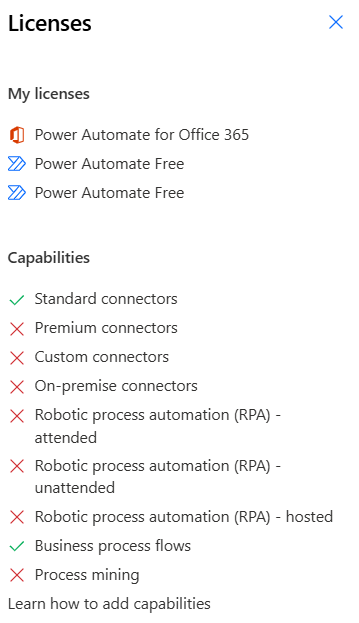
     
    Are you using Premium licenses, or Per Flow/Per App licenses? It's possible they are all used up so others cannot see it, or they are not properly added to the environment with permissions and roles.
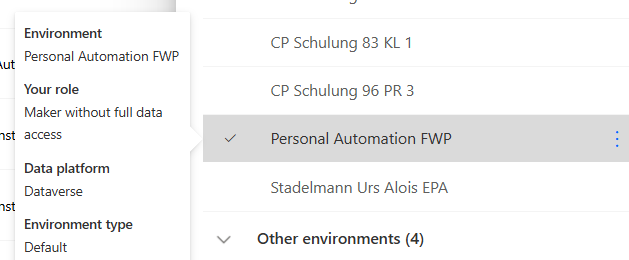
    > Which environment? I got that one:
     
    Are these part of a Solution Or simply standalone flows?
    > Standalone
     
    Can you please also, go to the Power Apps or Power Automate Home Page (or ask IT to do it)
    Go to the admin
    Go to the Environment of the Flows
    Go to All Users
    Find the user(s) one of them that cannot see the flows.
    Run a diagnostic on them from the Top menu (after selecting them in the pre step)
     
    It will give us more information
    > I will try to get this information by the it - it is a institution with 40'000 employees ... 
    Also, its possible its just going to take time, so what you can try it this
     
    1. You go to the flow
    2. Click on the Details Page
    3. Grab the Link once it opens
    4. Share with the person who cannot see it
    5. See if they open the Details page using the Direct link to the Details page.
     
    If so, then its just a refresh/timing issue
    If NOT it should also give us more information (Permissions etc)
     
    Cheers
     
    If any of these help you resolve the issue Please Mark my answer as such and maybe a like.
     
    Thanks
  • Suggested answer
    Michael E. Gernaey Profile Picture
    53,969 Moderator on at
     
    NOTE: I noticed that you called that Personal (in the environment), is that a personal Dev or Sandbox or Production? I ask because I want to make sure that you added the people who you shared with, are in the environment itself and have the proper roles
     
    If some people cannot see, then they do not have the right licenses, or they are looking in the wrong tenant and environment.
     
    Can you do this please.
     
    Can you share one of the people below (in your image of run only users), then, verify that in your Environment (admin center) that they are there (let's just pick HB for instance), and then verify please their login etc.
     
    You can also, select that user in the Environment and Run Diagnostics and see if it gives more information about the issue, but honest, if they have the roles, the login, they have the licenses (for the connections etc) they should see it.


    If these suggestions help resolve your issue, Please consider Marking the answer as such and also maybe a like.

    Thank you!
    Sincerely, Michael Gernaey

Under review

Thank you for your reply! To ensure a great experience for everyone, your content is awaiting approval by our Community Managers. Please check back later.

Helpful resources

Quick Links

Introducing the 2026 Season 1 community Super Users

Congratulations to our 2026 Super Users!

Kudos to our 2025 Community Spotlight Honorees

Congratulations to our 2025 community superstars!

Congratulations to the March Top 10 Community Leaders!

These are the community rock stars!

Leaderboard > Power Automate

#1
Haque Profile Picture

Haque 592

#2
Valantis Profile Picture

Valantis 340

#3
11manish Profile Picture

11manish 284

Last 30 days Overall leaderboard
