web
You’re offline. This is a read only version of the page.
close
Skip to main content

Notifications

Announcements

Community site session details

Community site session details

Session Id :
Power Platform Community / Forums / Power Automate / Apply to Each is trigg...
Power Automate
Answered

Apply to Each is triggering twice for some reason?

(0) ShareShare
ReportReport
Posted on by 12

Hi there!


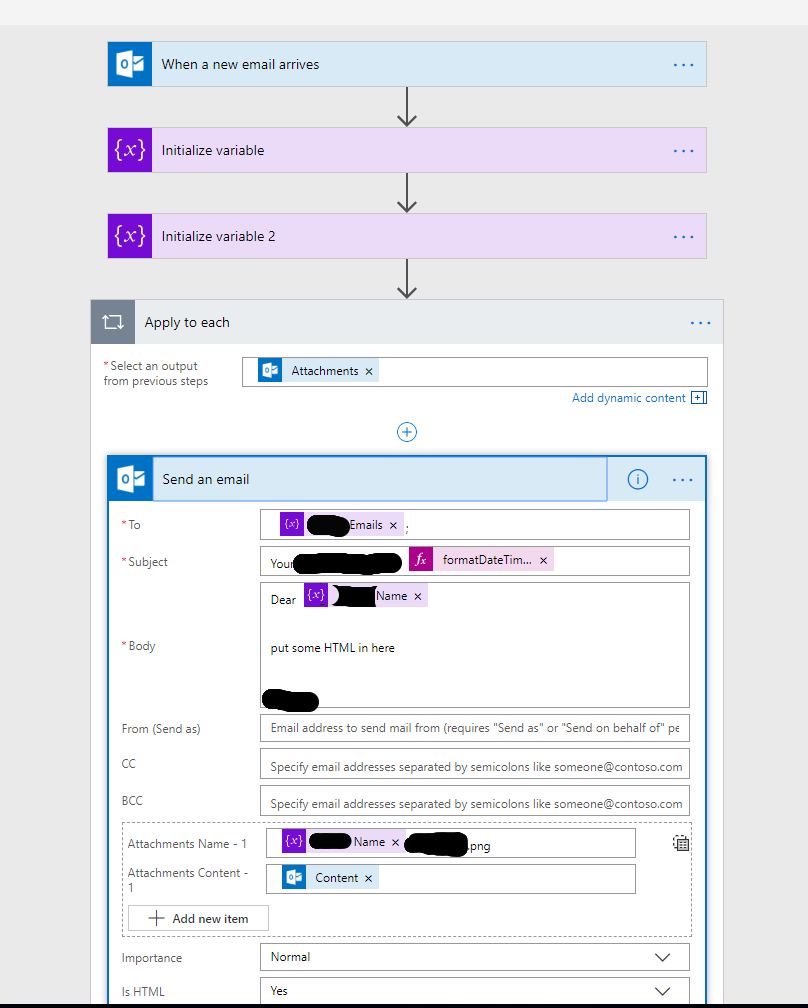
Trying to make a flow to take an incoming email, grab the attachment, and send out the attachment in a different format.


The incoming email always has only one attachment, but Flow seems to believe it has two? And so whenever I add the attachment to my Send an Email card it puts it in an Apply To Each loop, and send out the email twice?


Here's what it looks like:


How can I:


a) Limit the Apply To Each loop to only occur once?


or


b) Make Flow realise there is only one attachment and take it out of the Apply To Each loop?


Thanks

Categories:
I have the same question (0)
  • v-yuazh-msft Profile Picture
    on at

    Hi @ ryans32229,


    Could you please share a screenshot of the run details of your flow?


    If the incoming email always has only one attachment, the apply to each in the flow would only run one time and will not have a loop.


    I afraid that you have two incoming emails arrive so the flow would run two times, so the email would be sent twice.


    Please make sure the incoming email has only one attachment and see the run details of the flow.


    Please let me know if your problem could be solved or show more details so we could provide a proper workaround for you.


    Regards,
    Alice Zhang

  • ryans32229 Profile Picture
    12 on at

    @v-yuazh-msft


    Thanks for the response


    Here is the run details:


    As you can see the Apply To Each card is running twice.


    The incoming email is a Power BI subscription, so it will definitely only have 1 attachment (a .png of the dashboard).


    What more details would you like to see Alice?


    Thanks

  • v-yuazh-msft Profile Picture
    on at

    Hi @ryans32229,


    The applay to each have run twice in one flow run as you said.


    Please check the run detail of the trigger in your flow, and copy the details in the Body of the output of the trigger, you could paste the body in a notepad, see the two attachment of the email.and check the name of the extra attamment,idendify what file it is and why it is sent as the attachment.

    Capture.PNG


    Best regards,

    Alice


  • v-yuazh-msft Profile Picture
    on at

    Hi @ryans32229,


    The applay to each have run twice in one flow run as you said.


    Please check the run detail of the trigger in your flow, and copy the details in the Body of the output of the trigger, you could paste the body in a notepad, see the two attachment of the email.and check the name of the extra attamment,idendify what file it is and why it is sent as the attachment.

    Capture.PNG


    Best regards,

    Alice


  • v-yuazh-msft Profile Picture
    on at

    Hi @ryans32229,


    The applay to each have run twice in one flow run as you said.


    Please check the run detail of the trigger in your flow, and copy the details in the Body of the output of the trigger, you could paste the body in a notepad, see the two attachment of the email.and check the name of the extra attamment,idendify what file it is and why it is sent as the attachment.

    Capture.PNG


    Best regards,

    Alice


  • ryans32229 Profile Picture
    12 on at

    Hi @v-yuazh-msft


    Here is the attachment section of the body details:


     "Attachments": [
     {
     "@odata.type": "#Microsoft.OutlookServices.FileAttachment",
     "Id": "AAMkADM3NDJjZTAzLWIzYjktNGQwMi05N2M3LTdhNmVjYWQ4MjczOQBGAAAAAACSAIlHLdzxRLYalGwoVqlGBwBne0HwvqbaSq7XSbrN58bxAAAAAAEMAABne0HwvqbaSq7XSbrN58bxAABMC24xAAABEgAQAEowcGbLe9VOrCK8t7Jnjbo=",
     "Name": ",********,ryan.s*****@*******.co.uk.png",
     "ContentType": "application/octet-stream",
     "Size": 25957,
     "ContentBytes": "iV..."
     },
     {
     "@odata.type": "#Microsoft.OutlookServices.FileAttachment",
     "Id": "AAMkADM3NDJjZTAzLWIzYjktNGQwMi05N2M3LTdhNmVjYWQ4MjczOQBGAAAAAACSAIlHLdzxRLYalGwoVqlGBwBne0HwvqbaSq7XSbrN58bxAAAAAAEMAABne0HwvqbaSq7XSbrN58bxAABMC24xAAABEgAQAAafp6PtI-pKmlDhlnSimhY=",
     "Name": "959d496b7c39497c8375e9d71b60e91c",
     "ContentType": "image/jpeg",
     "Size": 25833,
     "ContentBytes": "iV..."
     }
     ]

    As you can see it is indeed finding 2 attachments, however in the incoming email in my Outlook it only shows 1. Is it possible one of these is an 'invisible' attachment?


    Either way, how can I get Flow to only pick up the image/jpeg attachment, and ignore the application/octet-stream one?


    Thanks

  • Verified answer
    v-yuazh-msft Profile Picture
    on at

    Hi @ryans32229,


    Please take a try to add a Condition under the Apply to each to check the Content type.


    Capture.PNG


    Or you add a expression in the Condition as below to check if the content type contain value "image":

    @contains(items('Apply_to_each')?['ContentType'], 'image')


    Please let me know if your problem could be solved.


    Best regards,

    Alice


Under review

Thank you for your reply! To ensure a great experience for everyone, your content is awaiting approval by our Community Managers. Please check back later.

Helpful resources

Quick Links

Forum hierarchy changes are complete!

In our never-ending quest to improve we are simplifying the forum hierarchy…

Ajay Kumar Gannamaneni – Community Spotlight

We are honored to recognize Ajay Kumar Gannamaneni as our Community Spotlight for December…

Leaderboard > Power Automate

#1
Michael E. Gernaey Profile Picture

Michael E. Gernaey 525 Super User 2025 Season 2

#2
Tomac Profile Picture

Tomac 324 Moderator

#3
abm abm Profile Picture

abm abm 232 Most Valuable Professional

Last 30 days Overall leaderboard



