web
You’re offline. This is a read only version of the page.
close
Skip to main content

Announcements

News and Announcements icon
Community site session details

Community site session details

Session Id :
Power Platform Community / Forums / Power Automate / Export (express mode) ...
Power Automate
Unanswered

Export (express mode) azure function api to Flow, missing security scheme

(0) ShareShare
ReportReport
Posted on by 19

I try to follow this tutorial where you can create an Azure Function, define it as an api. And then export the api to Flow in express mode. At this last step I see in the tutorial you need to select the security scheme "API Key". But in my situation I do not see "API Key" in the dropdown.


Tutorial link: https://docs.microsoft.com/en-gb/azure/azure-functions/functions-flow-scenario


Why I dont see the security scheme "API Key"?


See below an picture of the turial:

export-api-2.png


See below a picture on my environment:


missing security scheme.png


When I export the azure function api manual I can see the security scheme "API Key". Here's a tutorial of how you can export it manual: https://docs.microsoft.com/en-us/azure/azure-functions/app-service-export-api-to-powerapps-and-flow


Categories:
I have the same question (0)
  • v-xida-msft Profile Picture
    Microsoft Employee on at

    Hi @khalidinio,


    I have made a test on my side and don't have the issue that you mentioned. 


    Please check if you have obtained the API key for your custom API. If you have obtained the API key on your side, please consider refresh your browser or clear the cache of your browser and check if he issue is solved.


    Best regards,

    Kris

  • khalidinio Profile Picture
    19 on at

    What do you exactly mean with: "Please check if you have obtained the API key for your custom API" ?? I followed this toturial to create the Azure function api: https://docs.microsoft.com/en-gb/azure/azure-functions/functions-openapi-definition


    Do you mean this step in the tutorial? 
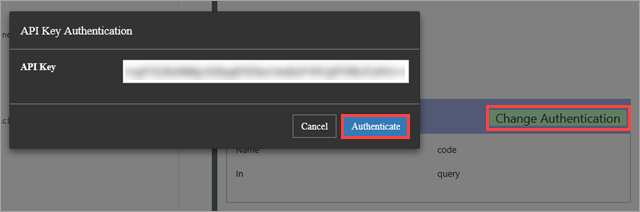
     

    Also my api definition template is created like in the tutorial. You see below in the template the authentication type.


    {
     "swagger": "2.0",
     "info": {
     "title": "myCompany.azurewebsites.net",
     "version": "1.0.0"
     },
     "host": "myCompany.azurewebsites.net",
     "basePath": "/",
     "schemes": [ "https", "http" ],
     "paths": {
     "/api/TurbineRepair": {
     "post": {
     "operationId": "CalculateCosts",
     "description": "Determines if a technician should be sent for repair",
     "summary": "Calculates costs",
     "x-ms-summary": "Calculates costs",
     "x-ms-visibility": "important",
     "produces": [ "application/json" ],
     "consumes": [ "application/json" ],
     "parameters": [
     {
     "name": "body",
     "in": "body",
     "description": "Hours and capacity used to calculate costs",
     "x-ms-summary": "Hours and capacity",
     "x-ms-visibility": "important",
     "required": true,
     "schema": {
     "type": "object",
     "properties": {
     "hours": {
     "description": "The amount of effort in hours required to conduct repair",
     "type": "number",
     "x-ms-summary": "Hours",
     "x-ms-visibility": "important"
     },
     "capacity": {
     "description": "The max output of a turbine in kilowatts",
     "type": "number",
     "x-ms-summary": "Capacity",
     "x-ms-visibility": "important"
     }
     }
     }
     }
     ],
     "responses": {
     "200": {
     "description": "Message with cost and revenue numbers",
     "x-ms-summary": "Message",
     "schema": {
     "type": "object",
     "properties": {
     "message": {
     "type": "string",
     "description": "Returns Yes or No depending on calculations",
     "x-ms-summary": "Message"
     },
     "revenueOpportunity": {
     "type": "string",
     "description": "The revenue opportunity cost",
     "x-ms-summary": "RevenueOpportunity"
     },
     "costToFix": {
     "type": "string",
     "description": "The cost in $ to fix the turbine",
     "x-ms-summary": "CostToFix"
     }
     }
     }
     }
     },
     "security": [ { "apikeyQuery": [] } ]
     }
     }
     },
     "definitions": {},
     "securityDefinitions": {
     "apikeyQuery": {
     "type": "apiKey",
     "name": "code",
     "in": "query"
     }
     }
    }


  • aow Profile Picture
    19 on at

    We are facing the same issue.

    Unable to select APIKey for security, I only see "None".


    Please let me know how you resolve this?


    Thank you.

  • khalidinio Profile Picture
    19 on at

    I used the manual export of the azure function. That will generate an json file. You can import that json file as a custom connector in flow.


    export-mode.png

    https://docs.microsoft.com/en-us/azure/azure-functions/app-service-export-api-to-powerapps-and-flow#manual


  • GabrielStJohn Profile Picture
    Microsoft Employee on at

    Hello, @khalidinio!


    Thank you for posting to the Flow Community Forum! It appears you have found a solution to your issue! If you feel as though your issue has been resolved and you are satisfied with one of the previous replies, please click "Accept as Solution" so that this thread will be marked for other users to easily identify!


    Thank you for being an active member of the Flow Community!


    -Gabriel

    (Flow Community Admin)

  • Peter1234 Profile Picture
    on at

    I have the same issue... I feel doing a manual export is not exactly a solution to this problem.


    I would like to see a "real" solution making the API Key option available in the dropdown.

Under review

Thank you for your reply! To ensure a great experience for everyone, your content is awaiting approval by our Community Managers. Please check back later.

Helpful resources

Quick Links

Introducing the 2026 Season 1 community Super Users

Congratulations to our 2026 Super Users!

Kudos to our 2025 Community Spotlight Honorees

Congratulations to our 2025 community superstars!

Leaderboard > Power Automate

#1
David_MA Profile Picture

David_MA 262 Super User 2026 Season 1

#2
Haque Profile Picture

Haque 227

#3
Expiscornovus Profile Picture

Expiscornovus 225 Most Valuable Professional

Last 30 days Overall leaderboard
