web
You’re offline. This is a read only version of the page.
close
Skip to main content

Notifications

Announcements

Community site session details

Community site session details

Session Id :
Power Platform Community / Forums / Power Automate / Getting the Email ID f...
Power Automate
Answered

Getting the Email ID from the Office 365 email adapter

(0) ShareShare
ReportReport
Posted on by

Cross-posting from MS Tech Community as suggested by MSFlow on Twitter


Hi,


I have a question, very likely a silly one as I have started dabbling with Flow. I am using this public flow template to copy my Outlook / Office 365 contacts to Google contacts, and it seems to work fine. However, I don't seem to be able to get a way to grab the email from the O365 contact? I have searched through the fields and don't seem to find an email field. I am almost certain I am doing something wrong here, as the ability to get the email is quite basic. However, I did not find a clear answer by binging with google and the other way round :). So my question is - 


  • Is this possible, and if yes, how?
  • Generally, what is the best way to figure things like this out? I could not find docs that talk about specific connectors, and since the Flow connectors are black-box-ish (in my limited understanding so far), wanted to find out how we can understand them better.
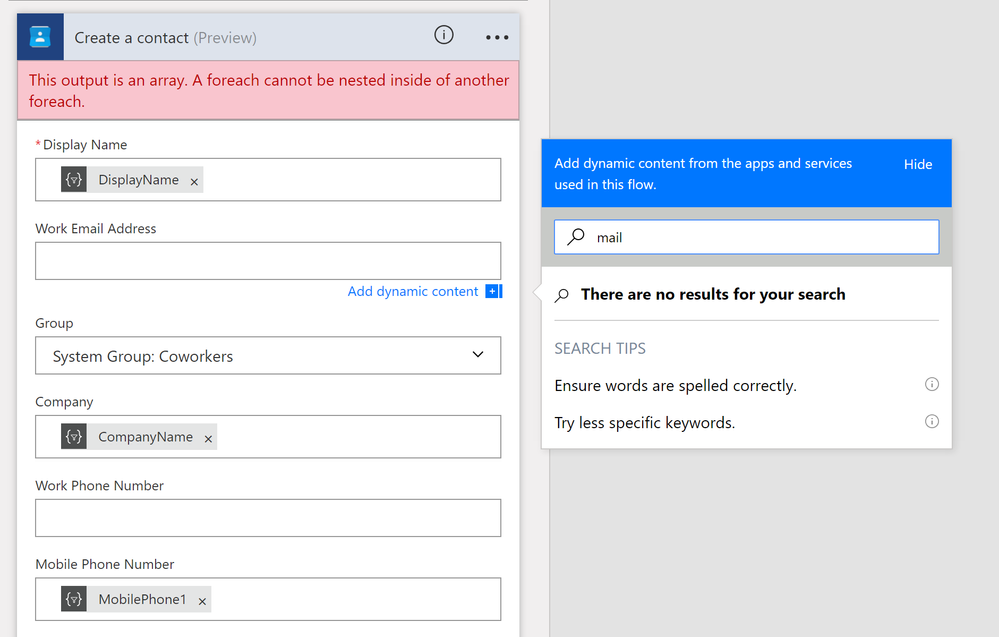
 

FlowEmail.png


Categories:
I have the same question (0)
  • Verified answer
    v-micsh-msft Profile Picture
    on at

    Hi @Anonymous,


    Would the following thread be helpful here?

    How to get array elements in a foreach

    Please take a try to input the EmailAddress with the code below:

    "@first(item()?['EmailAddresses'])?['Address']"


    Connectors are mostly built on top of the REST APIs (not all the related APIs are available) provided by the corresponding service, we could check the REST API document for the service to understand what Dynamic content could be generated, for the service (outlook) used here, please check:Outlook Contacts REST API reference.

    In addition, Microsoft Flow could work with Workflow Definition Language:

    Workflow Definition Language

    Some more reference:

    Choose between Flow, Logic Apps, Functions, and WebJobs


    If you have any further questions, please post back.

    Regards

  • Community Power Platform Member Profile Picture
    on at

    Thanks @v-micsh-msft, that looks like the solution, I would try them out. Precisely what I tried to understand. Thanks for the detailed answer! You're the man!

Under review

Thank you for your reply! To ensure a great experience for everyone, your content is awaiting approval by our Community Managers. Please check back later.

Helpful resources

Quick Links

Forum hierarchy changes are complete!

In our never-ending quest to improve we are simplifying the forum hierarchy…

Ajay Kumar Gannamaneni – Community Spotlight

We are honored to recognize Ajay Kumar Gannamaneni as our Community Spotlight for December…

Leaderboard > Power Automate

#1
Expiscornovus Profile Picture

Expiscornovus 199 Most Valuable Professional

#2
David_MA Profile Picture

David_MA 194 Super User 2025 Season 2

#3
harshdeol Profile Picture

harshdeol 167 Moderator

Last 30 days Overall leaderboard
