web
You’re offline. This is a read only version of the page.
close
Skip to main content

Notifications

Announcements

Community site session details

Community site session details

Session Id :
Power Platform Community / Forums / Power Automate / If File name uploaded ...
Power Automate
Unanswered

If File name uploaded contains string of sharepoint list item, then update sharepoint list

(0) ShareShare
ReportReport
Posted on by 43
I am quite new to PowerAutomate
I have a sharepoint list to keep track of the ordering status with the supplier. 
 
I already had a flow where when the supplier gives me the quotation, it will download the file and create a folder for that quotation. The flow also generates the subfolder with suffix 'signed'. This is for me to sign the quotation manually, and deposit into this subfolder.
 
For example, the supplier will provide a quotation with a file name SO24-2502.pdf, then the flow generates an empty folder called SO-2502.pdf_signed.
Another example will be, a quotation with a file name ABC.pdf generated, then the flow generates an empty folder name called ABC.pdf_signed. 
 
 
Now I want to create a flow that triggers the sharepoint list (shown below) to update the 'Quotation Signed Date" column (based on the date and time the file is uploaded to the folder), when the signed quotation pdf is uploaded into the 'quotation signed' file, which is dynamically generated in my separate flow. 


My current attempt of the flow is shown below: 
 
Filter Query: substringof('@{triggerOutputs()?['body/{FilenameWithExtension}']}',QuotationNo)
 
What I want to do is when the file name contains a substring of the QuotationNo on sharepoint, it updates the item on sharepoint 
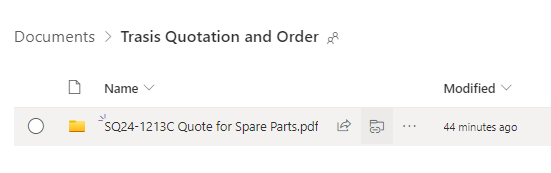
(i.e. if the file uploaded has a name "SQ24-1213C Quote for Spare Parts.pdf_Signed.pdf", then I want the "Quotation Signed Date" column for item "SQ24-1213C Quote for Spare Parts.pdf" to be updated. 
 
I also applied a condition such that to make sure the file created is not equal to the sharepoint item created 
 
The flow doesn't seem to work. Would anyone be able to help? 
 
 
Categories:
I have the same question (0)
  • Suggested answer
    BizAppBee Profile Picture
    87 on at
    Hi there! Would the following solution work:
     
    1. Create a Power Automate flow with trigger 'When a file is created (properties only)'
    2. Add condition 'If Title contains 'Signed'
    3. Update file properties on Sharepoint
    Quotation Signed Date: utcNow()
     
    This is what the flow looks like on my end:
     
    To test, I uploaded a file called 'PC_Hardware_Signed.pdf' in my document library which successfully triggered the flow and updated the 'Quotation Signed Date' column:
     

    Hope it helps!


    If this post helps, then please consider Accepting it as the solution to help the other members find it more quickly.

    Thank you!

    Leoza


Under review

Thank you for your reply! To ensure a great experience for everyone, your content is awaiting approval by our Community Managers. Please check back later.

Helpful resources

Quick Links

Forum hierarchy changes are complete!

In our never-ending quest to improve we are simplifying the forum hierarchy…

Ajay Kumar Gannamaneni – Community Spotlight

We are honored to recognize Ajay Kumar Gannamaneni as our Community Spotlight for December…

Leaderboard > Power Automate

#1
Michael E. Gernaey Profile Picture

Michael E. Gernaey 538 Super User 2025 Season 2

#2
Tomac Profile Picture

Tomac 405 Moderator

#3
abm abm Profile Picture

abm abm 252 Most Valuable Professional

Last 30 days Overall leaderboard







