web
You’re offline. This is a read only version of the page.
close
Skip to main content

Announcements

News and Announcements icon
Community site session details

Community site session details

Session Id :
Power Platform Community / Forums / Power Automate / I want clickable Hyper...
Power Automate
Suggested Answer

I want clickable Hyperlink in My Excel

(0) ShareShare
ReportReport
Posted on by 10
Hello,
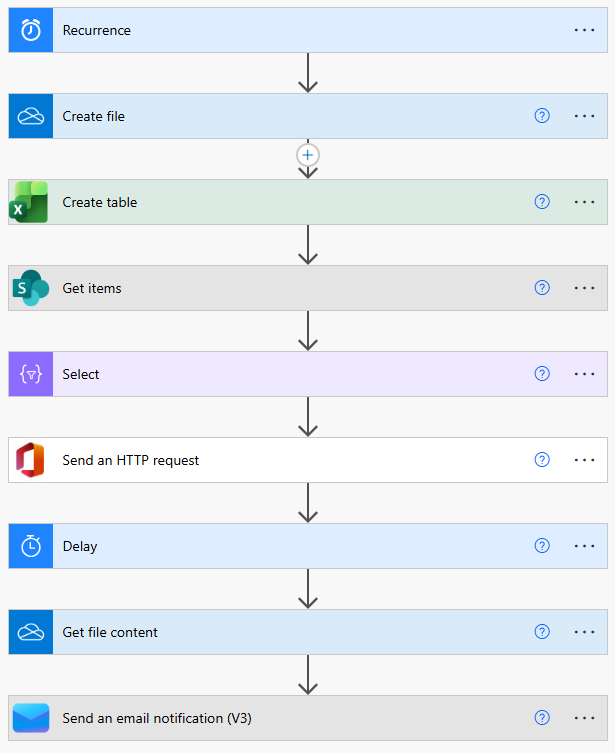
i have a power automate flow, that get data form SharePoint list and create a table in an excel file and send it via email.
it works good, but i want to make one of columns "the Titel " to be clickable  with hyper link, so the email receiver can click on the titel in excel file and it open the item in the SharePoint.
 
i reade that in "Select" i should make a function as below, but it didn't work so far :-
 
concat(
  '=HYPERLINK("',
  item()?['{Link}'],
  '","',
  item()?['Title'],
  '")'
)
 
any help or best practice on how my issue would be solved?
Categories:
I have the same question (0)
  • Suggested answer
    Vish WR Profile Picture
    3,259 on at
     

    The formula you tried in Select is correct but the problem is Power Automate doesn't evaluate it as an Excel formula — it just writes it as plain text in the cell, so you end up seeing the formula string instead of a clickable link.

    What you need to do is add an Update a row action right after your rows are inserted, and set the Title column to your HYPERLINK formula there. That action actually pushes it as a real formula and Excel will treat it as a proper clickable link.

    Your Get file content and email steps stay exactly as they are — once the Update a row runs, the file already has the links baked in before it gets attached and sent out.

    Give that a try and let me know how it goes!

    Vishnu WR
     
    Please âœ… Does this answer your question if my post helped you solve your issue. This will help others find it more readily. It also closes the item. If the content was useful in other ways, please consider answering Yes to Was this reply helpful? or give it a Like â™¥
  • CU21050605-0 Profile Picture
    10 on at
    Thank you @Vish WR
    i am trying to configure the "Update a row" but i don't know how, can you please advice what shall i do?
    the file created on a Desktop 

  • Suggested answer
    Vish WR Profile Picture
    3,259 on at
     

    To configure the Update a row action, you need three things:

    1. Location : same as your existing Excel actions (OneDrive or SharePoint)

    2. Document Library / File :  point it to the same Excel file you're already using

    3. Table : select your table, then in the Title column set the value to:

    =HYPERLINK("@{item()?['Link']}","@{item()?['Title']}")

    Add this inside a loop (Apply to each) so it updates every row after they're inserted. Once that runs, the file will have proper clickable links before it gets emailed out.

    Also, if your Excel file is saved locally on your desktop, make sure it's in a folder that syncs to OneDrive so the connector can access it. You can confirm this by checking if the folder has the OneDrive sync icon on it.

    One more thing — if the Table dropdown isn't showing anything, it's because your data range in Excel isn't formatted as a table. Open the file, select your data range, and go to Insert > Table to convert it. Once that's done, the table will show up in the action.

Under review

Thank you for your reply! To ensure a great experience for everyone, your content is awaiting approval by our Community Managers. Please check back later.

Helpful resources

Quick Links

Introducing the 2026 Season 1 community Super Users

Congratulations to our 2026 Super Users!

Kudos to our 2025 Community Spotlight Honorees

Congratulations to our 2025 community superstars!

Congratulations to the April Top 10 Community Leaders!

These are the community rock stars!

Leaderboard > Power Automate

#1
Vish WR Profile Picture

Vish WR 791

#2
Valantis Profile Picture

Valantis 568

#3
Haque Profile Picture

Haque 535

Last 30 days Overall leaderboard



