Hi everyone,
I’m running into an issue with corrupted email attachments in a Power Automate flow and I can’t figure out where the encoding breaks.
Scenario
I have a cloud flow that:
-
Triggers when a new email arrives in a shared mailbox
-
Runs the content through a Copilot/AI agent to classify it
-
Depending on the result, forwards/sends the email to one of two shared mailboxes
-
Loops through the original attachments
-
Saves each attachment to SharePoint
-
Retrieves the file again from SharePoint
-
Re-attaches the file to a new email using Send email from shared mailbox (V2)
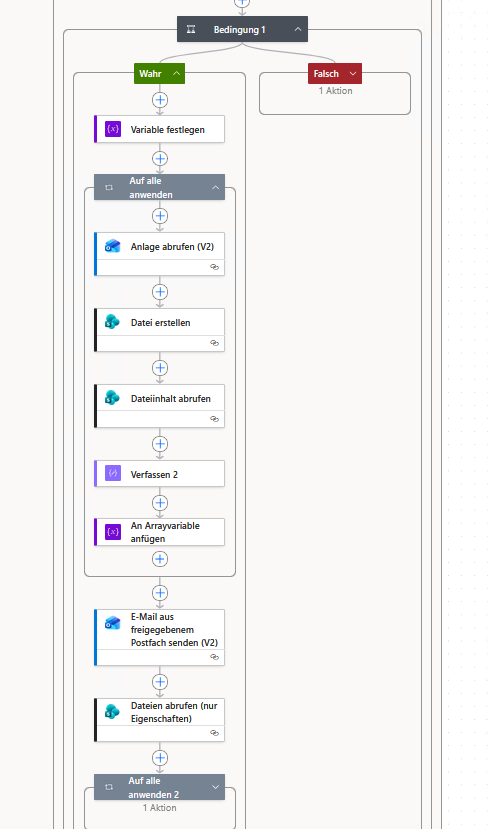
Everything works functionally, but the re-attached files (PDFs and images) are corrupted
Flow details
Inside an Apply to each loop:
-
Get attachment (V2) (Office 365 Outlook)
-
Create file (SharePoint)
-
Get file content (SharePoint)
-
Append to an array variable (spAttachments)
-
Use that array in Send email from shared mailbox (V2) → Attachments
The problem
The attachments arrive at the destination mailbox but are corrupted (PDFs cannot be opened, images are invalid).
To debug, I added a Compose action after Get file content.
The output starts with:
So Get file content is returning raw file content (PDF structure), not Base64.
However, the Outlook "Send email (V2)" connector expects:
What I already tried
-
Passing body('Get_file_content') directly → corrupted
-
Using base64(body('Get_file_content')) → still corrupted
-
Using $content property (when available) → still corrupted
-
Bypassing SharePoint and directly using:
-
Building the attachment object using: addProperty(json('{}'), ...)
-
Using JSON(concat()) method
-
Using direct object syntax in the array
Flow runs successfully. No runtime errors. Attachments just arrive broken
Key observation
From Compose output:
Get file content clearly returns raw binary (PDF text structure), not Base64.
Even when converting with base64() before assigning to ContentBytes, the attachment still arrives corrupted
Questions
-
Is there a known issue when re-attaching files retrieved via SharePoint Get file content?
-
Should base64ToBinary() be used before saving to SharePoint and then $content retrieved?
-
Is there a known size/encoding limitation with array variables and large Base64 strings? I just send normal seized pdfs and pictures so far
-
Is it recommended to use Forward email (V2) instead of rebuilding attachments? - which was also not working for me...
-
Is there a specific way the Outlook connector expects attachment objects when using shared mailboxes?
Expected behavior
Original attachment → saved to SharePoint → retrieved → reattached → identical file.
Currently: file content is altered/corrupted somewhere in the process
If anyone has a proven pattern for:
Email attachment → SharePoint → retrieve → reattach → Send email (V2)
without corruption, I would greatly appreciate it.
Thanks in advance.







 Share
Share Report
 All responses (
 Answers (
 2,116
2,116





