web
You’re offline. This is a read only version of the page.
close
Skip to main content

Announcements

News and Announcements icon
Community site session details

Community site session details

Session Id :
Power Platform Community / Forums / Power Automate / Using Power Automate t...
Power Automate
Answered

Using Power Automate to Page through List of Records

(0) ShareShare
ReportReport
Posted on by 6

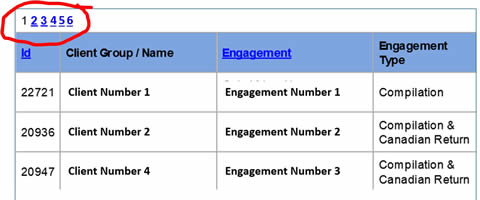
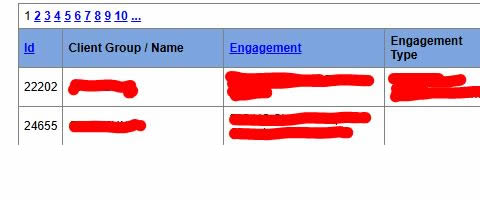
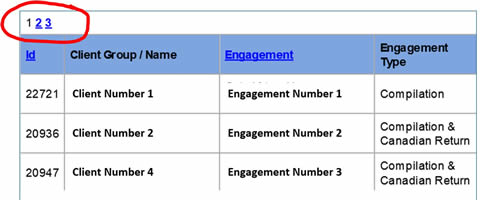
I'm using Power Automate Desktop to navigate through multiple pages of a list on an ASP.NET page. The number of pages available in the navigation go up to max of 10. If more than 10 pages, the remaking pages are access by clicking an ellipsis link. See images.

I've tried using the "Extract data from web page" action to select the page navigation link, but it fixes it to the page selected during the set up. It's not flexible to recognize if the number of pages changes. And, it doesn't know if more than 10 pages are available and to pick the "ellipses".

How do I do this?

Images:
 

I have the same question (0)
  • Verified answer
    eetuRobo Profile Picture
    4,522 Super User 2026 Season 1 on at
    Try this

    When you have captured the html table go to "Advanced settings" in the Live web helper -window


    Then paste the selector in the "CSS selector for next page of search results" field.


    Then when you click "OK" and "Finish" the Extract data from web page -action should have "Extract data from" drop down available.


    Try with "All available". If it doesn't work and it keeps trying to click next page when there is no pages left then choose "Only the first" and set "Max web pages to process" to something you think will be the maximum.

    Or you can make it precise and dynamic and have some extra logic to first go to the last page of the tables and store the last page number to a variable. Then use that in the "Max web pages to process" 


    Your page doesn't seem to have "Go to last page" -button. But maybe you can build a loop condition that loops as long as those three dots are available. And then when there is no three dots anymore then take the last page number.
  • CU01091535-4 Profile Picture
    6 on at
    Thanks  for your response. While your examples didn't work exactly in my flow because I don't have the "Next" or "Last Page" navigation, your examples and suggestions sparked an idea that may solve my problem.

Under review

Thank you for your reply! To ensure a great experience for everyone, your content is awaiting approval by our Community Managers. Please check back later.

Helpful resources

Quick Links

Introducing the 2026 Season 1 community Super Users

Congratulations to our 2026 Super Users!

Kudos to our 2025 Community Spotlight Honorees

Congratulations to our 2025 community superstars!

Congratulations to the April Top 10 Community Leaders!

These are the community rock stars!

Leaderboard > Power Automate

#1
Vish WR Profile Picture

Vish WR 976

#2
Valantis Profile Picture

Valantis 863

#3
Haque Profile Picture

Haque 547

Last 30 days Overall leaderboard