web
You’re offline. This is a read only version of the page.
close
Skip to main content

Notifications

Announcements

Community site session details

Community site session details

Session Id :
Power Platform Community / Forums / Power Automate / Update an item where t...
Power Automate
Unanswered

Update an item where table has a dynamic value (only Row item available)

(1) ShareShare
ReportReport
Posted on by 47
I have created a flow where a user can enter a table name or many table names separated by a semi colon.

The workflow splits the text in an apply to each, then users the table logical plural name in a list rows action.

In another apply to each - derived from the list row action - I have used an expression to grab the owner id value and set it to a variable called varOperationsOfficer, as I need this to update a field in the current item, and since the list action is using a dynamic value for the table ,the fields are not available in the dynamic content menu.

So I have:
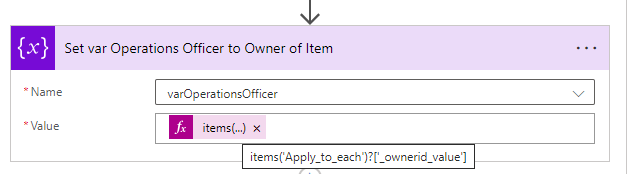

I now need to update a field in the current table called OperationsOfficer with the value of the 'varOperationsOfficer' variable,

Normally in the action below (not using a dynamic value for a table) you would target the OperationsOfficer field (which is a lookup field to the user table) and update by:

OperationsOfficer: systemusers(varOperationsOfficer)

However, since I am using a dynamic value for the table in the action below I only have Row Item*

So my question is, how do I update the OperationsOfficer field with my variable?
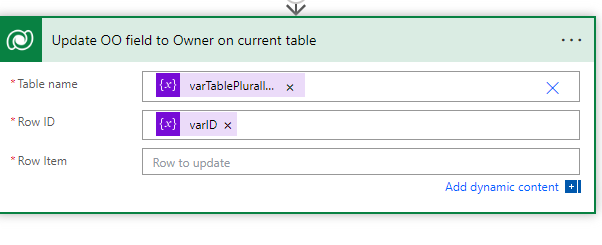
Categories:
I have the same question (0)
  • Suggested answer
    rzaneti Profile Picture
    4,241 Super User 2025 Season 2 on at
    Hi,
     
    You will need to pass aa JSON as input for the Row Item. First, find the OperationsOfficer column logical name, and use it as key in the JSON. As value, you can use systemusers(varOperationOfficer).
     
    To find the column logical name, go to the Dataverse table column and click Edit column. After expanding the Advanced options, you will see the logical name:
     
     
    In Power Automate, your action will look like this
     
     
    In my case, I'm updating a single-line text type column, but the same logic can be used for a Lookup one.
     
    Let me know if it works for you or if you need any additional help!
    -------------------------------------------------------------------------
    If this is the answer for your question, please mark the post as Solved.
    If this answer helps you in any way, please give it a like.
  • darren1372 Profile Picture
    47 on at
    Hi Rzaneti

    thanks for your response but it is not working.

    So far I've tried:

    These returned there is an error in the payload by the user


    This returned the  error:

    CRM do not support direct update of Entity Reference properties, Use Navigation properties instead."
     
    CRM do not support direct update of Entity Reference properties, Use Navigation properties instead."


    This ran successfully but didn't update the field....


      If you get get it to work with a lookup field to the user table please let me know. At the moment it's not playing ball!
  • Verified answer
    rzaneti Profile Picture
    4,241 Super User 2025 Season 2 on at
    Hi @darren1372,
     
    I ran some tests and it looks that I found a solution:
     
    You need to use [schema_name]@data.bind as key. So far, we were using the logical name instead. It's tricky, because the schema name is usually the same of logical one, but with some characters in upper case (like "R" in Relateduser, in my case).
     
    After this small change, the flow ran successfully:
     
    This thread from Dynamics Community helped me to find the solution: https://community.dynamics.com/forums/thread/details/?threadid=4d7f3e6a-c8e0-4584-982c-a0749a67bfdc
     
    Let me know if it works for you or if you need any additional help!
    -------------------------------------------------------------------------
    If this is the answer for your question, please mark the post as Solved.
    If this answer helps you in any way, please give it a like.
  • darren1372 Profile Picture
    47 on at
    Great stuff Rzaneti,

    worked a treat:


Under review

Thank you for your reply! To ensure a great experience for everyone, your content is awaiting approval by our Community Managers. Please check back later.

Helpful resources

Quick Links

Forum hierarchy changes are complete!

In our never-ending quest to improve we are simplifying the forum hierarchy…

Ajay Kumar Gannamaneni – Community Spotlight

We are honored to recognize Ajay Kumar Gannamaneni as our Community Spotlight for December…

Leaderboard > Power Automate

#1
Michael E. Gernaey Profile Picture

Michael E. Gernaey 522 Super User 2025 Season 2

#2
Tomac Profile Picture

Tomac 364 Moderator

#3
abm abm Profile Picture

abm abm 243 Most Valuable Professional

Last 30 days Overall leaderboard
