web
You’re offline. This is a read only version of the page.
close
Skip to main content

Notifications

Announcements

Community site session details

Community site session details

Session Id :
Power Platform Community / Forums / Power Automate / Extracting data from i...
Power Automate
Suggested Answer

Extracting data from inconsistent emails

(0) ShareShare
ReportReport
Posted on by 91
Hello,
 
I hope you're doing well.
 
I need to ask for your assistance because I created a power automate flow that extracts data from an automated email received every time people request a product through a third party platform. The problem that I have is that the email format is never consistent. The lines change for every single email received; therefore, my flow fails all the time.
This is the information I am trying to retrieve from each email:
 
Name of the employee (Nombre del asociado:)
EmployeeID (Identificación del asociado:)
Type of product (Ahorro retirado:)
Date and time (Fecha y hora:)
Total amount (Total desembolso:)
 
Please see the email samples below (information is fake) I just kept the format:
 
AHORRO 1 - SAMPLE
*** EXTERNAL EMAIL ***

Gestión APP
Retiro de ahorro

Nombre del asociado:XXXXXXX XXXXXX XXXXXXIdentificación del
asociado:1234567Ahorro retirado:ahorro a la vistaFecha y hora:29/8/2025
11:10:35Institución bancaria:BANCONúmero de cuenta:XXXXXXXDetalle
del movimiento:Solicitud de transferencia 1817Principal anterior:20,000.00Retiro
Principal:20,000.00Cargos a aplicar principal:0.00Principal actual:0.00Intereses
anterior:0.00Retiro de intereses:0.00Cargos a aplicar intereses:0.00Intereses
actual:0.00Total a retirar:20,000.00Total
desembolso:20,000.00Observaciones:
 
AHORRO 2 - SAMPLE
*** EXTERNAL EMAIL ***

Gestión APP
Retiro de ahorro

Nombre del asociado:XXXXX XXXXX XXXXXIdentificación del
asociado:1234567Ahorro retirado:ahorro vacacional (12 meses)Fecha y
hora:29/8/2025 13:02:39Institución bancaria:BANCONúmero de
cuenta:XXXXXXXXXDetalle del movimiento:Solicitud de transferencia 1820Principal
anterior:140,000.00Retiro Principal:100,000.00Cargos a aplicar
principal:0.00Principal actual:40,000.00Intereses anterior:0.00Retiro de
intereses:0.00Cargos a aplicar intereses:0.00Intereses actual:0.00Total a
retirar:100,000.00Total desembolso:100,000.00Observaciones:

AHORRO 3 - SAMPLE
[
    "*** EXTERNAL EMAIL ***",
    "",
    "",
    "Gestión APP",
    "Retiro de ahorro",
    "",
    "",
    "Nombre del asociado:XXXXX XXXXX XXXXXXIdentificación del asociado:12345678Ahorro",
    "retirado:ahorro a la vistaFecha y hora:29/8/2025 13:56:24Institución",
    "bancaria:BANCONúmero de cuenta:XXXXXXXXXXXXDetalle del",
    "movimiento:Solicitud de transferencia 1821Principal anterior:50,000.00Retiro",
    "Principal:50,000.00Cargos a aplicar principal:0.00Principal actual:0.00Intereses",
    "anterior:0.00Retiro de intereses:0.00Cargos a aplicar intereses:0.00Intereses",
    "actual:0.00Total a retirar:50,000.00Total desembolso:50,000.00Observaciones:",
    "",
    " ",
    "",
    "",
    "",
    "",
    "",
    ""
My flow looks like this:
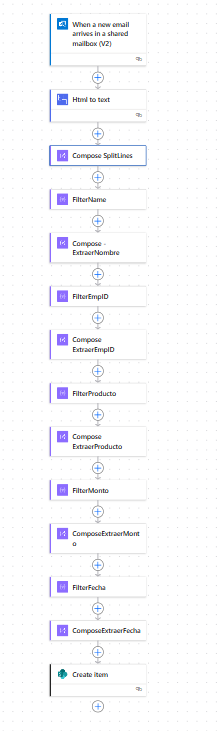
My ComposeSplitLines uses this formula: 
split(replace(replace(replace(body('Html_to_text'), decodeUriComponent('%0D%0A'), decodeUriComponent('%0A')), decodeUriComponent('%0D'), decodeUriComponent('%0A')), '<br>', decodeUriComponent('%0A')), decodeUriComponent('%0A'))
Then I have a filter to get each one of the datapoints I need (FullName, EmployeeID, Product, Amount and Date) Filter arrays formulas look like this:
After each filter array, there is a compose action retrieving the values between delimiters:
split(split(first(body('FilterName')), 'Nombre del asociado:')[1], 'Identificación')[0]
But since the order of the data changes with every email, it keeps failing. I've tried doing it in so many ways but nothing seems to work. Could you please help?
 
Thanks in advance!
Categories:
I have the same question (0)
  • Michael E. Gernaey Profile Picture
    53,479 Super User 2025 Season 2 on at
     
    Apologies, but I started to read it all, but you never explain what you are trying to Parse out.
     
    Please provide that information at the top by Editing the Ask, so that we can better assist you. 
     
    Definitely can help but looking at long expressions and errors :-( isn't a good way to get help as we have to guess at your intent. Not intentionally I know :-) but please add that
     

    If these suggestions help resolve your issue, Please consider Marking the answer as such and also maybe a like.

    Thank you!
    Sincerely, Michael Gernaey
  • MG-27051438-0 Profile Picture
    91 on at
    @Michael E. Gernaey I'm sorry about that, I have edited the post now. I also added a screen capture of what the email looks like in the inbox, in case it helps. There are two types of emails one for savings and one for loans, the information to retrieve is very similar, the only difference is the type of product, but I am experiencing the issue with both. so I included both screen captures. Thanks a lot!
  • MG-27051438-0 Profile Picture
    91 on at
    Hi @Michael E. Gernaey, I'm sorry to bother you, I was wondering if you were able to look at my issue. Thanks again for your help.
  • Suggested answer
    Tomac Profile Picture
    3,953 Moderator on at
    Looks like the data format is similar enough (all information is received in the same order, but the values are not of a set length and there is no delimiter) that you can use a bunch of string functions to find and select bits of text out of the whole.
     
    Once you've converted the HTML to text, to can remove quotation marks ( " ), commas ( , ),  and line breaks using the replace() function and all 3 examples will be in the same exact format with known data field names.
     
    1. Use the indexOf() function to find the beginning of a known block of text ( "Nombre del asociado:" ) and add the length of this text to it
    2. Use the indexOf() function to find the start of the next known block of text ( "Identificación del asociado:" )
    3. Use the substring() function to get the text in between the value from step 1 (the end of the known text block) and the value from step 2 (the beginning of the next known block)
    4. Repeat for each data field you're trying to extract, appending each value to an array that you can later work with
    If you need to extract the Observations section, you would use the total length of the email (use the length() function) instead of step 2.
  • VictorIvanidze Profile Picture
    13,073 on at
  • MG-27051438-0 Profile Picture
    91 on at
    @Tomac I tried that but it keeps failing because the spaces and length are not always the same. For example, I used this formula to retrieve the identification last Friday:
     
    
    trim(
      substring(
        outputs('Compose_CleanedText'),
        add(indexOf(outputs('Compose_CleanedText'), 'Identificación asociado:'), 24),
        sub(
          indexOf(outputs('Compose_CleanedText'), 'Líneade crédito:'),
          add(indexOf(outputs('Compose_CleanedText'), 'Identificación asociado:'), 24)
        )
      )
    )
    This worked because the outputs of the cleaned text were:
     
    *** EXTERNAL EMAIL ***ASOCIACIÓN SOLIDARISTA DE EMPLEADOSGestión APPSolicitud de créditoNombre asociado:LASTNAME2 LASTNAME1 NAMEIdentificación asociado:12345Líneade crédito:PRESTAMO PERSONALMonto solicitado:123 456,76Monto derefundición:123 456,76Cargo(s):0,00Monto desembolso:15 000,00Tasa deinterés:18,00Cuota:6 410,00Frecuencia:QUINCENALPlazo:73,00Fecha y hora:6/9/202510:37:40Observaciones:Crédito solicitado vía APP.Estatus :Crédito aprobadoautomáticamenteEstimado(a) asociado(a), este correo se ha generado a partir de una transacciónrealizada en Gestión App. En caso de haber alguna duda con el mismo, favorcomunicarse con la asociación solidarista.
     
    But then today, a new request came and this is the output:
     
    *** EXTERNAL EMAIL ***ASOCIACIÓN SOLIDARISTA DE EMPLEADOSGestión APPSolicitud de créditoNombre asociado:LASTNAME2 LASTNAME1 NAMEIdentificación asociado:12345Línea decrédito:PRESTAMO PERSONALMonto solicitado:123 000,00Monto derefundición:0,00Cargo(s):0,00Monto desembolso:123 000,00Tasa deinterés:18,00Cuota:58 165,00Frecuencia:QUINCENALPlazo:8,00Fecha y hora:8/9/202510:19:42Observaciones:Crédito solicitado vía APP.Estatus :Crédito aprobadoautomáticamenteEstimado(a) asociado(a), este correo se ha generado a partir de una transacciónrealizada en Gestión App. En caso de haber alguna duda con el mismo, favorcomunicarse con la asociación solidarista.
     
    So, the formula was loking for 'Líneade crédito:' but the spaces changed, so it could not find it. And this can happen with any part of the email, it-s never the same structure. :(
  • MG-27051438-0 Profile Picture
    91 on at
    @VictorIvanidze thanks, I will look into that and update once I've tried it.

Under review

Thank you for your reply! To ensure a great experience for everyone, your content is awaiting approval by our Community Managers. Please check back later.

Helpful resources

Quick Links

Forum hierarchy changes are complete!

In our never-ending quest to improve we are simplifying the forum hierarchy…

Ajay Kumar Gannamaneni – Community Spotlight

We are honored to recognize Ajay Kumar Gannamaneni as our Community Spotlight for December…

Leaderboard > Power Automate

#1
Michael E. Gernaey Profile Picture

Michael E. Gernaey 519 Super User 2025 Season 2

#2
Tomac Profile Picture

Tomac 296 Moderator

#3
abm abm Profile Picture

abm abm 232 Most Valuable Professional

Last 30 days Overall leaderboard



